• >>>NEW Colour 2.0 Workshop<<<
  • Technique
    • Latest Techniques
    • FREE TIPS
    • Quick Tips
    • Video
    • Site Search
    • Blog
    • Archives
  • Mentoring
  • 2026 Workshops
  • >Online Workshops<
  • Studio Lighting Books
  • Contact
    • Newsletter
    • Contact
    • Statement
Jake Hicks Photography
  • >>>NEW Colour 2.0 Workshop<<<
  • Technique
    • Latest Techniques
    • FREE TIPS
    • Quick Tips
    • Video
    • Site Search
    • Blog
    • Archives
  • Mentoring
  • 2026 Workshops
  • >Online Workshops<
  • Studio Lighting Books
  • Contact
    • Newsletter
    • Contact
    • Statement

5 Things We Can Learn From Cinematic Lighting

Technique Tuesday 5 Things We Can Learn From Cinematic Lighting.jpg

One of the bigger personal projects I’ve been working on recently is my Cinematic Studio Lighting course. During the process of writing the accompanying notes and shooting promotional images for the event, I’ve done a ton of research on how cinematographers and directors of photography work, think and plan their shots. I originally thought the two worlds of photography and cinematography would be fairly similar, but I ended up learning a lot more than I thought I would and I think that’s down to how cinematographers approach the setup of their image compared to many of us photographers, especially those of us who primarily shoot in a studio.

As portrait photographers, the subject takes centre stage. Everything revolves around the subject looking their best and although we consider the background, it will always take a backseat over our primary goal of making the subject look perfect.

This idea is often reversed in cinema as the background and environment takes the lead. The scene needs to look believable, lived-in and real. The subject is obviously important, but they have to exist within the environment you’ve created. You can’t light a late-night bar scene believably and naturally, only to have your subject lit perfectly with three-point lighting. It would look ridiculous, nobody would believe its a real place and the viewer is kicked out of the immersion.

Light your scene beautifully and your subject will exist effortlessly within it.

So with this bigger picture approach to lighting in mind, let’s now look at 5 key aspects of cinematic lighting that we can learn from cinematography.

The following article is just one of the chapters from my workbook of notes for my new Cinematic Studio Lighting course and if you’re interested, for context, here’s a link to what I am teaching at the event: Cinematic Studio Lighting

Below I’ll share pages from my book and elaborate on certain elements I refer to. Everyone at the workshops will obviously get my entire workbook of notes as part of the event.

5 Aspects of Cinematic Lighting

What defines a ‘cinematic’ image and what can we do as image makers to try and capture the essence of a ‘cinematic shot’?

1. Depth

Think about the key layers of interest to your shot.

Consdier the foreground, subject and background and what part they play in the shot as a whole. What light does each of them need and where do you want the viewer to look within that scene? Don’t forget that lens choice and apertures will play a huge role in depth too.

Scene from ‘No Country for Old Men’ 2007.

Scene from ‘No Country for Old Men’ 2007.

Leading your viewer into a scene is something we should do more of as photographers and ordinarily we’re very wary of having anything in front of our subject. But as long as the foreground isn’t fighting for attention with our subject, nor is it obscuring anything important, it can add a huge amount of interest to the shot, especially in a studio shot. The reason for this is because we as the viewer are drawn into this artificial depth. I say artificial as it’s still a 2D image, but we’re adding the illusion of a 3rd dimension with forced depth.

As I mentioned above, be sure to consider the lens length and aperture when looking to add depth. As a guide though, a longer lens (e.g. 85mm, 105mm) with a shallower aperture (f2.8, f1.8) will often give you a strong sense of depth with your subject in the middle.


Here are some examples of adding depth into your photos:

Click to enlarge: Holding elements in front of your lens is an easy way to add fake depth to your shot. Crystals, glasses, even cellophane wrappers can do this very quickly and easily.

Click to enlarge: If you’re on location, you can often find elements around you to use. Here the light is catching a handrail in the foreground to add subtle foreground depth.

Click to enlarge: Another of my favourite elements to look for in a scene is mirrors. They can can be tricky to light, but persevering with them will often pay-off as you can get some very unique looks with multiple layers of depth to them.

Click to enlarge: You can of course keep adding to the depth by including multiple mirrors and although a little unrealistic, you are now making depth a feature of the shot with mirrors.

Click to enlarge: This isn’t reserved for on-location work ether and you should consider bringing the mirror idea into the studio too. It’s simple to setup and instantly adds depth to the shot in any space.

If you’re looking to add depth to your shot, be sure to consider the following:

  • Foreground

  • Mid-ground (subject)

  • Background

  • Contrast between them

  • Focal point (viewers attention)

  • Lens length

  • Aperture


2. Shape & Form

In portrait photography, I break a subject into ‘shape’ and ‘form’.

The shape is the subjects outline (silhouette) or their contrast against their surroundings, and form is the 3D structure light gives to the subject to show depth on them. In cinema, we have to apply that same principle of shape and form to not only the subject, but the foreground and background as well, we just need to be more mindful of how much of each we give them.

‘Shape’ outlines and separates the subject from their surroundings and ‘form’ gives them dimensionality.

In cinematography we have to account for the background and foreground as well as the subject and we need to make a conscious decision on how much shape and form we give the less important aspects of our scene.

Ordinarily, our subject is the key feature so we need make sure we show a lot of shape and form on them, whilst allowing for the less important layers to have less.

Take a look at one of the great masters of cinematography today, David Fincher. Fincher isn’t known for his bold strokes in colour and although there are exceptions to this, he often shoots his films either at night, or in very dark locations. As a result of this, he is an absolute master of manipulating shape and form in his predominantly dark films.

One of the best examples of this, is in his 1995 film ‘Se7en’. Again, most of this film is shot in dark, dingy apartments or in subdued, raining, outside light. Almost all of this film is shot with carefully placed lighting and even in scenes with windows in them, they are rarely allowed to light the actual scene.

Take a look at the office scene below where we see impeccable lighting throughout a very detailed shot with a lot of depth and including multiple layers of foreground and background. Pay careful attention to how the important aspects have a lot of shape and form and how less important elements have very limited form.

Scene from ‘Se7en’ 1995

Scene from ‘Se7en’ 1995

See how we have multiple foreground and background layers? See how the deep foreground and deep background don’t really have any form to them whatsoever? The black boxes in the foreground are just dark shapes and the widow blinds behind are the same.

Let’s break it down visually and see how they’ve managed to light what could have been a very visually busy and complex scene.

seven office blocked.jpg

Breaking your shot down into layers like this can help you to visualise what’s important in the scene and whats simply there to help sell the story within it. Make sure you subject has a lot of shape and form and then try to ensure other aspects of your image have less form to them. Doing this allows the extra detail that form provides on the subject to draw your viewers attention.

Truth be told, this is far easier-said-than-done, and to do it at the same level as directors like Fincher requires a lot experience, time and kit. I personally rarely shoot on location, but in the studio I can keep it incredibly simple whilst still applying these same principles. Take a look at some examples of what I mean below.


Here are some examples of shape and form within photos:

Click to enlarge: It doesn’t get any simpler than this. Have a tiny amount of light in the background and then make sure the subjects shape is clearly defined against it.

Click to enlarge: Even with far more complex form lighting on the subject like this, the same principle is still in place. Clearly define your subject against your background and add detailed form to make them stand out.

Click to enlarge: Long-time followers of my work will know that I use ‘colour-blocking’ to force depth and shape into my location shoots. The same technique is being used here as I wash the background in one colour with minimal form being present (the sofa, curtains, table are all one colour), yet the subject has a lot of strong shape and form. Lastly, the minimal foreground element is also washed in one colour tone as well… (yes, I use mirrors a lot!)

When considering Shape and Form in your shot, be sure to include the following:

  • Ensure a clear shape around your subject against the background

  • Draw the viewers focus by ensuring the subject has a lot of form from the lighting

  • Think about the layers in your shot and how the light should be on each of them

  • A darker foreground and background is an easy way to make your subject more pronounced


3. Contrast

Contrast is far more than just the colour grade you apply in the final edit.

We need to give careful consideration to the contrast at the point of capture, as leaving it to the final edit is too late.

Would the scene benefit from soft contrast or high contrast? How will colour contrast affect that? We need to manage both light and the surroundings to achieve the look we’re after. From here, we can enhance and build upon that contrast in post-production, but only if the foundation of light was captured to begin with.

Below you’ll find one of the pages from my Cinematic Studio Lighting workshop workbook as an example of some variations of contrast found in cinema.

Click to enlarge: Above is a page from my Cinematic Studio Lighting workshop workbook and it shows the various contrasts cinema uses.

Next time you’re watching a film, pay close attention to the mood of a scene and then look at the contrast being used within it to see how that mood is being bolstered by the lighting. This is a general guide, but usually high-contrast scenes will have drama, tension or action unfolding, and low contrast scenes tend to be slower, have longer exchanges of dialogue or are simply trying to represent a more believable natural environment on screen.

Like it or not, modern cinema now heavily relies on bold colour contrasts in their films as well. Big-budget movies that want you to view it in 8K wowo-vision don’t tend to have a lot bold contrast as every pixel contains masses of data. To combat this, colour is used to great effect as a way to guide the viewer, and although they’re far from good movies, the seemingly endless supply of superhero movies in recent years, do use colour contrast very well in this way. [-You have over 55 superhero movies from the last 20 years to choose from! I hope you’re ready for those films from 20 years ago to start being remade!]

Bringing it back to photography though, we need to be applying the same mindset with how contrast in our shots can affect the final look too. One last element I want to clarify about contrast is the idea that hard-light always equals hard-contrast. Yes this can be true, but try instead to think about contrast has how much light the shadows have. Below are two images, on the left (the orangey one incase you’re viewing it on mobile) I’m using a very soft-light modifier and on the right (red styling) I’m using a very hard-light modifier, yet the contrast is similar due to how much light they both have in shadows.


Here’s some examples of various contrasts in photos:

Click to enlarge: Contrast doesn’t necessarily just come from the type of lighting modifier you use. This image has soft contrast and uses a soft-light modifier to achieve it.

Click to enlarge: This image actually uses an extremely hard-light modifier to light the subject, yet the contrast is kept to a minimum thanks to the amount of light in the shadows.

Contrast also applies directly to colour too and a little knowledge of the colour wheel and a basic grasp colour theory will help you here as well.

For example, an image can have contrast even if all lights within the image are the same exposure thanks to ‘colour-contrast’. Take a look the colour image below and then look at that exact same image in black and white next to it.

Click to enlarge: On the left we have a colour image and on the right we have the exact same shot, just converted to black and white. See how the contrast isn’t coming from the lighting directly, but instead from the contrast between colours.
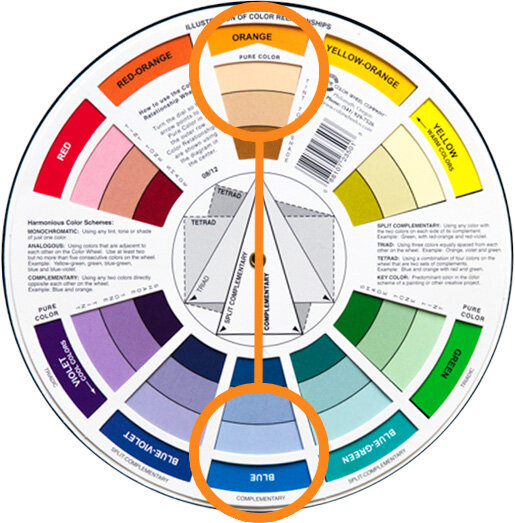
The strongest colour contrast can be found via complimentary colours.

The strongest colour contrast can be found via complimentary colours.

Colour contrast and using colour theory to achieve it is an entire article in its own right, so although I won’t do a deep-dive on it here (plus there’s already loads of articles on my site regarding this subject already), Here’s a few pointers to get you started.

Complimentary colours will give you the most colour-contrast when using 2 colours and these are the colours opposite one another on the colour wheel. Yes you guessed it, orange and blue are the most popular complimentary colours in cinema. From here, it’s really any colour furthest from one another on the colour wheel when adding multiple colours in the same scene. So for 3 colours like the image above, consider the triadic colour theory, for 4 colours look for tetradic colours and for 5 look at tertiary colours.

When considering contrast in your shots, remember to think about:

  • How will contrast affect the mood of this shot?

  • Do I want high or low contrast?

  • Contrast is not just the lighting modifier you use, but the amount of light in the shadows.

  • Contrast in an image can be achieved purely by using contrasting colours.


4. Motivation

‘Motivation’ speaks to ‘motivated light’.

This is actually far less prevalent to studio shooters like myself, but it’s always of the upmost importance in every movie and it’s an extremely useful skill to have if you’re shooting on location or simply wanting to understand light better in general.

So what is ‘motivated light’? Motivated light refers to where the light is ‘supposed’ to be coming from in the scene to make the shot look believable to the viewer. For example, If we see a zoomed-in shot of someone sat down at a table with very little context, yet they are lit with a very bright warm light to camera left, it feels odd. If we then show a wider shot that includes a table, a cereal bowl and large window to camera left, are brain immediately puts the scene together as a breakfast table and the warm bright light is now accepted as a beautiful early morning light.

The trick here comes in that the window may not be the actual light source in the shot, the subject may in fact be lit from a giant scrim and colour temperature orange gel, but the viewer never questions that because we saw the window.

This is what the vast majority of lighting on film sets deal with and its actually a great way to plan your lighting in general. The goal is always to make the shot look visually engaging, yet still believable and each light in cinematic lighting has to have a purpose. What is this light adding to the scene? If it’s not adding anything, it really needs to be removed.

Like I mentioned above, motivated light is about making a scene ‘believable’. In a studio, if I wanted to make someone look scary, I’d light them from below and that’s it. I wouldn’t need to show the viewer where the light was to make it believable yet in cinema, they don’t get that luxury and if they want to light someone from below, they essentially have to show their workings.

Take a look below at another example from my Cinematic Studio Lighting workbook.

Scene from ‘No Country for Old Men’ 2007.

Scene from ‘No Country for Old Men’ 2007.

Lighting from below is often used to make the subject look scary or menacing. It’s also very obvious and can look awkward if not done well. Here, the bad guy on the bed is lit from below yet we don’t question the lighting because we can clearly see the light source in shot. This is motivated light and you can get away with almost any lighting, as long as you make it believable in the context of the scene.

d2b3ecd80878d672876f0394cbf33f43.jpg

Take a look at another example of motivated light here from David Fincher’s 1995 film ‘Se7en’.

Many lighting setups are trying to light the scene and the subjects at the same time. On film, this actually requires a lot of light and more often than not, you need to have a lot more lights on set than in your actual shot.

Here we have a ‘motivated’ light on the left in the form of a lamp, but there’s actually a lot more lights involved to illuminate the subjects clearly.

One of the other reasons it’s hard to light the subjects with lights in the actual scene, is that they’d need to be very bright to do so. This would then result in this lamp being extremely blown out in shot and distracting.


Sometimes, motivated lights may even be out of place in reality, but in the flow of a movie, they go unnoticed yet still do their job of motivating the light in the scene.

Here in Todd Phillips 2019 film ‘Joker’, we see a small office scene. The back corner of the room was obviously very dark in shot, so rather than have it drop off to black, they’ve added a small desk lamp back there to fill in some of those heavy shadows.

There’s no real reason to have a random lamp on in the back of the room here, but it’s still better to do that than it is to throw supplemental light back there from a crew light that would be out of shot. Motivating the light in the scene is extremely crucial in cinema and you’ll find odd lights placed in films to fulfil this desire to make the light believable to the audience as their immersion is key.

7cf4184adf17e9b3ea13942764891aea.jpg
 

Here’s some examples of motivated light within photos:

Click to enlarge: It’s rare that I shoot outside of the studio, so ordinarily I don’t get to play with motivated light all that much. But when I am on location, I’m always on the lookout for lights in the environment that can be used within the shot.

In the above shot, I’m using a section of a London nightclub that has these interesting hanging ambient lights. As in most nightclubs, the lights are very dim, so I’ve augmented the look with not only an orange light coming through onto the model, but I’ve also added an orange light in the room behind her to illuminate that section behind her as well.


Click to enlarge: Depending on the shoot and location, I may even take some potential motivated lights with me. I try and keep the lights themselves very generic looking so they’ll work anywhere, but here you can see I’ve added a simple globe light to the shelf in this shot.

The motivated lights I bring along to location shoots are often just tungsten bulbs and when combined with flash in a shot like this, they’re actually not that powerful. As a result, the model light is ‘motivated’ by that globe, but in reality she’s being lit by another flash out of shot to camera right. You need to be careful when doing this though as you can’t stray too far from where the motivational light is. I’ve cheated a little by raising the light up to get a more flattering light on her face, but I couldn’t have brought the flash closer to camera to light this side of her as it wouldn’t have been believable that the globe was lighting her anymore.

When using ‘motivated’ lights in your shot, be sure to consider the following:

  • If shooting on location, would this lighting be believable to the viewer?

  • If it’s not immediately believable, can we add a motivational light in the scene to help?

  • Use motivational lights to add interest and depth to a shot?

  • If the motivational light isn’t lighting the subject directly, be sure to add believable additional lights out of shot.

  • When adding lighting to compliment the motivated light, don’t stray too far from where that light is coming from.


5. Atmosphere

Atmosphere or ‘volumetric light’ can quickly give you that cinematic look, but you need to be careful and purposeful with how you use it.

In the context of this article, atmosphere refers to the actual air or look of the air in the scene. This is often easily achieved in cinema with fog and haze machines, but care needs to be taken to not overdo it. Yes, haze looks cool, but it may look a little out of place to have thick casino-smoke with god-rays pouring through the windows at a 4 year olds kids birthday party. Again, what is motivating that atmosphere?

Adding fog, haze or other forms of smoke to your shot can dramatically change the look of the image by enhancing the depth within the frame. We’ve already established how important depth is to a shot, but by adding atmosphere to that, we can further guide our viewer where we want them or say something extra about the subject.

Atmosphere doesn’t stop with physical particles in the air either, as we can even add lens filters or even post-production atmosphere to further get the desired look we’re after as well.


Here’s some of the main ways we can add atmosphere to our scene:

1. Fog

There’s a few key differences between fog and haze, but primary among them is the shape and texture of fog. Fog is far thicker in shot and is often used to light outdoor scenes as it will hang in the air longer. Fog machines are fairly cheap to buy and run too.

Scene from ‘Blade Runner 2049’ (2017)

Scene from ‘Blade Runner 2049’ (2017)

 
Scene from TV show ‘Peaky Blinders’

Scene from TV show ‘Peaky Blinders’

2. Haze

Compared to fog, haze appears far finer in shot and doesn’t clump and swirl like fog can. Thanks to this, haze is primarily used indoors to add volume to the light without dominating the scene. For indoor photography, I’d have to recommend haze every time, although the machines can cost a little more.


3. Motivated Atmosphere

Sometimes, heavy haze indoors can look odd and out of place, even if it looks visually good in shot. By adding a reason for the atmosphere, like someone smoking or a fireplace, the haze immediately feels more natural and can ofter allow you to add more of it without it being distracting.
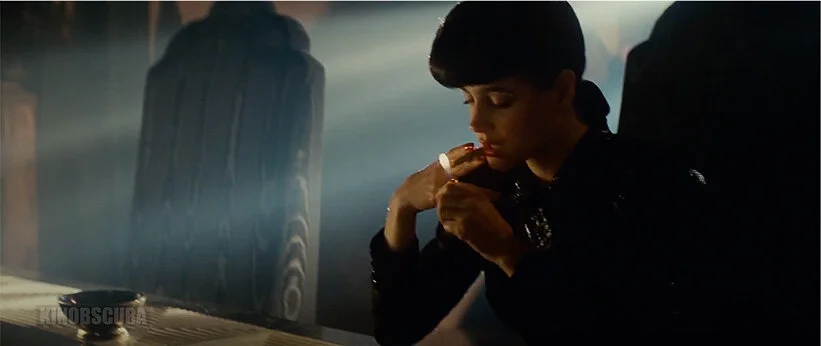
Scene from ‘Blade Runner’ (1982)

Scene from ‘Blade Runner’ (1982)

 
Scene from TV show ‘The Crown’

Scene from TV show ‘The Crown’

4. Lens Filters

Many cinematographers will try to soften a sharp, modern digital image with lens filters. This technique is especially useful when filming a period piece where an overly crisp or sharp image can feel out of place for the time. Many brands make a variety of filters like this and they come in a variety of strengths depending on the look required.


Post-Production Atmosphere

Although you may have used fog or haze at the point of capture, you can add further drama and atmosphere with lens flares in post. This look has fallen a long way out of favour at the moment though, so I would be very cautious of using the post-pro method unless the scene really benefits from it. Instead, I would urge you to capture more believable flares in camera with lenses and filters.

Scene from ‘John Wick’ (2014)

Scene from ‘John Wick’ (2014)


Here’s some examples of atmosphere in photos:

Click to enlarge: Fog is far thicker than haze and is very 3-dimensional in shot. Fog is supposed to almost be a character in the image and is often used to obscure elements in frame.

Click to enlarge: Haze is often very fine and should appear in shot without having visible texture or form. Haze is great for adding subtle depth to a shot as well as a slight flare or glow around points of light.

Click to enlarge: Motivated atmosphere can allow for a stronger fog or smoke effect to appear in shot without it looking out of place. Here a faux stage scene allows for us add a little more smoke to help sell the scene.

Click to enlarge: Many modern cameras and lenses produce extremely sharp images. This can be fine for small Instagram posts, but many photographers are now toning that sharpness down in favour of a more natural looking image. One way to do this, is with lens filters. Here I’m using low contrast lens filters to just soften the shot slightly and you should also notice that the dark shadows are lifted as well.

Click to enlarge: Post-Production atmosphere is also an option and adding a quick lens flare here and there can be a nice touch to add some interest. I caution you to be extremely careful not to overdo this though, as lens flares have been overused in recent years resulting in some of them looking tacky and unprofessional. My advice is to always try to achieve the lens flares in-camera where possible and that can be easily done with lens filters like I’ve done here.

When looking to add atmosphere to your shots, be sure to consider the following:

  • Add fog for a far more dramatic effect or to hide background elements

  • Use haze for a very subtle and less distracting look

  • If you want a lot of smoke or haze in your shot, can you add a motivation to the scene to provide an excuse for it to be there

  • Make your modern digital images a little more organic to look at by using a subtle lens filter

  • Add post-pro atmosphere and flares sparingly. Always try to achieve those looks in-camera to make them believable


Some closing thoughts…

Obviously cinematography learns a huge amount from the photography world, especially where lighting is concerned, but in turn, I think we as photographers can learn a huge amount from cinematography as well. Yes, many of us may only work in the studio and yes, much of our lighting must be fully focused on making the subject look their absolute best and not necessarily prioritise the room they’re in, but I still think there is room for us to consider adding another layer to our lighting.

By all means light the subject beautifully, but how can you maximise depth within that shot so as to draw the viewer in? Yes the subject is lit well, but do they stand forward of their surroundings? Is their black jacket getting lost against a dark corner of the background? Can we use contrast in this portrait to really make the image pop? Is heavy contrast needed, or do we want a softer contrast to suggest a more demure mood to the image? What about colour? Can we use contrasting colours as well as light and shadow to push engagement?

Also, be sure to consider the story or motivation behind the shot. Can we add some believable warmer colours to the image if we include a lamp in the background? Can we cool the image down by placing them by a window and playing with the white balance? And lastly, can we add some atmosphere to the shot? Sure the studio may be cool, but is it feeling a little too clinical and un-lived-in? Perhaps adding a little haze to the shot will keep the focus on the subject and less on their surroundings.

It goes without saying that there’s a lot to consider here, but I think it’s all of these little extra cinematic elements that can take a potentially good image to a great image with only just a little thought.

cine book mock.jpg

As always, thank you for taking the time to read this article. If have any questions about what I’ve covered here today then let me know in the comments below.

If you’re interested in learning more about other aspects of cinematic lighting, including film-set lighting setups and set designs you can use in your own portrait photography, then by all means check out my latest lighting course ‘Cinematic Studio Lighting’. More details on the event can be found via the link below where all attendees will get to shoot all the setups taught on the day as well as receive my complete digital workbook of notes and my Cinematic Colour Grade Presets too.

Learn more about Cinematic Studio Lighting
cine ws banner no date.jpg

online+ws+bottom.jpg
Online Workshops - Learn more
gels+bottom.jpg
Colour Gel Packs - Available Now
mentoring+bottom.jpg
Online mentoring - Learn more
 
Tuesday 08.24.21
Posted by Jake Hicks
Comments: 3
 

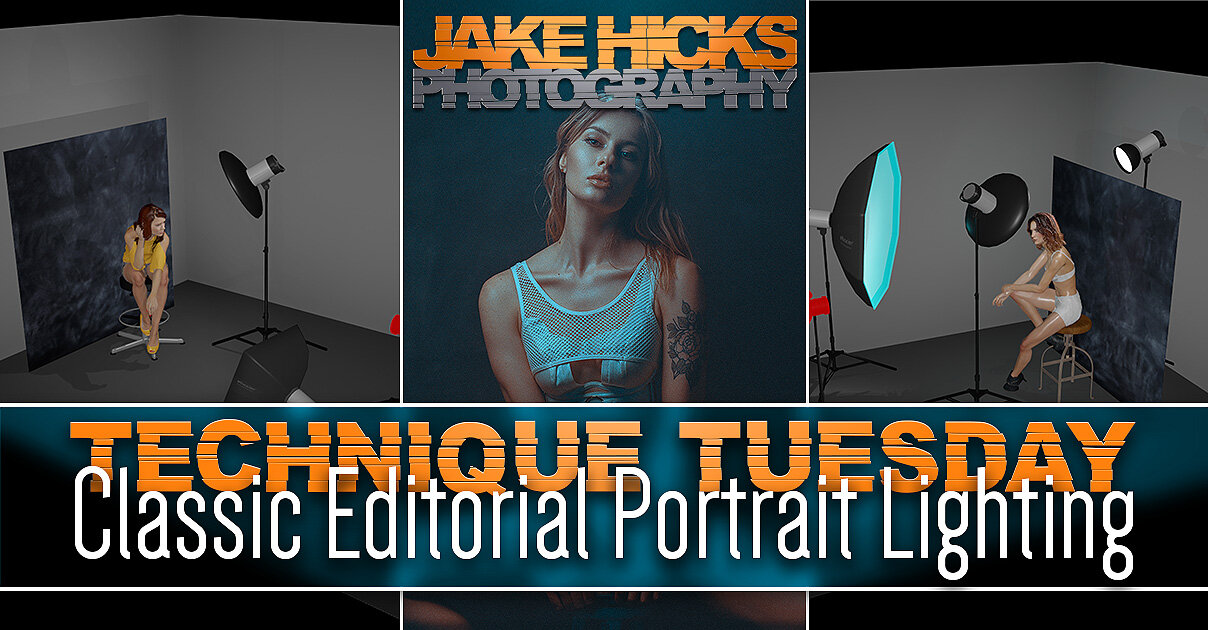
Lighting Setup: Classic Editorial Portrait Lighting

Technique Tuesday Classic Editorial Portrait Lighting.jpg

There will always be ‘classics’ in any industry. Sure these classics may not turn heads or make the headlines and they may even take a dip in popularity for a while, but these ‘classics’ will always be a timeless safe bet.

Fashion has its ‘little black dress’ and ‘tan trench coat’, cooking has its lasagne, burger, pizza, and many, many more. They’re always going to be winners in most peoples eyes and they’re as popular today as they were years ago, plus they will undoubtedly be poplar for many years to come.

Shot an old medium format film camera, the Pentax 67 on Lomo 100 film.

But what about photography, more precisely, studio lighting, what are some classics in our field? We of course have the traditional ‘clamshell lighting’, maybe even the ‘Rembrandt lighting’ if you’re feeling adventurous, but if we want to make it a little more engaging, we can take it one step further with some classic editorial lighting.

To be clear, this ‘editorial lighting’ term is something I personally use in the studio to refer to a certain type of lighting, it’s far from industry standard, but for me, it explains exactly what the lighting does.

Editorial lighting is often very clean, descriptive light that displays everything it needs to. With fashion it illuminates the garment and often portrays the subject in a flattering manner. Model agencies love this type of lighting and it usually works just as well in black and white as it does in colour. Is it going to break the mould of creative lighting? Absolutely not, but it is most definitely a style of lighting that is both timeless and one that every decent studio lighting photographer should be able to pull-off with their eyes closed.

To be honest, I am not known for this type of lighting, far from it and there is certainly a million and one photographers out there who manage to shoot this type of work, day in and day out without losing their minds, and I admire their ability to do so. For me though, I prefer something a little more visually engaging, so when I posted a bunch of these more ‘editorial style’ shots a couple of weeks ago and people started to ask questions about the lighting, I was a little surprised. Firstly, I forget that this type of look is new to some people, the clean lighting and mottled, darker background has certainly seen a resurgence in recent years and the NY fashion magazines can’t get enough of it. But I understand that, what’s not to love? The light is beautifully clean, it illuminates everything and the darker mottled background perfectly contrasts the brighter well-lit subject in the foreground. The editorial style lighting will always be a winner, now as well as 50 years from now and if you’d like to learn it plus a few tweaks to give it a little something extra, your’e in the right place.

Timeless editorial portrait lighting: Here are some examples from other photographers through the years…

Photographers top row, left to right: Emily Soto, Paolo Roversi, Paolo Roversi, Emily Soto. Photographers bottom row, left to right: Clay Cook, Lara Jade, Sue Bryce, Sue Bryce.


Setup 1: Keeping it simple

I get it, not everybody has tons of lights, modifiers and space to play with, so what’s the basic version of an ‘editorial lighting’ setup? Thankfully this is super-easy and you can even make your own fancy mottled background for next to no money as well. And yes, this can even be achieved in small homes studios with ease too.

What you will need…

  • 2x lights

  • 2x modifiers (ideally a beauty dish and small soft box, but two small soft boxes or umbrellas will also work)

  • Your fancy DIY backdrop (details below)

Note: If you’re interested, I will include a complete kit list, including links, at the bottom of this article incase you see something you’re not familiar with.

 
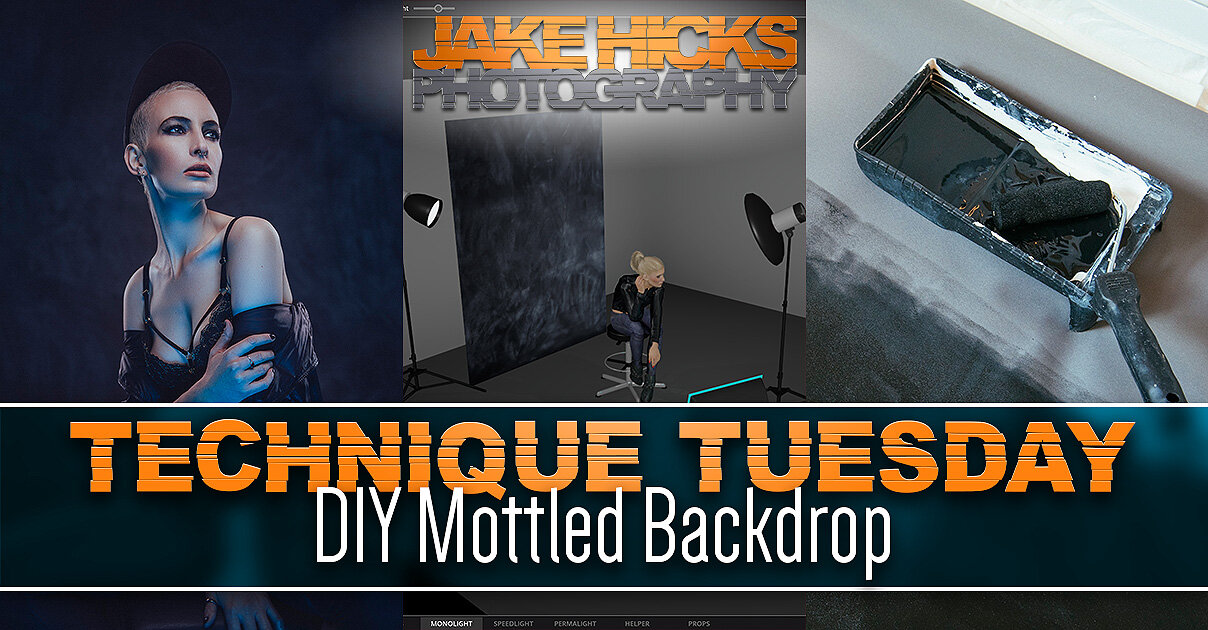
Technique Tuesday DIY Mottled Backdrop.jpg

DIY Mottled Backdrop

If you are interested in learning how to make the DIY mottled backdrop, you can find all the info in my previous article here DIY Mottled Backdrop

Essentially all you need is to buy a dark blackout window blind, paint it with blackboard paint and then rub it down with chalk. From here you can choose to add more chalk or rub more away depending on the look you’re after. It's super-easy to do, plus it’ll only cost you around £25!


The Setup

Yup, you guessed it, simply set your lights up with a key-light above the models head and angled down, then add a fill-light on the floor angled back up at the model. If you have a beauty dish, then use that as your key-light and your small softbox as a fill-light. Take a look at the diagram below to get you started…

Click to enlarge: Cut-out-and-keep

Key points to remember…

  • Place the model close to the backdrop so the key and fill-light can illuminate it as well as the model.

  • Consider positioning the key-light off to one side so as to get some shadow and sculpting on the face.

  • Try not to have the fill-light too close so that it can fill in the shadows evenly when further back.

  • Be sure to not have the key light too high, as you want light and catchlights in the eyes.

  • Bonus: This setup can be done in very small spaces too!


Shot an old medium format film camera, the Pentax 67 on Lomo 100 film.

Setup 2: Getting Creative

With this slightly more advanced lighting setup, I’m going to keep the basic principles of the first one, but try to add some creative elements to make it a little more visually engaging whilst still maintaining that classic editorial look.

What you will need…

  • 3x Lights

  • 1x Beauty dish

  • 1x Large softbox (120cm octabox will be fine)

  • 1x Standard reflector and grid

  • Your fancy DIY mottled backdrop

  • Coloured gels (ideally a light blue gel)

  • Diffusion or low contrast lens filter

Note: If you’re interested, I will include a complete kit list, including links, at the bottom of this article incase you see something you’re not familiar with.

Okay, so don’t panic or be fooled into thinking this is ‘too complicated’ just yet, because I assure you this is one of the easier lighting setups, it just looks like a lot is going on.

Let’s first take a look at the lighting setup diagram and break it down from there…

Click to enlarge: Cut-out-and-keep

Like I mentioned above, this is not much more complicated than the original setup, we simply need to change our fill-light modifier to a large softbox, here I’m using a 120cm octa with a blue gel inside, but any large softbox will do and then you simply add a third light behind the model.

 
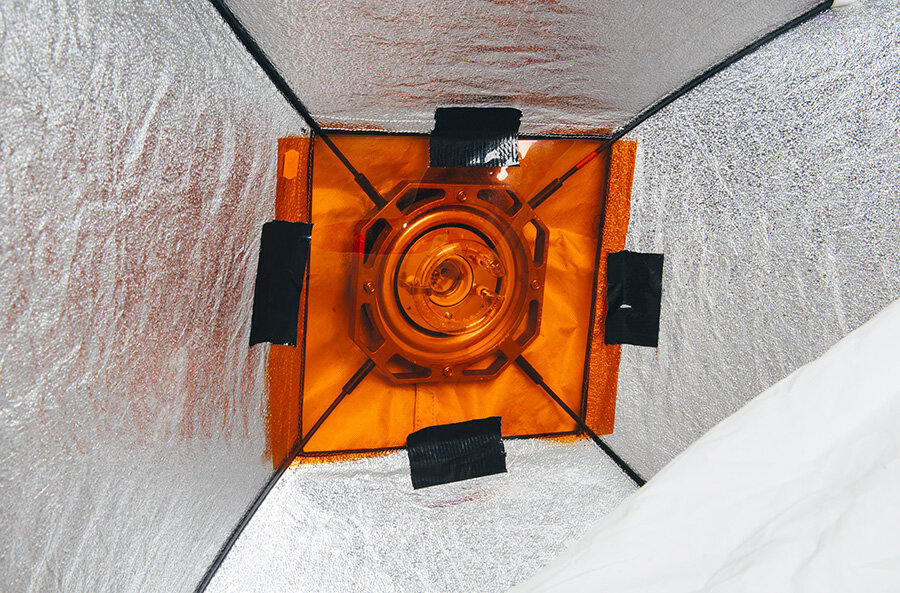
gel softbox copy.jpg

Bonus Tip

Don’t forget that you don’t need a huge sheet of gel to gel your softbox. Some people use massive gel sheets to cover the entire front of their light when it really isn’t necessary. If you want to gel your softbox, simply open the front diffusion cover and tape the gel over the flash tube inside.

Warning: Be careful if your strobe is an older model and has a tungsten modelling bulb. Most modern modelling bulbs are LEDs, but these tungsten ones will get very hot and will melt your gel. Either unscrew it (like I did here) or simply turn it off for the shoot.


The third light…

That third light behind is positioned so as to peek over the background. I’m not using a boom to get it above the model as I didn’t have the space to do so, all I’m doing is putting it on a stand and then getting it just high enough so as to shine over the top of the backdrop. That back-light has a reflector dish with a wide grid (large holes) attached and its job is more to add flare into the camera rather than to light the top of the models head. I make this distinction, as I was positioning the light to point to where I was going to be with the camera, rather than angling it down on top of the models head.


Take a look below at some of the results…

Click on any of the shots below to enlarge them


Getting the Flare

This next part is going to be more personal preference and some of you may not like this effect and that’s okay too. If you do fancy adding a little interest to your shot though and want to include the addition of some flare, here’s how I went about it.

What Flare?

If you’re reading this section and are not entirely sure what I’m referring to by ‘flare’, take a look at the image I’ve included here where I’ve circled the effect in red. Essentially without that flare, the top of this image would have no glow or halo-like light coming into frame. Flare is only present when we have light coming directly into the lens and is ordinarily avoided due to it being considered undesirable. Here though, I’m adding it for creative effect and is of course purely optional.

The gridded light behind the model is positioned so as to be firing straight at the camera. You may find that this automatically adds some lens flare to your shot, but if you have a modern camera and lens, you may be surprised at how little flare you actually get.

Nearly all modern lenses are polished and coated in such a way so as to almost entirely eliminate flare. Older lenses, especially vintage lens, were very susceptible to flare, but that’s all but been eliminated today. To counter this, I like to use certain lens filters to add a little visual interest to the shot, without actually overpowering it.

There are many, many options to try when it comes to adding flare, but if you want to add flare or depth into your shot via a lens filter, here’s a few options I like to play with.

 
Technique Tuesday lee softs.jpg

Diffusion Filter

This is probably one of the most aggressive ways to add flare into a shot and as such, they are becoming harder to come by today. In fact LEE Filters recently told me that they were ceasing all development of these ‘diffusion’ filters like the ones I regularly use. If you’re interested in seeing exactly what they do, then by all means take a look at my comparison article on the LEE ‘Softs’ from a couple of years ago. Read the full article here Using Diffusion Filters - LEE 'Soft' Filters 1 to 5 Comparison Test

Essentially, diffusion filters or ‘Softs’ as LEE calls them, create a very noticeable and localised point of flare that radiates out from the point of light. Take a look at the examples below.

Click to enlarge

Click to enlarge

 
Technique Tuesday Lens Flare Camera Filters Comparison.jpg

Cinematic Lens Filters

There are new companies coming out with these slightly more creative lens filters all the time and that may be due to the fact that we live in an age where lens are simple becoming a little too sharp. Some projects simply don’t require us to see the DNA in the pores of the models skin and many of us are looking for ways to tone down the somewhat aggressively sharp images as a result. Because of this, there is a rise in smaller companies meeting this demand and one of those is a company called Prism FX. They produce a large number of ways to ‘degrade’ your perfectly sharp image and one of those is their ‘Dream FX’ filter. Essentially this does what the diffusion filter above does, just not as aggressively. Again, if you’re interested in digging a little deeper on this, by all means check the comparison shots in my recent Cinematic Lens-Flare Filter Comparison article, or take a quick look at the shots below to get the gist of what the filter does.

Click to enlarge

Click to enlarge

 
Technique Tuesday Using Low Contrast Lens Filters in Portraits.jpg

Low Contrast Filters

Lastly, we have the most subtle flare-inducing filters I own and this is actually the filter I used during the shoot in this article. These lens filters are Low Contrast filters and again, there are many versions of these and nearly all filter companies make them or something similar. I personally use the LEE Low Contrast filters for my work and I absolutely love these things. In fact, I think I’d leave them on my camera the entire time if I thought I could get away with it. So why do I like them? Firstly, they are a little more subtle than the other filters I’ve tried and you barely even know they’re there unless light is shining directly into the lens, but when it catches a glimpse of that light, it opens up the shadow details beautifully and for that I love them. I’m sure it comes as no surprise by now, but yes, I have tested these as well and written in detail why I love them so much. If you’re interested in learning more, take a look at one of my articles on them here Using Low Contrast Lens Filters in Portraits. Alternatively, take a look at the shots below to get the rough idea of what they do.

Click to enlarge

Click to enlarge


Key points to remember when shooting the more advanced setup…

  • Keep that gridded light just out of shot above the model. Have it too high and you won’t get the flare.

  • Advise the model to always keep her chin up so as to avoid too much colour on the front of the face.

  • Try having the gelled lights power low to begin with and slowly increase the power to get the desired amount.

  • Once again, position your subject close to backdrop to avoid the background going too dark.

  • Remember that back light is for flare; adjusting the power of that light will adjust the amount of flare you get.

  • Bonus: Try experimenting with various coloured gels to see what works best for you.


Lastly…

Just to show you how easy this setup is to get right, I’ll include some film photography shots from the shoot below. All of these were shot on the medium format Pentax 67 with Lomo 100 colour film.

Click to enlarge any of the shots below…

Featured model: Pippa Model


Complete Kit List

Below I’ll provide links to all of the items of kit I used. Chances are, you already own most of these, but if there’s something new, here’s the links.

Clicking on the images below will take you to the relevant product on Essential Photo. Please be aware that the Essential Photo links are affiliate links, so if a million and one of you click them, I’ll get a small beer out of it! - Joking aside, the links are more for your convenience over me trying to fund Manuel to fish champagne glasses out of the pool on my multi-story yacht in Monaco.

Top of the range location strobe, the CITI400 Pro TTL. If you want cable-less lighting and all the bells and whistles. This is it.

Top of the range location strobe, the CITI400 Pro TTL. If you want cable-less lighting and all the bells and whistles. This is it.

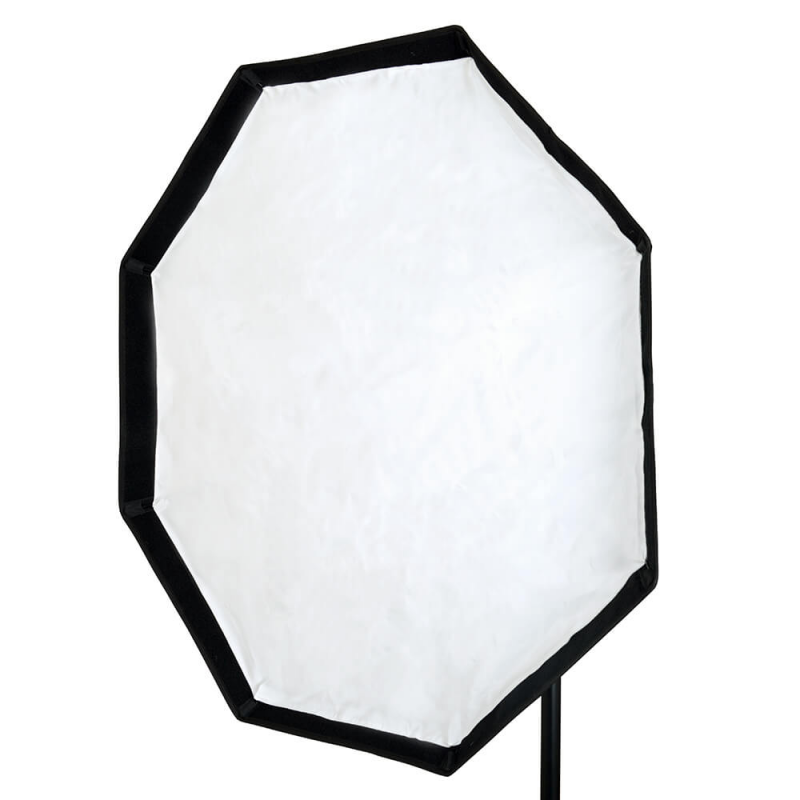
A classic octabox. Nothing fancy here and when you need to fill a room with flat light, a big 120cm octa like this will do the job.

A classic octabox. Nothing fancy here and when you need to fill a room with flat light, a big 120cm octa like this will do the job.

Budget, but still excellent. You dont get many features, but the light leaving this flash will look exactly the same and its only around £115!

Budget, but still excellent. You dont get many features, but the light leaving this flash will look exactly the same and its only around £115!

Honeycombs/grids for your standard reflectors. They come as a pack or separately, but the big-hole one (40) is the most useful.

Honeycombs/grids for your standard reflectors. They come as a pack or separately, but the big-hole one (40) is the most useful.

22” beauty dish is a MUST have modifier in my opinion. Please stop buying nasty soft boxes and get one ASAP! You will love them.

22” beauty dish is a MUST have modifier in my opinion. Please stop buying nasty soft boxes and get one ASAP! You will love them.

Absolutely ground-breakingly amazing gel packs! The only gel packs you’ll ever need! (Your milage may vary)

Absolutely ground-breakingly amazing gel packs! The only gel packs you’ll ever need! Note: Your milage may vary.

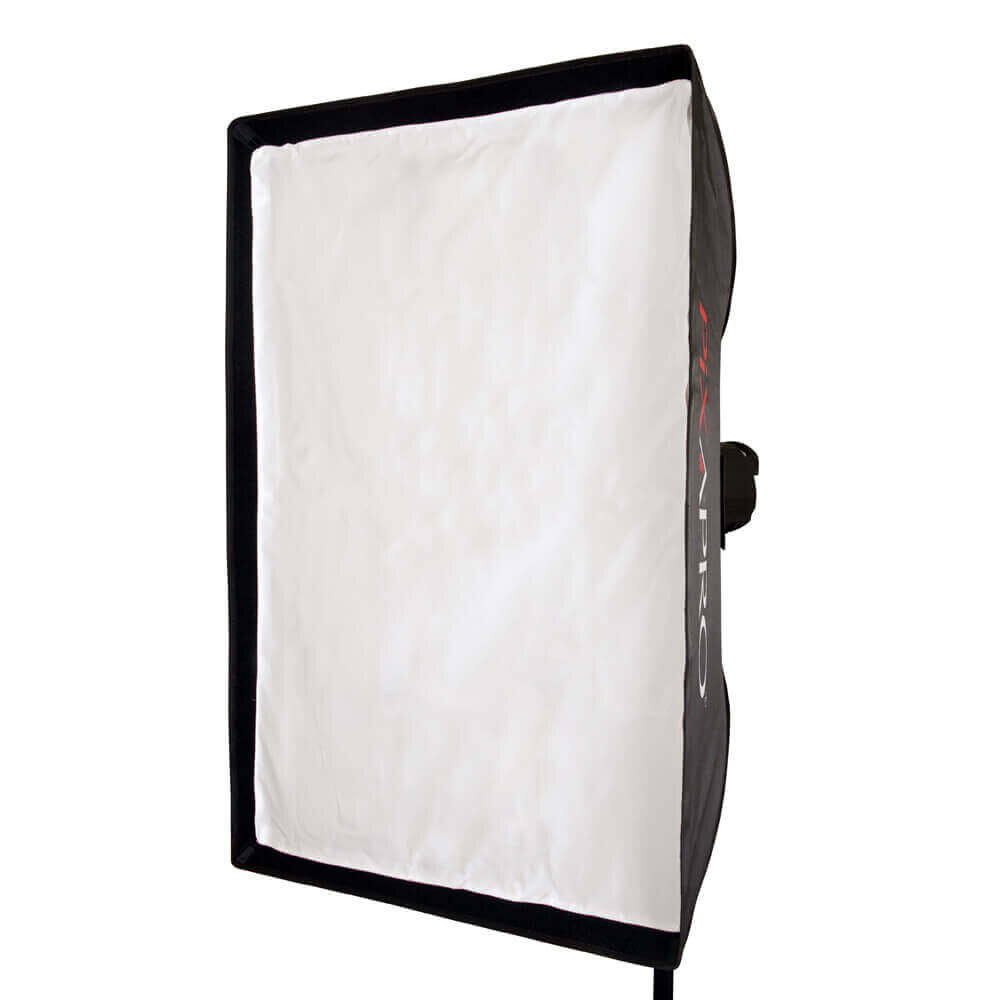
Your basic softbox. As much as I dislike softboxes, I still always have a small one for a fill light. A 60x60cm is good or this 60x90cm.

Your basic softbox. As much as I dislike softboxes, I still always have a small one for a fill light. A 60x60cm is good or this 60x90cm.

DIY mottled backdrop. Clicking the shot will take you to a page where I show all products used. Feel free to buy them wherever though.

DIY mottled backdrop. Clicking the shot will take you to a page where I show all products used. Feel free to buy them wherever though.


Thank You

As always, thanks for checking out this article and spending a little bit of your day with me here. I hope you found it useful and if you left with a little more knowledge than when you arrived, it’s been worth it.

If you have any questions or comments or if something doesn’t make sense, by all means fire-away in the comments below and I’ll do my best to answer what I can. Thanks again and I’ll see you in the next one.

Don’t forget to sign up to my newsletter to be sent all of these photo tips and techniques articles every month in case you miss one.


online ws bottom.jpg
Online Workshops -Learn More-
gels bottom.jpg
JHP Colour Gel Packs -Buy now-
mentoring bottom.jpg
one-2-one mentoring -Learn more-

 
Tuesday 06.22.21
Posted by Jake Hicks
Comments: 8
 

Why you should Upgrade your Speedlight to a Studio Strobe

Technique Tuesday Why you should Upgrade your Speedlight to a Studio Strobe.jpg

I’d argue that nearly all of us owned a speedlight at some point before we owned a studio strobe. When we’re looking to dip our toes into supplemental lighting, strobes seem like a big investment. It just makes sense to pick up a cheap speedlight to play with right?

Like many others, I did the same thing. I bought a cheap speedlight (that was ultimately pretty crappy), then I got a proper one, but I was still unhappy, whereupon I quickly bought a strobe.

I immediately wished I’d done it sooner. Here’s why.

Defining Strobes and Speedlights

Firstly, let’s all just get on a similar page with the whole speedlight and strobe thing as there are a some who think they’re the same thing.

JakeHicksPhotography_A (1 of 7) copy.jpg

Speedlights

To clarify what I will be referring to as a ‘speedlight’ in this article, I mean the little black boxes that bend in the middle and are usually designed to sit atop your camera via the hotshoe.

There are a million and one cheap versions of these, but you can also spend a lot of money for more features if you need them.

Speedlights are also battery powered and will often have a small LCD screen on them that displays limited info regarding power, battery life and outputs etc.

 
JakeHicksPhotography_A (2 of 7) copy.jpg

Studio Strobes

From here on out, I’ll be referring to these simply as strobes and these lights are very different to speedlights so shouldn’t be confused.

Firstly they are a lot bigger and a lot heavier making them impossible to mount on your camera via the hotshoe adapter. Plus, although many use speedlights off-camera, many see strobes as the more sensible OCF (off camera flash) option due to a multitude of reasons I’ll explain in a moment.

Strobes also tend to be significantly more powerful than speedlights (they can produce a brighter light) and although some older strobes are still powered by cables plugged into the wall, many consumer level strobes are now battery powered.


The Features and Benefits of Both

As I know many people will likely feel attacked if I just simply appear to trample all over speedlights, let me be clear that all some photographers need, is a speedlight. Strobes are not for everyone, but I do think that some photographers are using speedlights that should, or at least could, be using strobes to improve their work and their skills in the long run.

JakeHicksPhotography_A (3 of 7) copy.jpg

Is a speedlight right for you, or should you get a strobe?

For me, the primary reason for using a speedlight is…(wait for it), speed. If you are someone that absolutely needs to get the shot at a split seconds notice with very little to no prep time, speedlights is definitely the way to go.

Wedding shooters, paparazzi, reportage, journalists, certain sports, all of these disciplines thrive with the use of a speedlight. You can grab a shot at a moments notice and no matter if it’s inside in a dingy corridor or outside on a gloomy day, you have the power to properly illuminate a scene in front of you. Yes you can use your speedlight off camera and trigger it like a strobe, but this does require a little prep time. Plus, wouldn’t a strobe be a better choice for this if you had that extra time?

Is a strobe right for you?

If you’re someone that has a little more control and time prior to firing the shutter, chances are you’re ready for a strobe. If you’re working indoors, whether it be on location or in a studio and you have the ability to talk to and communicate with your subject or otherwise have complete control of it, chances are that a strobe is going to be a good fit. Portrait shooters, car photographers, still life, fashion, editorial, family, really anything that involves you having a little time and control, strobes is probably the best fit.

Still not convinced? Read on and I’ll explain where your speedlight may be letting you down, plus I’ll also talk about a third option that may be perfect for you.


What’s wrong with my speedlight?

Some of you may be perfectly happy with your speedlight and you may be happy with the shots you’re taking with it. But could they be better? It’s my opinion that yes, yes they can.

I can wholeheartedly say that I would never, ever want to go back to shooting with speedlights. Almost every shot I take now is better because I use a strobe instead of a speedlight. Yes, that’s just me and my particular work, so your milage may vary, but if you don’t believe me, ask around. Ask some of your friends or colleagues that now own a strobe, ask them how often they still use their speedlight. Why would they?

So if everybody who gets a studio strobe never looks back, what are you potentially missing out on?

For me it comes down to quality of light and the vast majority of the time, speedlights simply can’t compete with strobes in this regard.

What does quality of light even mean?

This is a very difficult thing to quantify and even if I showed you, you still may not be able to see it yet. Essentially speedlights illuminate their subject in a very tell-tale way and to the experienced photographer, you can often spot a shot lit by a speedlight over a strobe a million miles away. This is not a good thing. This is not user error, this is simply the physics and constraints of a speedlight.

By its very design, a speedlight has to fire a ton of light down and out of a very small chute. There’s no way around this as the poor little thing is perched atop your camera and no amount of prisms, cloudy Tupperware or cigarette papers is going to soften that very hard light enough so that it looks non-speedlight-like and more natural and pleasurable to look at.


It’s in the delivery

Here is where I’ll start to give my opinions on where the limits of a speedlight are and how a strobe can potentially outperform them. TL;DR It’s all about how the flash delivers light to the modifier they are attached too.

I mentioned at the start that there was a ton of options for both speedlights and strobes and you can get both cheap and expensive versions of each. But don’t think this is about money, because it isn't . In fact you can get many speedlights that cost a lot more than strobes, but I, and many others would happily use the cheap strobe over the expensive speedlight, because like I said, it’s all about the delivery of light.

I am of course referring to the delivery method of the flashlight or photons themselves. The speedlight is unfortunately always held back by that tiny chute to deliver its light, whereas the strobes will often have their light source fully exposed for all to see. These two delivery methods will provide drastically different results, but take a look below to see what I mean.

The very directional expulsion of light seen in speedlights results in many lighting modifiers providing a poor quality of light.

The very directional expulsion of light seen in speedlights results in many lighting modifiers providing a poor quality of light.

Many strobes have exposed flash tubes. This results in light being spread in all directions which in turn fills many modifiers more evenly.

Many strobes have exposed flash tubes. This results in light being spread in all directions which in turn fills many modifiers more evenly.

At this stage you may be thinking,

‘Well, I want my light to actually illuminate whats in front of me. Not what’s above, below and to the side of me. Why would I want a light that does that?

Of course you’re absolutely right, the light needs to illuminate what’s in front of you, you just need to remember that it’s rarely the bare bulb light that is hitting the subject, as the light is nearly always modified by a lighting modifier like a soft box, beauty dish, grid and so on first.

Speedlights are excellent straight out of the box with no lighting modifiers, whereas strobes really do need a modifier to work as intended. It’s when we start to add lighting modifiers into the mix that speedlights start to fall apart.


Quality of Light

I wrote about this same subject specifically many, many years ago and you can read the original article here, Defining Quality of Light in Photography, and although I cover my concerns with speedlights there. it’s most certainly worth a revisit here as the physics of light haven’t changed, nor are they likely to anytime soon.

A quick recap on what we’re looking for in quality of light; a clean and aesthetically believable light that doesn’t look artificial and jarring to the viewer when seen.

Elements of light that can trigger this almost ‘uncanny valley’ of ugly light is, blotchy or patchy light. Light that drops off from light to dark in unbeilable ways, light that covers a large area, but fades at the edges and more. Yes, there are many more examples of unnatural light and yes, although these characteristics in nature can occasionally happen, there are specific circumstances surrounding them.

One well known characteristic of light is that it travels in straights lines (again there are extreme cases where light bends thanks to gravity, but for the most part, it goes straight). The light from the sun travels to us directly and as such, creates strong shadows thanks to how small the sun is in relation to us.

Remember: The smaller the light source relative to the subject, the harder (more contrasty) the light becomes.

The sun is a tiny spec in the sky, so its light is extremely ‘hard’ resulting in very bright highlights and very dark shadows. This is known as very hard light, or contrasty light.

Now picture yourself at home on a bright sunny day and the light is coming through the window in front of you. You cast a shadow on the floor behind you right? The edge of that shadow is very sharp thanks to the sun being a very hard light source, but how come your shadow isn’t jet black? How can you see detail in that shadow if no light is reaching it?

The reason for this is because sunlight is also hitting and bouncing off everything around you. This results in that light also falling onto that very dark shadow as well and it’s why it doesn’t appear jet-black.

Click to enlarge: This is an example of sunlight streaming through a window and the resulting shadow cast on the floor behind you.

As you can see in the image above, the shadow has light within it and this is how we see the world around us the whole time, nearly every shadow actually has light within it. I won’t get to involved in this here, but this is what I’ll often refer to as ‘shadow light’ in my workshops and training and although many don’t teach it, it’s a fundamental part of every image we see and take, yet many overlook this in studio lighting.

The same scene, but lit with a speedlight

Now let’s shoot the exact same scenario with a speedlight. After all, the sun is a tiny spec in the sky and casts very hard shadows, surely the speedlight should do the same right?

Click to enlarge: Here is the same scenario, but lit with a speedlight. Take note of the shadow detail now.

It should now be immediately obvious as to where the speedlight is falling short. Yes it creates the same bright, contrasty highlights and razor sharp shadows, but those shadows are jet black with almost no light in them whatsoever. I’m sure many of us have taken a very similar speedlight shot with those exact same jet-black shadows.

The reason for this is the very directional light that speedlights produce. They fire that hard light straight out and it has no chance to bounce around and spread onto other surfaces. It’s this type of light that immediately looks unnatural and wrong, even though many of us may not be able to explain why.

To be clear, I’m by no means saying that strobes produce light similar to that of the sun, but I do want you to start seeing the differences between a hard light that spreads light in multiple directions like a strobe and a hard light that only spreads light in one direction like a speedlight.


Practical comparisons

So how do speedlights actually compare to strobes in terms of quality of light in the studio? In this section I’m assuming you will be modifying your lights with softboxes, umbrellas, grids etc. And here I want to show you how both the speedlight and strobe lighting looks after it has been modified.

Here is the resulting light from a softbox attached to a strobe and a speedlight.

Click to enlarge: Softbox attached to a speedlight

Click to enlarge: Softbox attached to a strobe


Here is a strobe and a speedlight with a grid

Click to enlarge: Grid attached to a speedlight

Click to enlarge: Grid attached to a strobe


Here is a strobe and a speedlight with a silver umbrella

Click to enlarge: Silver umbrella attached to a speedlight

Click to enlarge: Silver umbrella attached to a strobe


Here is a strobe and a speedlight with a beauty dish

Click to enlarge: Beauty dish attached to a speedlight

Click to enlarge: Beauty dish attached to a strobe

What should be apparent by now, is just how different a speedlights quality of light is compared to a strobes quality of light. The speedlight holds up remarkably well when dealing with very diffused modifiers like the softbox, but when you move into more directional shapers of light, things start to fall apart. The grids leave a distinct honeycomb pattern on the wall, the umbrella leaves a mottled and marbled pattern and the beauty dish is simply nowhere near fit for purpose.

The speedlight simply cannot compete with the strobes and nor should it. Speedlights are quick and responsive solutions to lighting situations and in that test, they would beat strobes every time.


But can we have both lightweight and great quality of light from our flash?

I think by now we’ve established a few key things. Speedlights are great if you need a fast and lightweight solution for when you absolutely have to illuminate the scene in front of you and move on. This is obviously ideal for wedding and paparazzi shooters for example. In contrast to that, the studio strobe is great for when we really want beautiful quality of light and we don’t mind sacrificing time and manoeuvrability to get it. This is ideal for fashion and still life shooters who work in a studio.

But is there a middle ground? Is there a way to have both lightweight and manoeuvrable lights, that also have fantastic quality of light?

Thankfully, there might be.

There is a flash out there that is only slightly bigger and heavier than a speedlight, but it also has the ability to deliver strobe-level quality of light. This little flash is the Godox AD200 (AKA PIKA200 here in the U.K.)

Click to enlarge: The Godox AD200 AKA PIKA200.

Click to enlarge: Here is the AD200 compared to both a speedlight and a strobe.

As you can see from the image above, the AD/PIKA200 is tiny (compared to a studio strobe) and at 880 grams (560 grams without battery and flash head), it’s pretty damn lightweight too. For reference a typical speedlight weighs around 350g plus 4x AA batteries at 27g each and a 200w strobe (Lumi 200) weighs around 2Kg.


So what’s the big deal?

The big deal is the genius exposed flash tube attachment! This little feature changes everything in my opinion as this allows us to access and properly use so many modifiers that were previously rendered almost useless to regular speedlights.


Take a look at how the PIKA/AD200 performs with some of the modifiers I used earlier and make your own decisions.

Click to enlarge: AD/PIKA200 with a softbox attached

Click to enlarge: AD/PIKA200 with a grid attached

Click to enlarge: AD/PIKA200 with a silver umbrella attached

Click to enlarge: AD/PIKA200 with a beauty dish attached

I think you’ll agree that the exposed bulb of the AD200 easily proves itself as being able to provide beautiful quality of light, plus it comes in a tiny package too. The softbox is as expected and although I would avoid the grid modifier here, the umbrella and beauty dish lighting qualities are marked improvements.

Note: My guess as to why this AD/PIKA200 doesn’t quite match strobe quality level lighting, for example the grid modifier, is likely due to the bulb being physically smaller. Yes the bulb is exposed, but it is small in size and this results in a harder light. This is seen most noticeably on the grid as that little bulb shoots straight out.


Field Testing

Firing it at a white wall is one thing, but how does the AD200 perform in reality on a portrait shoot. In the following images, I’ll show you how the AD/PIKA200 looks when used as a keylight on a portrait shoot compared to the same image being taken with a studio strobe.

Click to enlarge: This image here was captured using the AD/PIKA200 with the flash tube attached. The modifier being used was the 21” beauty dish.

Click to enlarge: This image here was captured using a regular studio strobe. The modifier being used was the 21” beauty dish.


Click to enlarge: This image here was captured using the AD/PIKA200 with the flash tube attached. The modifier being used was a 60cmx60cm softbox.

Click to enlarge: This image here was captured using a regular studio strobe. The modifier being used was a 60cmx60cm softbox.


Conclusions

I think even the most skeptical would agree that the AD/PIKA200 holds up remarkably well when compared to a regular studio strobe. The quality of light is excellent and the exposed bulb attachment is making the most of the lighting modifiers that have been specially designed for studio strobes.

So why aren’t we all running out to get these AD200?

As you may imagine, these little pocket-rockets have some limitations you should be mindful of…

Power output

These are 200w strobes so if you’re used to a 500w strobe, these will be less than half as powerful. But is that as bad as it sounds? In reality, no. With lighting, you have to double the power to get 1 stop extra of light. So if we had a 500w strobe that we were already firing at full power, yet we needed one more stop of light, we could either get a 1000w strobe and fire that at full power, or we could simply increase our ISO from 100 to 200 on our cameras. Both of those would result in the same increase in brightness.

You start to see how little an impact having a 200w strobe may be compared to a more powerful 400w or 500w strobe, it’s simply the difference of increasing your ISO one stop or opening up your aperture one stop.

Shoot time

The AD200 quotes as having a battery power equivalent to 500 full power flashes. Chances are that’s enough for most people for one shoot and I expect it’s highly likely that you won’t be using it at full power the entire time. Remember how I explained power output above? I mentioned that to get one more stop of light, you’d need to double the strobe output. The same applies here, so if you were to fire this AD200 at one stop below full power, you’re immediately looking at 1000 flashes compared to 500 at full power (it’s likely not quite as much as this in reality, but it will be a significant increase).

Chances are, this battery power is more than enough for most shoots and even if you did need more, you can simply slap in another battery if it runs out. -For context, the bigger studio strobe that costs more than twice as much as the AD200 (the Godox Citi400 Pro (Wistro AD400), provides 390 full power flashes from a single battery charge.

Recycle Times

Another factor is recycle times. If you’re not sure what this means, its essentially the time delay between firing the flash and firing it again. For example, on the the AD200 it will take 2 seconds between full power flashes at 200w, compared to around 1 second at full power on the CITI 400 at 400w. This may not be an issue for you, but if you’re one of those crazy fashion shooters who’s firing off a million frames a minute, this slower flash charge time may be a factor to consider.

Colour Consistency

I personally believe this is less of an issue than people make out, but colour consistency refers to how much the colour temperature of your flash bulb fluctuates between flashes. For example, the AD200 fires a flash with a colour temp of 5600 Kelvin, but that can fluctuate up or down by 200K. By comparison, the CITI400 quotes a flash colour temp of 5600 Kelvin, but between each shot that temp will only fluctuate up or down by 75K. Is this a deal breaker? I doubt it very much. Most of us are shooting raw and that colour temp can easily be adjusted, plus many wouldn’t even spot the difference anyway. On top of that, bulb age. environment and modifier will also affect this from shoot to shoot so this is a non-issue for me and many others. Just be mindful that this gets more apparent if you’re shooting with multiple lights. For example; one light could be +200K and another could be -200K. This is extremely unlikely of course, but with a deficit of 400K, this cannot be easily fixed in post when multiple lights are varying colour temps. Again, this is rare and only applicable to the highest end of users.

Build Quality

Another important area to consider with the AD200’s is build quality. There is absolutely nothing wrong with the build of the AD200, but they will not stand up to the regular use and abuse a full-blown metal cased strobe like the CITI400 may experience over years of shooting. If you’re only using the AD200 a couple of times a month and you’re sensible, keep it in its case and don’t leave it rolling around in the boot of your car, I’m sure this will last many, many years.

Modeling Bulb

A modelling bulb is a small light that is always on when you have your flash unit switched on. The modelling bulb can help to focus in low light situations as well as help you get an idea of what your light is doing before you fire the flash. Most speedlights do not have a modelling bulb, but most strobes do. Ironically, the AD200 exposed strobe bulb attachment does not have a modelling bulb, yet the speedlight attachment does. If you’re a speedlight shooter, you’re likely very familiar to dealing with no modelling bulb, but if you’re a strobe shooter this may be awkward to deal with at first.


Looking to buy a PIKA/AD200…

For the complete breakdown and all the relevant info, here’s a link to the product here in the U.K. at Essential Photo PIKA200 Portable Battery Powered Mini TTL Flash

Note that is an affiliate link so anything purchased at Essential Photo via this will earn me a beer. I was not paid to write this article nor am I sponsored by them.

GBP price here as of May 2021

GBP price here as of May 2021

View fullsize db_file_img_1571_800xauto@2x.png.jpeg
View fullsize db_file_img_1569_800xauto@2x.png.jpeg
View fullsize db_file_img_1570_800xauto@2x.png.jpeg
View fullsize db_file_img_20200_800xauto@2x.png.jpeg
View fullsize db_file_img_1567_800xauto@2x.png.jpeg
View fullsize db_file_img_1566_800xauto@2x.png.jpeg
View fullsize db_file_img_1565_800xauto@2x.png.jpeg
View fullsize db_file_img_1564_800xauto@2x.png.jpeg
View fullsize db_file_img_1563_800xauto@2x.png.jpeg
View fullsize db_file_img_1562_800xauto@2x.png.jpeg
View fullsize db_file_img_1561_800xauto@2x.png.jpeg
View fullsize db_file_img_1560_800xauto@2x.png.jpeg

Take a look below at the geek-sheets to see any other relevant info. I’ve also included the specs of the CITI/AD400 studio strobe below that for the sake of comparison.

Click to enlarge: AD200 specs sheet

Click to enlarge: Citi400 Specs Sheet


Note: Godox lights are almost always called something different in each country. Godox sells the lights to distributers and they often brand them differently. For example in the U.K. they are branded as ‘PixaPro’ lights by Essential Photo and in the U.S. they are branded ‘Flashpoint’ by Adorama. My point here is that if they look like these lights but are called something different, they are likely the exact same lights made by Godox in China but with a different label.


Closing Comments

I’ve tried to be as objective as my conscience would allow up until this point, but now I’ll be a little more candid for my closing thoughts. Feel free to skip this if you’re easily triggered though.

The AD200 is a truly excellent little strobe unit. It’s crazy-cheap for what it can do, it’s lightweight, packs up small, takes a ton of shots on a single charge and most importantly…. it produces excellent quality of light shots.

The exposed bulb attachment on the AD200 is the secret weapon here (yes you can use it with the alternative speedlight head that it comes with, but I recommend not doing so). This exposed bulb allows for the light to properly fill the modifiers that we’re all familiar with using and remember, the modifiers were all designed with that exposed bulb flash delivery in mind.

The reason I’m labouring this point is because your speedlight or even your strobe with an enclosed bulb, may be holding you back. and just because this AD200 is cheap, doesn’t mean that it’s crappy at all, in fact, I would go as far as to say that I would use this over a Profoto B1 that costs nearly 10 times this!

Now, just before you close this tab and walk away laughing, hear me out. Profoto, according to many professionals, myself included, dropped the ball a little with their B1’s and D1’s. Why? Because of their somewhat bizarre design choice to recess the flash tube in that long tube. Take a look below at the B1 and D1 if you’re not familiar with them.

To be clear, I’m not crapping on these lights, as they are likely excellent units and many, many photographers are extremely happy with them. But, for what I do and the modifiers I use, they are simply not fit for purpose and many were baffled by their decision to place the bulb where they did. Don’t just take my word for it though and you can easily find more examples online where others are voicing their confusion.

Yes, the bulb is very protected in that tube and that is clearly a more sensible place to put it for a battery powered strobe that is designed to be used on the road and up a mountain, if that’s where you are using it. Plus, if you’re a shooter that predominantly uses softboxes, this will be absolutely fine too (within reason and a hot spot is still apparent in certain sizes an depths), but if you’re a photographer like me that uses a wide variety of modifiers, this will cause you issues. What was most bizarre though, was that Profoto didn’t seem to test this new design with their own popular modifiers. Take a look at the quality of light from their very popular beauty dish on the B1 below.

Image courtesy of professional fashion photographer Kasimir Szekeres

I think it’s safe to say that Kasimir was not impressed with the results. Just in case you were confused, the huge black circle in the centre of the light is not a good look for a portrait!!!!!

Screenshot 2021-04-30 at 17.45.10.jpg

To be fair, Profoto did almost admit that there was an issue with their design and if you were among the many concerned photographers that bought one of these recessed bulb strobes, you could purchase some frosted domes that sat on top. These supposedly spread the light a little more.

Putting aside the fact that these little domes cost nearly $200 each, sadly they really did very little to change anything because…. you guessed it, the flash tube is still recessed in the bottom of that tube.

Look, I’m not going to turn this into slagging-match, and if you’re a Profoto user that is very happy with you strobe, that is fantastic and you are making it work for you and your images. Those portable B1s and D1s strobes are excellent for shooters on the move and everybody has different requirements from their kit. But, if I hire a studio that comes equipped with B1s or D1s etc., I need to be aware that I may need to hire alternative lights for the work that I do, or I need to use alternative modifiers.

Lighting modifiers are designed with an exposed flash bulb in mind, the recessed flash tube is a modern thing after all and using a strobe or speedlight with recessed flash tubes may well result in poor quality of light.

All I’m asking is that you be mindful of everything I’ve spoken about here today. One thing to try is to test your current flash unit against a white wall like I did above. Test it what a variety of your favourite modifiers and see how they do. But don’t beat yourself up if you cant achieve certain looks with these recessed flashtube products, as it’s one of the rare cases where your kit is holding you back.


Will I be switching all my lights to AD200?

No. The build quality, although fine, it isn’t great for busy and varied shoots both in and out of the studio long term. Plus, there is the extra faff with the lighting modifier holder that I need to setup each time too. But, if was starting out today and I didn’t already own 10 studio strobes, this would be a no-brainer purchase.

I’d urge anybody to skip the speedlight step in your photography career and go straight to these.

Plus, if you do decide to get into strobe photography more seriously later on, you can still use these in conjunction with your new strobes too.

The other deal-breaker for me, is the lack of modelling light when using the exposed bulb attachment. I do find it a lot easier to see and understand the light when there is a modelling bulb. Plus, it obviously makes focusing in a dark studio much easier when you have a modelling bulb to light your subject.

If you’re someone who only uses the flash a few times a month and will be taking care of it, this little AD/PIKA200 will serve you well for many years. If you’re someone who plans to use this outside to add a little pop of light in a portrait, this is ideal. Plus, if you’re all too familiar with lighting without a modelling bulb from your speedlight experience or you’ll be shooting indoors in a well lit space and you can focus easily without the modelling lamp, the AD/PIKA200 is perfect for you.

Again, if you’re looking to pick up the PIKA/AD200, here’s the link to Essential Photo here in the U.K. PIKA200 Portable Battery Powered Mini TTL Flash

Screenshot 2021-05-04 at 18.06.15 copy.jpg

Thank You

As always, thanks for checking out this article and spending a little bit of your day with me here. I hope you found it useful and if you left with a little more knowledge than when you arrived, it’s been worth it.

If you have any questions or comments or if something doesn’t make sense, then by all means fire-away in the comments below and I’ll do my best to answer what I can. Thanks again and I’ll see you in the next one.

Don’t forget to sign up to my newsletter to be sent all of these photo tips and techniques articles every month in case you miss one.

new+2021+ws+dates+thin+strip-3.jpg
online+ws+thin-2.jpg
banner+offer+text+2000px+gel+packs-2.jpg

 
Tuesday 05.04.21
Posted by Jake Hicks
Comments: 12
 

Cinematic Lens-Flare Filter Comparison

Technique Tuesday Lens Flare Camera Filters Comparison.jpg

Clearer, sharper, brighter!

In recent years, we’ve spent a lot of money investing in expensive camera tech and lenses that produce flawless and crystal-clear imagery (ironically, that’s a dated expression given that we actually want images to be a lot clearer than crystal). But, is it really necessary? Do we really need to remove all traces of the image making process from our photographs? Have our images lost some of their uniqueness along the way?

Lens filters can be a great way to add visual interest to your shots, and many will also help soften some of the overly sharp modern lenses we own today.

Lens filters can be a great way to add visual interest to your shots, and many will also help soften some of the overly sharp modern lenses we own today.

Many modern lenses are now so clear that they’ve taken absolutely every visual optical characteristic possible from the image. No vignetting, no optical distortion and no depth thanks to superior optical clarity. There is certainly a time and a place for this look and architectural, crime scene photography and certain product photography can benefit from this somewhat clinical approach that purposely adds no story or bias to the scene in front of them. When you absolutely have to have a handheld photocopier, these new lenses are perfect.

But, there are times when our images can feel a little too ‘perfect’ and soulless. Sometimes we want to inject emotion into the shot by adding, rather than simply removing. If you have access to older editorials in magazines like Vogue or Harpers Bazaar (old as in 90’s), take a look at the images housed within. You’ll quickly see that the images have a certain visual quality that we can sometimes miss today.

Another discipline that has always coveted this more organic looking image, is cinema. Even big budget IMAX movies are often shot on lenses that are purposefully not perfect. A while back, I spent time at Panavision HQ here in London, and they routinely had directors of photography in there testing, adjusting and hiring their old Panavision lenses. In fact, these lenses are so coveted by certain production houses because you simply cannot buy them anymore…. legally. Many old Panavision lenses were made with a lead lens coatings that gives the final image a gorgeous sheen. Due to health and safety concerns though, you can no longer sell these lead coated lenses any more…. but you can rent them.

Cinema is absolutely rife with lens distortions, and although JJ Abrams did his level-best to single-handedly put everybody off of lens flares in 2009, the more subtle depth and flare is still present in nearly all modern films today.

But what can we do as photographers to add a little personality back into our lenses? Do we really need to hire lead coated lenses from the dark-web? Thankfully, like with cinematographers, there are lens filters we can place on our fancy, modern ‘perfect’ lenses to give them a little more personality and in this article I’ll go over a few new lens filters that I recently picked up from Prism Lens FX and I’ll compare them to my more traditional LEE lens filters.


Prism Lens FX

I only recently heard of this company and a community member mentioned that I should check them out as they knew I was interested in all manner of ways to ruin a perfectly good lens. Prism FX is a relatively new company and they only started in 2018, but since then they’ve released a whole host of lens filters that range from the very apparent crystal prisms to the more practical and subtle chromatic and anamorphic style flares.

Please note: This is not a sponsored post. I have no affiliation with Prism Flare FX and I was not sent these filters to test.

I jumped on the Prism Lens FX site a few weeks ago and picked up their ‘Flare FX’ filter, the ‘Chromatic Flare FX’ and the ‘Dream FX’ lens filters. Sadly, due to lockdowns it was a little tricky to test them out as much as I’d like, but recently I finally got to try them out on a shoot alongside my current lens filters to see how they compared. For those of you who may have missed previous articles, I often use the LEE Diffusion filters (Softs) and the LEE Low Contrast filters.


Click to enlarge: This image is what the scene looked like with no lens filter attached.

New Lens-Filter Test

Briefly, here’s what each of the new Prism Lens FX filters looks like and a crude example of what they do when they are on your lens.

To get these initial test shots for you, I simply fired a strobe with a partially covered gridded reflector dish attached, directly into the lens.

I was using a Nikon D850 with my 24-70 2.8 lens and all of these test shots were taken at f8. For reference, the initial shot being displayed here is what the image looked like with no lens filter at all attached.


Dream FX Lens Filter

This filter is the most subtle one I purchased and it’s the closest to what I currently have with the LEE Low Contrast filter. The Dream FX is almost like having a crappy piece of glass in front of your high-quality glass and although I’m likely oversimplifying it, you get the idea of how the resulting image will look. The resulting effect is a slight glow around the edges of high contrast areas.

Click to enlarge: Dream FX Filter

Click to enlarge: Dream FX Filter attached


Chromatic Flare FX Lens Filter

This filter adds red-ish streaks across the image where we see specular points of light. This effect is dramatic when we have a point of light in shot, but without a light in shot, the filter is very subtle. Note: This lens filter can be rotated to ensure the streaks go in whatever direction you want.

Click to enlarge: Chromatic Flare FX Filter

Click to enlarge: Chromatic Flare FX Filter attached


Flare FX Lens Filter

The Flare FX is actually very similar to the Chromatic Flare filter in that it really only comes to life when there is a point of light in the shot. With light sources in shot, this filter creates blue streaks that are aesthetically similar to that of cinematic anamorphic lenses. Obviously, the blue streaks is not the only factor to an anamorphic lens, but if you’re a fan of sci-fi lens flares, you’ll immediately recognise the look this filter is going for. Note: This lens filter can be rotated to ensure the streaks go in whatever direction you want.

Click to enlarge: Flare FX Lens Filter

Click to enlarge: Flare FX Lens Filter attached


For your reference, here is what my current LEE lens filters look like too.

LEE Diffusion (Softs) Filter

This filter adds a lot of flare to the image and again this filter tends to flare more noticeably nearer a point of light.

Click to enlarge: LEE Soft Filter

Click to enlarge: LEE Soft Filter attached (power 2)


LEE Low Contrast Filter

In recent shoots, I’ve fallen in love with this very clean and more subtle look the low contrast filter can offer. It is also less prone to flaring around points of light in the shot and gives a more overall misty effect to a shot. Like the other filters, it reacts well with points of light in shot, but it still has an effect even without light sources in frame.

Click to enlarge: LEE Low Contrast Filter

Click to enlarge: LEE Low Contrast Filter attached (power 1)


The Shoot

I didn’t do anything particularly unique to test these filters, but I did want to ensure I had at least one point of light within the actual image so I could see how each of these filters reacted with those specular highlights. As you will see from the images below, I achieved the light in shot by having a standard lamp behind the subject and for many of the images, I was also conscious that I needed to duck down a little, so that the lens could see the actual bare bulb in the image. Keep an eye out for how the flare effect changes when we can’t see the bare bulb in the image as this dramatically effects how the shot looks.

One last note is that both the Chromatic and Flare filters create streaks of light. The orientation of these streaks is solely dependant on how you have the filter rotated on your lens and you’ll notice that sometimes these streaks appear vertical and horizontal. Just remember that this can be adjusted as you shoot by simply turning the filter on the lens itself.

No Filter

Stupidly, I barely shot any images at all without a filter on the lens. Subsequently I only had a few lighting test shots to show you before I added the filters to test. This is one of those shots.

But, for the sake of comparison, this is the scene with no lens filter at all and all of these images are shot on Nikon D850 with a 24-70 f2.8 lens.

Click to enlarge: Image taken with no filter


Chromatic Flare FX

Below you’ll immediately see what the introduction of this new filter is doing and you can clearly see the effect it creates with those red streaks. As I mentioned above, the orientation of those streaks is purely dependant on how you rotate the filter on the lens. It’s also worth noting that the size of the streak is also very dependant on the size of the light source in the shot and by that I’m referring to the actual bulb. In the horizontal streak below, I only have a tiny bit of bulb showing, this results in a very small streak. In the vertical streak shot ( I rotate the filter on the lens), a far larger area of bulb is showing and this results in a more powerful streak.

Other things to note is how the rest of the image is affected by the filter and by that I mean areas that are not directly affected by the streak. There is a small amount of flare noticeable throughout the shot and the filter has introduced a little warmth, as well as lifting the blacks slightly too. Personally, I have no problem with any of that and I think it helps bed the streak into the shot over simply looking like it may have been added later on in post.

Click to enlarge: Chromatic Flare FX filter - horizontal orientation

Click to enlarge: Chromatic Flare FX filter - vertical orientation


Click to enlarge: Flare FX filter - horizontal orientation

Flare FX

This is the bluer, more anamorphic looking filter and although it produces a similar look to the Chromatic filter (albeit a blue streak instead of red), the physical filter itself does look very different by design.

By looking at the filter itself, you’ll notice that its entire surface is covered in blue lines compared to the Chromatic filter that just has one chunky line in the middle. I’m no filter expert, far from it, but it appears that the blue streak one here has more overall flare throughout the filter and as a result, you get a little more of an effect, even when you don’t have a point of light in shot.

Here I’ve included a shot where I don’t have the actual bulb in shot, but you can still see how the surrounding light in the lampshade is enough to start creating the horizontal flare effect, albeit subtle.

Again, I also took a shot with the filter rotated vertically for comparison too.

Click to enlarge: Flare FX filter - horizontal orientation

Click to enlarge: Flare FX filter - vertical orientation


Click to enlarge: Dream FX Filter

Dream FX

This was the third filter I got from Prism FX and it’s definitely the most subtle. The other two filters clearly do a very distinctive job and that’s very apparent with their coloured streaks. The Dream FX filter however is about creating a softer, more dreamy look (obviously). The Dream FX filter basically takes 50 years off your lens and gives the image a more analogue look thanks to the image having softer edges and blown highlights.

I only took a few shots with this filter though as it didn’t grab me as much as the others did. Don’t get me wrong, there is nothing wrong with this and it’s doing what it says it’s supposed too, but for me, this is a little too ‘middle-of-the-road’. It’s not doing anything distinctive like the streak ones, but it’s also not doing a strong enough job of reducing contrast or flaring highlights.

If you’re a fan of the analogue look, then this is a great way to get it with your modern camera. Personally though, I think if I wanted this, I may actually just use a vintage lens and go all-in on it. This Dream FX filter will get you close to that, plus it’ll allow you to retain all of the lens control you’re used to, most importantly among them being auto focus!


LEE Low Contrast Filter

This filter is always going to be a winner for me and although I use it a lot, I wanted to use the low contrast filter again here to compare it to the others. For reference, LEE make this filter in different powers too. They make a 1/4, 1/2, 3/4 and 1. These images here were all taken with the most powerful version, the 1.

This filter does a truly excellent job of lifting the shadows (appearing to add light to the shadows by scattering in light from brighter areas) and with modern cameras today, those lifted shadows now contain enough detail to be accessible and usable in raw software if you need it. The beauty of this filter though, is that it lifts these shadows with almost no noticeable flare at the highlight areas. Look at the bare bulb in shot below and you’ll see that it has no flaring around it. The resulting images whilst using the Low Contrast filter is beautifully clean, and although it’s flaring, it’s flaring all over the shot very evenly.

Click to enlarge: LEE Low Contrast Filter

Click to enlarge: LEE Low Contrast Filter


LEE Diffusion Filter (Softs)

The LEE Softs, or diffusion filters as they’re more commonly referred to, again do a more global job of affecting the entire image. This is another filter that I regularly use and have done so for many years, but the reason I use this as well as the Low Contrast filter is that it offers something unique. For me, the key difference between the Low Contrast and Diffusion filter is how they deal with highlights and points of light. The Low Contrast filter does an excellent job of spreading the flare very evenly throughout the image, whereas the diffusion filter here is very clearly showing more flare the closer you get to the point of light. In fact I often use the diffusion filter with the light source out of shot as this still creates flare even though you can’t see the light source in shot.

Click to enlarge: LEE Diffusion (Softs) Filter

Click to enlarge: LEE Diffusion (Softs) Filter


Combining Filters

This is a final bonus point for you to consider. The Prism FX Filters are screwed onto the front of your lens so you can also simply stack them on top of one another. Below I’ll show you what the results were from stacking the Dream FX and the Flare FX together in a single image.

By all means draw your own conclusions, but for me, this is probably a bit much and I think I’ll stick to just one or the other in the future as they are starting to appear a little too soft here.


Final Thoughts…

As always with these reviews/tests, I tend to shoot a bunch of shots and let you see the results for yourselves, but that being said, I’m happy to talk about what I learned along the way.

The extremely prominent blue streaks caused by the Flare FX do a surprisingly good job of replicating that anamorphic lens look from many sci-fi films…. but without the 10K price tag!

The extremely prominent blue streaks caused by the Flare FX do a surprisingly good job of replicating that anamorphic lens look from many sci-fi films…. but without the 10K price tag!

Flare FX

Personally, I really liked the Flare FX filter. The blue streaks look pretty legitimate if you’re a fan of that anamorphic flare and they integrated into the shot well without looking fake or stuck on in post. As I mentioned, I’m a big fan of anamorphic lenses and the effect those types of lenses produce, but sadly, there is no particularly affordable solution to an anamorphic lens, especially for us digital stills shooters. One of the more prominent characteristics of the anamorphic lens is those blue flares and in my mind, this filter does a pretty good job emulating that. Will it fool a director of photography? Not likely, but it can certainly add a little something extra to your shots.

The one biggest downside to this filter, as well as the Chromatic filter, is that you really need a light source in your shot. This is fairly common in cinema, T.V. and with many environmental shooters, but for studio shooters like many of us, you can have this filter on your lens, but without light coming directly into the lens, you won’t even know it’s there.

Chromatic FX

The Chromatic FX filter was also cool and there was nothing wrong with it, I just don’t know when I would use it over the Flare FX version. I personally shoot a lot of colder toned shots and my camera barely ever leaves 4500K. The blue streaks of the Flare FX simply appeal to me a little more, but I think that if you’re a natural light shooter or want a warmer effect in your shots or simply shoot at a warmer white balance, the Chromatic FX Filter may resonate a little louder with your vision.

Dream FX

The Dream FX is probably the filter I will now use the least. To be clear though, this is through no fault of the filter and it does exactly what it’s supposed to do, it’s just that I personally prefer other methods of getting to that same effect. The Dream FX does a great job of emulating that older vintage style lens look and it does create images that are very reminiscent of an 80’s pop video. That is not a jibe at it though and there is definitely a time and a place for that. If you want that very distinctive look, then great, but for me, I think I’ll stick to either actually using a vintage lens, or I’ll use my Low Contrast filter to give me that slightly cleaner look.


JakeHicksPhotography_A_GS (7 of 9).jpg

Closing Comments….

Overall I was pretty impressed with Prism FX filters. They shipped to the U.K. from the U.S. pretty quickly and they were well packaged and each filter came with its own individual, well-padded Velcro pouch. Another nice feature of the lens filters is that the actual glass of the filter is mounted in its own independent metal ring. What this means is that you can screw the filter on tight to your lens, but you can then still easily rotate the glass filter separately to get the look you want.

As many of you know who have been following my work recently, I’m exploring a lot more cinematic lighting within environmental setups and I can certainly see filters like the Flare FX making it into the shots when I have light sources within the frame. I’ll keep you posted on how they turn out, but until next time, stay safe and stay creative.

Featured Model: Gabriella Knight


I’ve already spoken at length about both the Low Contrast Filter and Diffusion Filter so I wont bore you again with it here. If you are interested though, you can of course check out one of my previous articles on it here Using Low Contrast Lens Filters in Portraits and LEE Filters - Portrait Lighting at Home with Jake Hicks

Technique+Tuesday+Using+Low+Contrast+Lens+Filters+in+Portraits.jpg
Screenshot 2021-04-02 at 18.28.26 copy.jpg

Thank You

As always, thanks for checking out this article and spending a little bit of your day with me here. I hope you found it useful and if you left with a little more knowledge than when you arrived, it’s been worth it.

If you have any questions or comments or if something doesn’t make sense, then by all means fire-away in the comments below and I’ll do my best to answer what I can. Thanks again and I’ll see you in the next one.

Don’t forget to sign up to my newsletter to be sent all of these photo tips and techniques articles every month in case you miss one.


new+2021+ws+dates+thin+strip.jpg
online+ws+thin.jpg
banner+offer+text+2000px+gel+packs.jpg

 
Tuesday 04.06.21
Posted by Jake Hicks
Comments: 5
 

Super-Soft Lighting in Small Home Studios

Technique Tuesday Super-Soft Lighting in Small Home Studios.jpg
JakeHicksPhotography_A_GS (1 of 5).jpg

In this article I’ll explain a beautifully soft lighting setup that can be achieved in almost any sized space - In fact, this setup actually takes advantage of very small rooms and the tight spaces of home studios!

In recent months, many of us have struggled to get back into the studio to shoot. Lock-downs and safety concerns surrounding large teams of people have made certain photoshoots pretty tricky to achieve whilst still being safe. But whilst we wait for things to get back to ‘normal’, I thought I’d share a lighting setup that actually takes advantage of small shoot spaces. Maybe you can't get back into the studio and maybe you’d prefer to shoot in a controlled space like your own home. What are some of the disadvantages/advantages of that?

Tight quarters is one thing, but low ceilings can be a real pain too. But is there a way we can use that to our advantage somehow?

In this setup I play with a clever little setup that uses the restrictive confines of your own home to your advantage, and this technique can be achieved in almost any size space!


What you will need

  • 1 Large White Sheet (approx 1.5m x1.5m minimum) - A white bed-sheet is also absolutely fine.

  • 4 Strobes/Speedlights (you can do this with less lights if need be though)

  • 1 Large Softbox - This doens’t have to be huge and even a small soft box will work here.

  • 2 Open Reflector Dishes

  • 1 Gridded Reflector (honeycomb grid)

  • 2 CTO Gels

  • 2 Additional Light Stands

  • 2 Crab Clamps

  • 2 Crossbars (any pole will do and you can even use broom handles if you need to)

  • 1 Backdrop

Don’t Panic…

Yes, I appreciate that seems like a ton of kit and it is, but you’ve probably already got most it tucked away somewhere or you can substitute some bits with other items you have around the home. The crossbars can be replaced by almost any pole or even a broom handle. The large white sheet is super-cheap to pick up if you don’t have one, but a white bed sheet will honestly be just as good. Plus the CTO gels, although not particularly common, may even be lurking in a pile of gels or multi pack somewhere.

There is also one odd item in here that many of you haven’t heard of, and that’s the ‘Crab Clamps’. I love these things and if you don’t already have some, I’d urge you to get them as they're only a few quid (freedom-bucks) each.

And lastly, (as I ALWAYS get asked this), but yes, you can do this setup with Speedlights if necessary.

Click to enlarge: Yes, there is a lot of kit, but most of it you should already have somewhere.


The Setup

First and foremost, let’s look at how everything is laid out in the small space and then I’ll explain some tips and things to bear in mind as you’re setting this up.

Click to enlarge: Here is everything in situ…

Click to enlarge


Step by step…

Note: We spoke about the restrictions of social distancing at the start of this article and how that might keep you out of a busy studio. If you’re shooting from home, it may be advisable to set everything up prior to inviting your subject into the small room with yourself. Once everything is in place, you can situate yourself further away to take the shots and then invite the subject in.

Technique+Tuesday+DIY+Mottled+Backdrop-3.jpg

The Backdrop

Firstly, let’s get that backdrop up and out of the way. You can use whatever backdrop you want here, but a grey or muted tone background will likely be best for the colour we’ll be adding to it later. Plus: If you like the look of my backdrop in these shots, ‘good news’ as this is a cheap DIY one I made and it’s very easy to do. If you’re interested, here’s a link to how I made it ‘DIY Mottled Backdrop’

Whatever you end up using though, simply place the backdrop at the back of the room and fairly low to the ground as our subject will be sat down for this shoot.

The White Sheet

The likely next logical step is the white sheet, and it’s this sheet that will give our subject a beautiful soft top-light. As we’re cramped on space and we’re stuck with low ceilings, we’ll want to have our white sheet about half way up the height of the room. Our subject will be sat down for this shot so we’ll want the sheet to be suspended above them and just high enough to be out of shot. Just make sure it’s also low enough so as to allow the light to be bounced off the ceiling around it.

I’ll just say that bit again;

The lights will be bounced off of the ceiling and you are not firing the lights directly through the sheet.

Click to enlarge: Here you can see the crab clamp griping the crossbar and then the white sheet is in turn attached to that. Repeat on the other side for a white roof of beautiful light.

Click to enlarge: You can see here in a previous setup where I simply used the cross arm of a c-stand to attach the sheet.

It’s up to you how you suspend the sheet above the subject, but for me, I just used two crossbars on top of lightstands either side of the subject. The crossbars were also held in place by crab clamps affixed to the lightstands like you can see in the image above.


The Lighting

It’s now time to setup the four lights.

The Two Soft Lights

Place two lights either side of the white sheet and point them up towards the low ceiling above. These two lights should have open dish reflectors attached to them so that we can spread the light over the ceiling as much as possible.

The light will then come back down through the white sheet and result in a beautifully soft light that has been double-diffused.


The Back Light

Next we can add the light that is going to be behind the subject. Attach a grid to this light (barn doors will also be fine here), place it just above shoulder height of the subject and point it so that it’s firing over their shoulder and almost back into camera where you will be taking the shot. Be sure to attach a CTO gel (colour temperature orange) to this light too. I’ll explain more on this later.


The Key/Fill Light

The job of this light can be a little confusing at first as it appears to be a key light, that is placed next to you and pointed straight at the subject. And although this light is adding some front illumination, it is also acting as a fill light for our large soft top light as well. As I mentioned, place the softbox next to you and keep it at a height so that it can shoot light under your white sheet and onto your subject.

Lastly, add a CTO gel to this light. If you’re not sure how to gel a softbox, take a look below for an easy solution.


CTO Gels

Some of you may not have encountered CTO (colour temperature orange) gels before so I’ll briefly explain what they do. All light has colour to it in the photographic world. The sun has a colour, candles have colour, flash has colour and so on. A CTO gel is made in such a way so that it can change the colour of one light to match the colour of another. For example, if you have a tungsten bulb illuminating part of your shot, and then you want to add some flash to it, you’ll quickly notice that they are two different colours when you take your shot. The tungsten light appears far warmer or more orange than the colder or bluer flash does. To match these two colours in the same shot, we place a CTO gel on the flash and now when we take the shot, the tungsten and flash lights appear to be the same colour.

This sounds a little more complicated than it is and although photographers rarely use these colour temperature gels today with modern strobes, the TV and cinema industry still use them a huge amount.


Attaching Gels to Softboxes

Many people think you need huge sheets of gels to use them with soft boxes, but thankfully that isn’t the case and you can just as easily use small sheets of gels to colour your softbox too.

To gel a softbox, simply open up the front of it by removing the front diffusion cover. Then tape the smaller gel sheet over the flash tube. As long as the flash tube is covered by the gel, it doesn’t matter whether you have your gel on the inside or outside of the softbox. One word of caution though; some of you may have older style strobes that have tungsten modelling bulbs. BEWARE: These bulbs get extremely hot so I’d advise having your modelling bulbs turned off or simply unscrew them and remove them like I’ve done here to make it easier to attach the gel flush to the flash tube.


The Self Promotion You All Knew Was Coming…

If you wanted to get yourself some CTO gels, or any other gels for that matter, I do sell comprehensive gel packs via the studio website. Follow this link here for more info Jake Hicks Photography - Gel Packs

gel packs.jpg

Camera Settings

The more experienced readers among you may have been curious as to how we’re going to deal with the orange colour cast that only some of the lights in this set are casting, thanks to the CTO gels. To answer that, let’s first look at the camera settings I was using.

I shot these images on a 105mm prime at f2. The shutter speed was my usual 1/125th and the ISO was set to the Nikon D850 lowest setting at ISO 30.

I personally don’t think that info is of particular importance though, as this shot can be achieved with any number of varying settings. The more important factor here is the white balance, as when I shot this, my camera was set to around 3500 K.

In the final shot I ended up warming it up a touch (increased the Kelvin value) in Lightroom and exported it at 3800K, but the ‘colder’ Kelvin setting here is to counter the warmer orange CTO gels.

Look again at the background in this shot…

See how it appears a blueish colour, even though you may have noticed the background is actually grey in real life? It now appears blue due to me shifting the Kelvin of the overall shot in camera.

Once more, look again at the shots and see how the front of the model is slightly warmer in tone thanks to that softbox with the CTO gel inside.

Also, look at the beautifully soft light from above and how that falls on the subject. See how it separates on the subject as it falls on the forehead, cheekbones and nose? Then see the warmer tones beneath that on the cheek hollows and neck?

This is how we’re separating those two lights, not only because of their placement, but the model position and pose within them.

There is one last thing that I’ll mention about colour temperature here, and that’s the fact that this should appear colder in appearance that it actually does. I set the Kelvin to around 3500K, this shot should be very blue due to that right? Although you’d be right to assume that, I think you’d be surprised how large the region of ‘usable’ white balance is in a shot. You can have a shot at 3500K-5000K and it still look okay. Yes this image may look blue in normal circumstances, but with us mixing a very large soft light in this setup, you can actually get away with a lot more than you might think. Play around with the Kelvin in camera, but remember that you can always tweak it later in post, so don’t get too hung-up on it.


The Final Shots

Take a look below at some of the final shots from this setup and simply click on any to enlarge them.

View fullsize JakeHicksPhotography_A_GS (1 of 5).jpg
View fullsize JakeHicksPhotography_A_GS (2 of 5).jpg
View fullsize JakeHicksPhotography_A_GS (3 of 5).jpg
View fullsize JakeHicksPhotography_A_GS (4 of 5).jpg
View fullsize JakeHicksPhotography_A_GS (5 of 5).jpg

Model: Gabriella Knight


Technique+Tuesday+foreground+flare.jpg

Finishing Touches…

I’m sure many of you may be wondering ‘what the hell the big streaks of orange across the models face is all about and how they got there’. This is actually a simple in-camera technique and is not added in post, but the orange streaks are appearing because I’m holding a wineglass in font of my lens. The colour of the streaks wouldn’t ordinarily be that strong, but remember, we have that light behind the model pointing back to camera with a CTO gel on it. It’s that apparent orange light that is picking up on the wine glass in front of the lens and causing that effect.

If you’d like more info on this technique then you can check my article on ‘Foreground Flare’ as that goes into it in a lot more detail.

Lastly…

The eagle-eyed among you may have also noticed that there appears to be a variety of visual differences in some of these shots. Elements like red streaks or blue undertones and these are the result of me testing various lens filters….. but that will have to wait for another day ;)


Closing Comments

Points to remember include:

Use the small space to your advantage and turn the entire ceiling into your light source - But remember, this really only works if your ceiling is white, or at the very least, a neutral colour.

In a small space with low ceilings, you’re likely be stuck with the subject being sat down. - But if you have higher ceilings and you think you have the room to place the white sheet higher whilst still being able to bounce light off of the ceiling, go for it and stand them up.

Manage your Kelvin - Be sure to dial down the white balance a little as this will allow you to get some colour on that background, without actually adding any colour back there. Plus, dialing the Kelvin back a little will help to neutralise some of the orange tone from your CTOs.

Work with the subject and guide the pose - Nearly every half-decent lighting setup requires your subject to work their pose with the lighting. Having your subjects chin-up and allowing that soft light to fall on their face will often produce great results with this setup.

Add the finishing touches - Don’t be afraid to add some extra elements in-camera, like the foreground flare. You have that back light pointed towards you, why not take advantage of it by holding something in front of the lens too.


Thank You

As always, thanks for checking out this article and spending a little bit of your day with me here. I hope you found it useful and if you left with a little more knowledge than when you arrived, it’s been worth it.

If you have any questions or comments or if something doesn’t make sense, then by all means fire-away in the comments below and I’ll do my best to answer what I can. Thanks again and I’ll see you in the next one.

Don’t forget to sign up to my newsletter to be sent all of these photo tips and techniques articles every month in case you miss one.


new+2021+ws+dates+thin+strip.jpg

online+ws+thin.jpg

banner+offer+text+2000px+gel+packs.jpg
Tuesday 03.09.21
Posted by Jake Hicks
Comments: 6
 
Newer / Older