• >>>NEW Colour 2.0 Workshop<<<
  • Technique
    • Latest Techniques
    • FREE TIPS
    • Quick Tips
    • Video
    • Site Search
    • Blog
    • Archives
  • Mentoring
  • 2026 Workshops
  • >Online Workshops<
  • Studio Lighting Books
  • Contact
    • Newsletter
    • Contact
    • Statement
Jake Hicks Photography
  • >>>NEW Colour 2.0 Workshop<<<
  • Technique
    • Latest Techniques
    • FREE TIPS
    • Quick Tips
    • Video
    • Site Search
    • Blog
    • Archives
  • Mentoring
  • 2026 Workshops
  • >Online Workshops<
  • Studio Lighting Books
  • Contact
    • Newsletter
    • Contact
    • Statement

Maximising the Colour in your Coloured Gel Shots

It's certainly no secret that I like to preach about getting everything right 'in-camera' before I press the shutter button. Thankfully this is becoming easier and easier to achieve with better and better cameras too…. but every image can always benefit from a little polish in post.

The learning process for photographers literally sky-rocketed overnight with the introduction of digital cameras, but for all their advantages over film they did bring a few downsides and one of those was laziness. Laziness in spades.

If I've heard it once, I've heard it a million times, “Don't worry about that. I'll fix it later in post”.

The words that make my blood boil because 9 times out of 10, it's a wire protruding out of someones head or a light is protruding into shot. The irony of it is, it would take 2 seconds to fix in real life or 2 minutes to fix it post!

But all that being said, there are some things we need to be cautious of when shooting digital over film, and that's flat looking files.

 
Here is an example of the difference in Raw colour versus me shooting the same shot using Fuji Velvia film. Raw processing is a must if you intend to get anywhere near the same level of saturation and contrast already present in film.

Here is an example of the difference in Raw colour versus me shooting the same shot using Fuji Velvia film. Raw processing is a must if you intend to get anywhere near the same level of saturation and contrast already present in film.

I mentioned earlier about digital having a couple of disadvantages over film, one of them being; making us lazy, but another being that it produces tonally flat raw files.

Film had a huge advantage in this as depth, colour and each manufacturer and film type had the look pre-baked into the film. There are tons of articles specifically based around what each film looked like (here's one). But for example: Fuji was a cooler toned film and Kodak produced warmer skin tones.

Also different film lines within those brands then produced different looks for different purposes, like my personal favourite the Fuji Velvia that produced outstanding saturation and contrast compared to the Kodak Portra that produced more believable and natural colours. These tones were set as soon as you clicked the shutter but now with our raw files we essentially get a very tonally flat and reduced contrast file, we get a blank canvas to work with and we can decide to add contrast, saturation or colour tones if we want to. It's my opinion that post production is a mandatory part of our digital workflow and I have little time for people who brag about 'straight out of camera' shots. The shots themselves may well look great but what their creators are failing to understand is, they could look so much better with at least some post production applied.
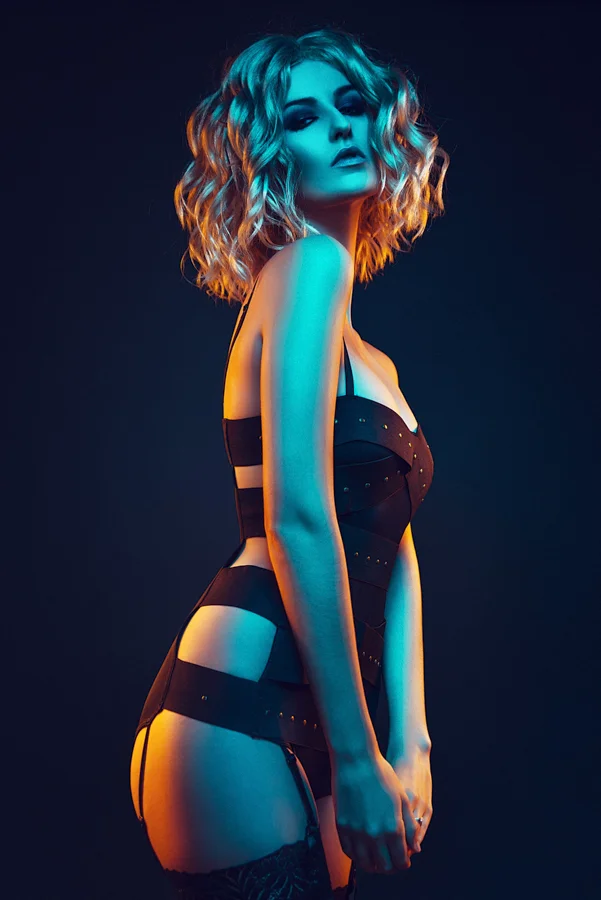
 
In the following steps I'll show you how I added dodge and burn layers as well as colour toning layers to this highly saturated image.

In the following steps I'll show you how I added dodge and burn layers as well as colour toning layers to this highly saturated image.

So even though I preach about 'getting it right in-camera' I am adamant that post-pro on digital files is necessary whether you are just adding some basic contrast and saturation or whether, like me, you're going to go down the pixel-punishing route and take control of every aspect of your shot. So for all those times where fixing it in real life is easier, make sure you realise it, move the cable protruding from the back of the models head in real life, and save yourself the post pro time for actually doing cool stuff like localised colour enhancements like this.

As some of you may know I take a lot of very saturated shots and I take them all digitally meaning that the resulting raw image may not be as saturated as I ideally want. I do a fair amount in Lightroom to get it close to what I like but for specific and localised adjustments with colour, I bring them into Photoshop and work on them in there using this technique.

The technique is a continuation of my digital 'Dodge and Burn' technique so let’s take us through the whole process from start to finish.

 
Drag your curve down from the middle and than select the adjustment layers mask.

Drag your curve down from the middle and than select the adjustment layers mask.

1. Create a Burn Curve

I use dodge and burn to add depth to a shot and we'll see later on that I use colour in the same way using the same technique.

First off lets add the burn layer.

Layer -> Adjustment Layer -> Curves

Name: Burn

Hit Ok

Select the Curve in the middle and drag it down.

Click on the Mask in the layer palette (the white rectangle)

CMD+I This will invert the mask turning it black and hiding the curve.


Drag the adjustment curve up from the centre to add your 'dodge curve'

Drag the adjustment curve up from the centre to add your 'dodge curve'

2. Create a Dodge Curve

Layer -> Adjustment Layer -> Curves

Name: Dodge

Hit Ok

Select the curve in the middle and drag it up.

Click on the Mask in the layer pallet (the white rectangle)

CMD+I This will invert the mask turning it black and hiding the curve.

 
Grouping your adjustment layers together will make them a lot easier to manage later on.

Grouping your adjustment layers together will make them a lot easier to manage later on.

3. Group them Together

Hold down CMD and click on the Burn layer so that both layers are now selected.

Drag both of those layers onto the folder icon at the bottom of the Layers palette to put both the Dodge and the Burn layers in a folder.

Rename that folder 'Dodge and Burn Group' (double click on current folder name to rename it)


4. Start Painting

Select the Brush tool (B) and I recommend a very soft edged brush.

Hit D to default the palettes, this should mean that your brush will now paint white (if the mask is selected).

Set the brush opacity down to about 5%-10%

Select the Burn Layers mask and start to paint onto the darker areas of the image you want to darken.

When that's done select the Dodge Mask and paint onto areas of the image you want to highlight.

This is an example of what my dodge and burn masks look like when they're selected. Areas to burn are usually enhancing the makeup and defining the lips where as areas to dodge are the forehead, cheek bones and hair etc.

This is an example of what my dodge and burn masks look like when they're selected. Areas to burn are usually enhancing the makeup and defining the lips where as areas to dodge are the forehead, cheek bones and hair etc.

 
As long as you don't have a mask already applied to your curve adjustment layer you should start to see the coloured effect taking effect its a lot easier to fine-tune.

As long as you don't have a mask already applied to your curve adjustment layer you should start to see the coloured effect taking effect its a lot easier to fine-tune.

5. Adding Colour with Dodge and Burn Layers

We now want to enhance certain areas of colour in the image just like we did with the shadows and highlights earlier.

Click on the previous 'Dodge' Layer we created

Layer -> Adjustment Layer -> Curves

Name: Orange

Hit Ok

You should see that its created another adjustment layer within our Dodge and Burn Group.

Go into the Curve adjustment box and click on the RGB drop down menu at the top.

Scroll down and select the Red Channel

Drag the curve up slightly from the middle to add more red.

Click on the RGB drop down menu and select Blue

Drag the curve down slightly from the middle to add some yellow.

You should start to see that the whole image has taken on an orange tone.

Make sure the Orange layers mask is selected and hit CMD+I to invert the mask and hide the colour.

 
You can add as many of these coloured adjustment curves as you like.

You can add as many of these coloured adjustment curves as you like.

6. Adding More Colour Adjustment Layers

We now want to add another adjustment layer for the blue in the image.

Layer -> Adjustment Layer -> Curves

Name: Blue

Hit Ok

Go into the Curve adjustment box and click on the RGB drop down menu at the top.

Scroll down and select the Red Channel

Drag the curve down slightly from the middle to add more cyan.

Click on the RGB drop down menu and select Blue

Drag the curve up slightly from the middle to add some blue.

We've essential just done the opposite adjustment that we made to the Orange adjustment layer.

Make sure the Blue layers mask is selected and hit CMD+I to invert the mask and hide the colour.


7.  Painting with Colour

We're now ready to start painting some colour back into our shot using these adjustment layers.

Select either Orange or Blue masks to start

Select the Brush tool (B) and select and a soft edged brush

Hit 'D' to default the palettes, this should mean that your brush will paint white (as long as the mask is selected).

Set the brush opacity down to about 5%-10%

Select the either Orange or Blue layer mask and start to paint onto the desired areas of the image you want to have more colour in.

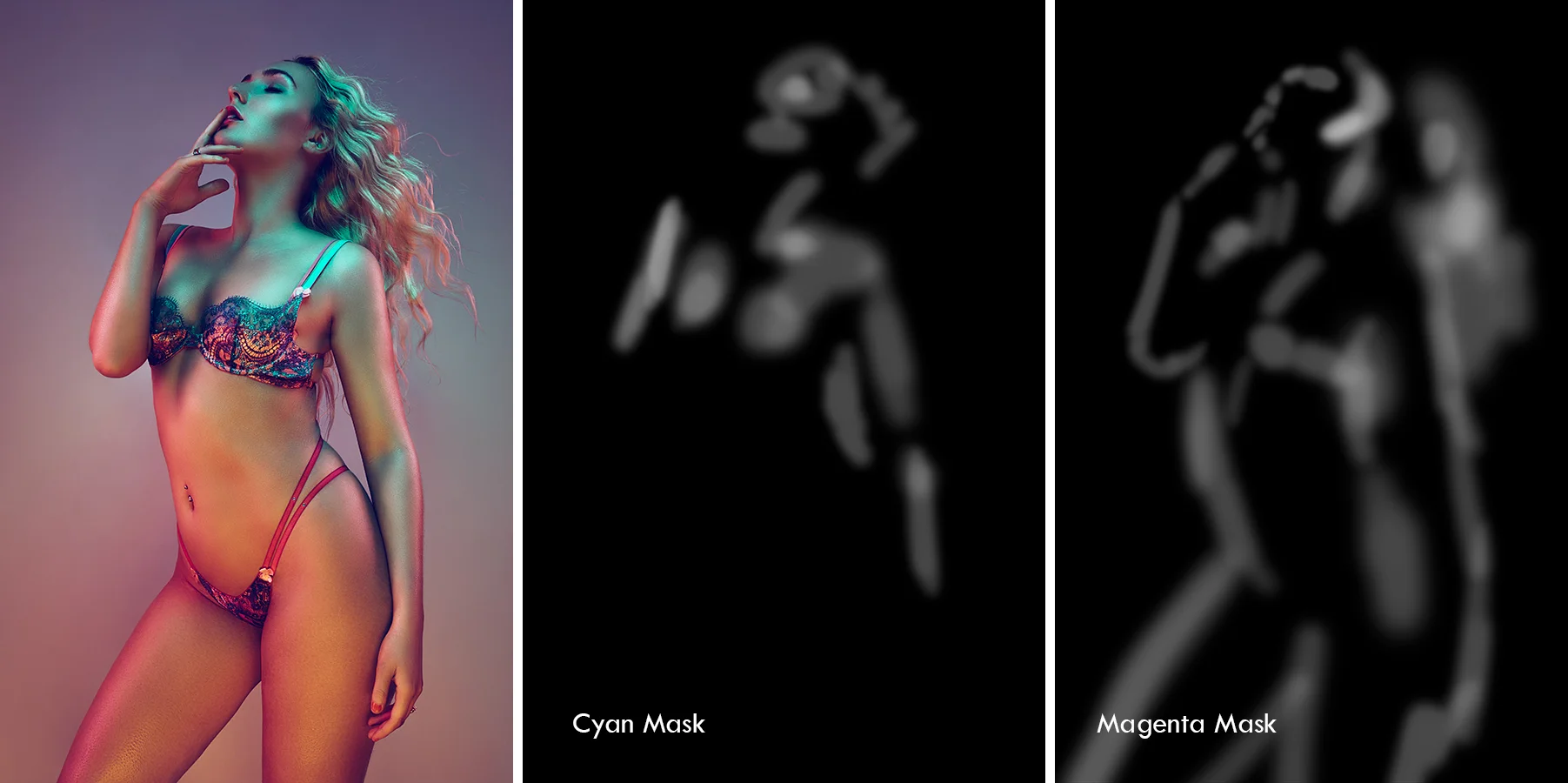
This is a really useful technique with a lot of gelled lighting shots, especially the ones with strong colours on the edges like this.

The mask above clearly show where the colour has been painted back into the image. Notice on the right hand mask, the orange mask, how I've concentrated heavily on the edges of the model. This technique really helps to pick the model out form the ba…

The mask above clearly show where the colour has been painted back into the image. Notice on the right hand mask, the orange mask, how I've concentrated heavily on the edges of the model. This technique really helps to pick the model out form the background.

You can take this technique as far as you want and you can add as many colours as you like to it. Remember that because you are using curves adjustment layers, you are really colouring the image based on the background image below it. As a result you don't need to be overly precise with your masks. This technique can have dramatic effects on images that aren't in a studio environment as well. For example you can add a green adjustment layer and paint onto an image with trees and bushes in the background to really enhance those green colours. The same thing can be applied on images with a lot of sky and sea and by simply adding a blue curves adjustment layer you can create some great saturation and impact in those types of shots too.

Check out a couple of my masks and resulting images below to see what I mean.

Here we can clearly see the blue and orange masks again but this time to different effect.

Here we can clearly see the blue and orange masks again but this time to different effect.

This time I am using a Green Adjustment Mask and a Magenta Adjustment Mask.
This time I am using a Green Adjustment Mask and a Magenta Adjustment Mask.

In this shot I am using a Cyan and a Magenta Adjustment Mask. You can clearly see how I am paining in the colour in completely different areas of the image and as a guide you shouldn't be paining in the same areas which each of the masks.

In this shot I am using a Cyan and a Magenta Adjustment Mask. You can clearly see how I am paining in the colour in completely different areas of the image and as a guide you shouldn't be paining in the same areas which each of the masks.

Of course this technique is just one of the many steps I take in my 1 to 2 hour post pro journey for each of my images. I hope you've found it useful and I hope you give it a try yourselves. Feel free to fire any questions my way down below and I will do my best to answer them.

Remember; no matter how good your Raw images look 'straight out of camera', they can always look better with a little bit of post pro ;)

To find out more about my post production workflow, why not come along to one of Post-Pro Workshops. On the day I go through absolutely everything I do to my images to make sure they're pixel-perfect and editorial ready. From Lightroom colour adjustments to exporting and right through my entire Photoshop process. On the day you will also receive all of my Lightroom Presets and Photoshop Actions plus tons of clearly explained step-by-step .pdfs of each and every part of my workflow.

To find out more and to sign up please follow the link below

Post-Production Workflow Workshop

Tuesday 03.08.16
Posted by Jake Hicks
Comments: 6
 

Simplest and Most Effective One Light Setup I've Ever Used

I'll come clean right off the bat here and say that I stumbled across this little super easy lighting technique more by luck than skill.

I'm pretty sure I can't be the only one who has taken a portrait whist using a single key light and reflector and fought with the reflector in one hand and the camera in the other. You know the scene; super quick and clean 'clamshell' lighting with the key just above the models eyeline and the reflector just below the chin bouncing some well needed light back up to fill in the shadows. You're micromanaging the reflector with one hand trying to bounce just the right amount of light back into the shot, you're scooping, flapping, bouncing and bending the damn thing around the key-light stand with one hand desperately trying to look professional. The result? Well the result for me is that when I load the images up on the laptop for review I find that half the damn shots have the actual reflector peeking in the bottom of the frame! Not good.

A while back I was experimenting with the reflector by bouncing back light into the shot from two hair lights behind the model pointed towards the camera. I had the reflector on a stand and I was literally holding the camera up in front of it so that the viewfinder was pressed against it and taking pictures using the blessings of autofocus alone because I couldn't look through the lens.

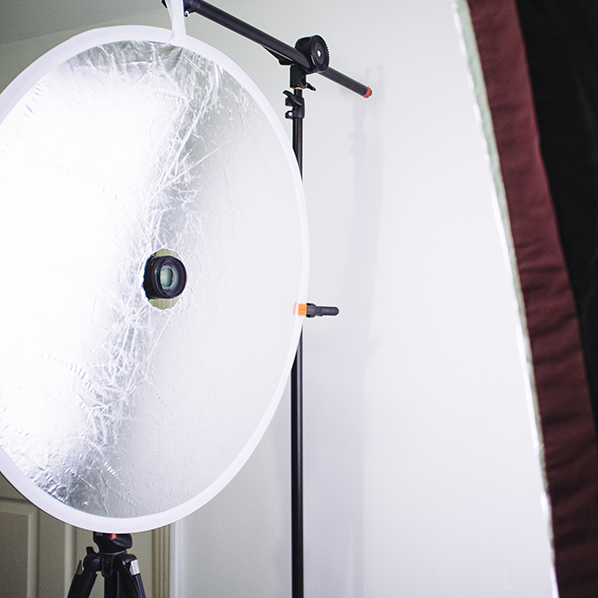
It then dawned on me 'to hell with this' and I cut a very rudimentary hole in the middle of my reflector so I could see what was actually going on.

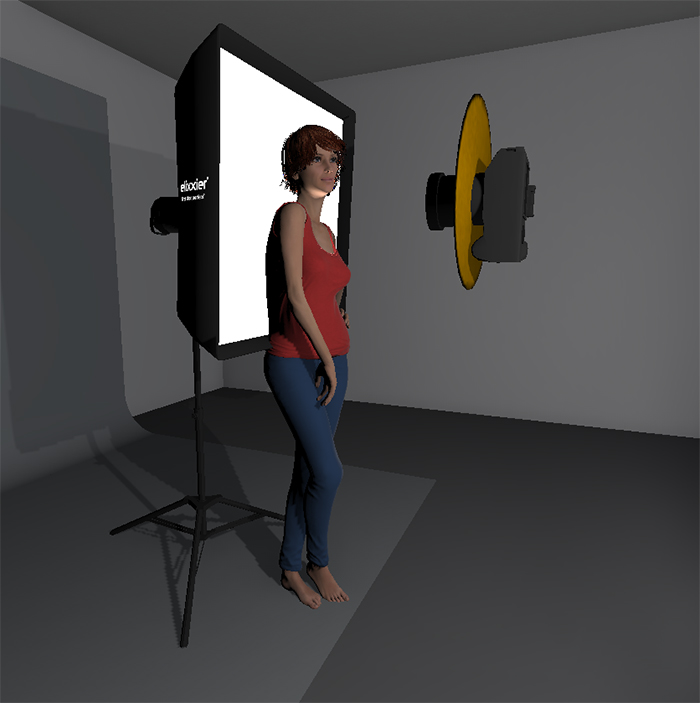
From there I ended up changing the lights around by putting a big softbox behind the model and letting my reflector simultaneously be the key-light and the fill-light. In actuality this super simple setup produces such a flattering light that its got to be one of the cheapest ring flashes you'll ever find.

Step one

Pick yourself up a super-cheap reflector of a decent size. The one that I got was a 32inch/80cm diameter one. I wouldn't go much smaller than that as you want to bounce back as much light as possible. I was fortunate enough to get a reflector that had both silver on one side and white on the other. That means that I can use the silver side to get more of a contrasting look but I can also flip it over to get a far softer look to. I managed to find mine on ebay for about a fiver. In fact heres the link to CameraKing UK 80cm 2in1 Silver & White Collapsable Circular Reflector (and no, I unfortunately I don't have any affiliation with the guy but I am going to message him right now and let him know you lot are coming and to ask where I can buy shares in 'CameraKing UK' sharpish ;) ).

 
Time to get crafty. A pen, a cutting mat and a craft knife and you're ready to make the cheapest ring-light ever.

Time to get crafty. A pen, a cutting mat and a craft knife and you're ready to make the cheapest ring-light ever.

Step Two

Grab yourself some real simple hobby tools like a craft knife, a thick pen, something circular to draw around (I used a roll of gaffer tape) and something like a cutting mat or cardboard so that you don't also slice a digestive biscuit sized hole in your lino!

 
Find something circular to draw around, preferably larger than your lens!

Find something circular to draw around, preferably larger than your lens!

Step Three

Hopefully you've found something of a decent size to draw a circle around in the middle of your reflector. This should obviously be larger than the diameter of your largest lens and I used a roll of gaffer tape as that seemed large enough. In actuality I might go back and find something larger and cut a larger hole so I can stand back a little and still shoot through the hole without getting the reflector in shot.

 
Cut the hole ensuring you've got your cutting mat beneath to protect the floor.

Cut the hole ensuring you've got your cutting mat beneath to protect the floor.

Step Four

Once you've found something of a suitable size to draw around its time to cut that hole. It's worth mentioning that I just plonked the hole roughly in the middle of my reflector and drew around it. I did think about placing the hole off centre so that when I shot through the reflector I could rotate it to adjust the amount of light I had coming from the top or bottom. It's probably worth an experiment at some point but for these shots I just had it in the centre. Place the cutting matt/cardboard underneath and simply cut the hole tracing the line you drew previously.

 
JakeHicksPhotography (5 of 7).jpg
JakeHicksPhotography (6 of 7).jpg
JakeHicksPhotography (7 of 7).jpg
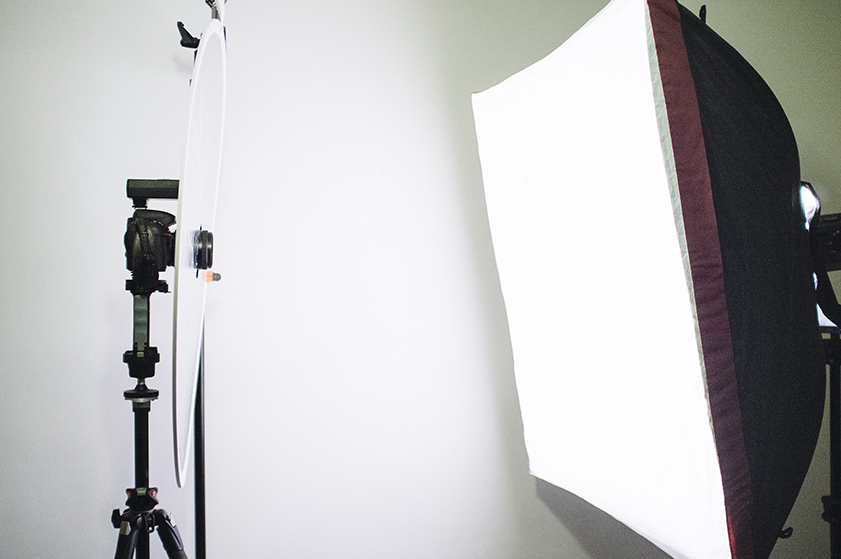
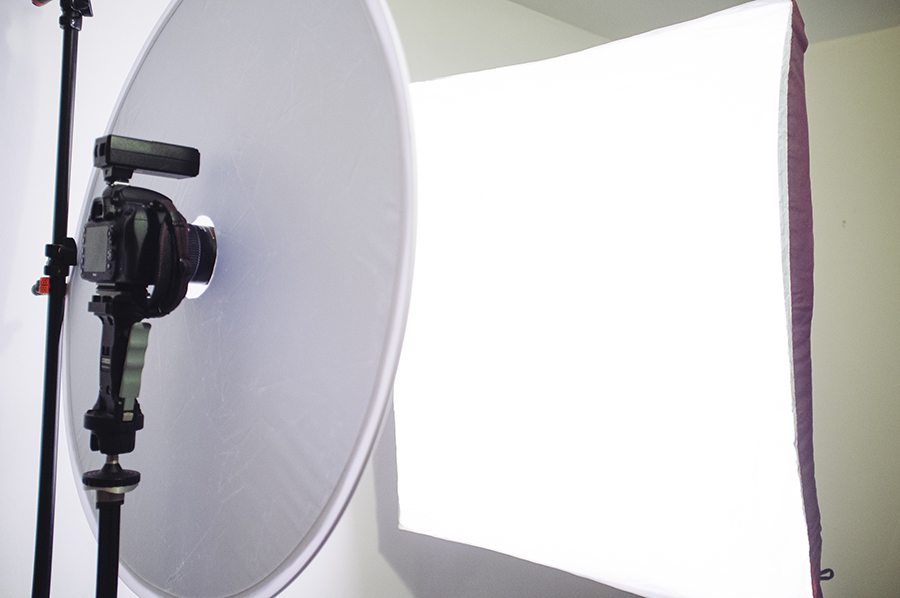
reflector setup.jpg
JakeHicksPhotography (5 of 7).jpg JakeHicksPhotography (6 of 7).jpg JakeHicksPhotography (7 of 7).jpg reflector setup.jpg

Step Five

That's it, you're pretty much done! All that's left to do is to set up your one light. I had a big softbox placed behind the model and then hung the reflector on a light-stand in front of her. You don't even need to hang the reflector though really and it's pretty easy to just hold it in your other hand. Also your lens is poking through the hole so the reflector is never getting in the shot anyway so it makes it really easy to control.

 
JakeHicksPhotography (1 of 6).jpg
JakeHicksPhotography (2 of 6).jpg
JakeHicksPhotography (3 of 6).jpg
JakeHicksPhotography (4 of 6).jpg
JakeHicksPhotography (5 of 6).jpg
JakeHicksPhotography (6 of 6).jpg
JakeHicksPhotography (1 of 6).jpg JakeHicksPhotography (2 of 6).jpg JakeHicksPhotography (3 of 6).jpg JakeHicksPhotography (4 of 6).jpg JakeHicksPhotography (5 of 6).jpg JakeHicksPhotography (6 of 6).jpg

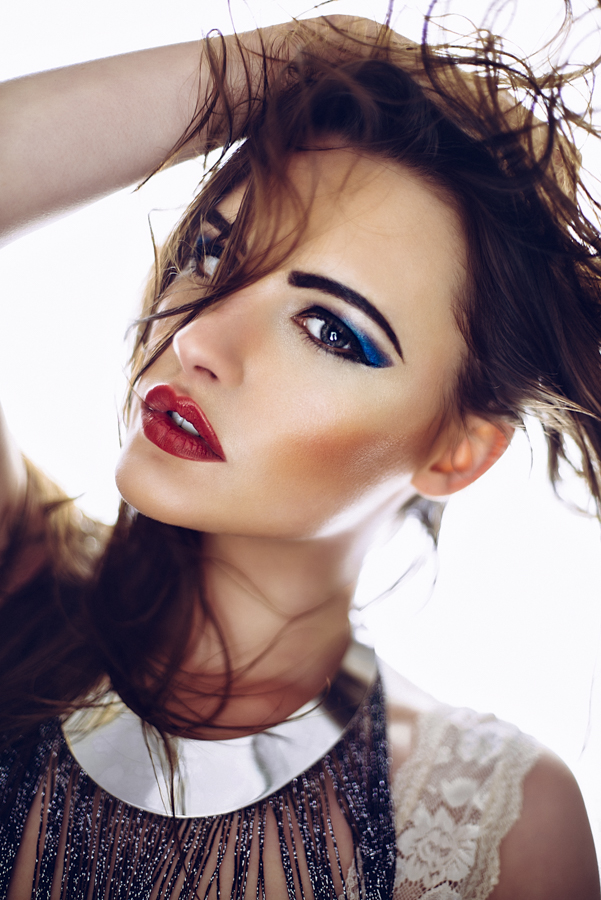
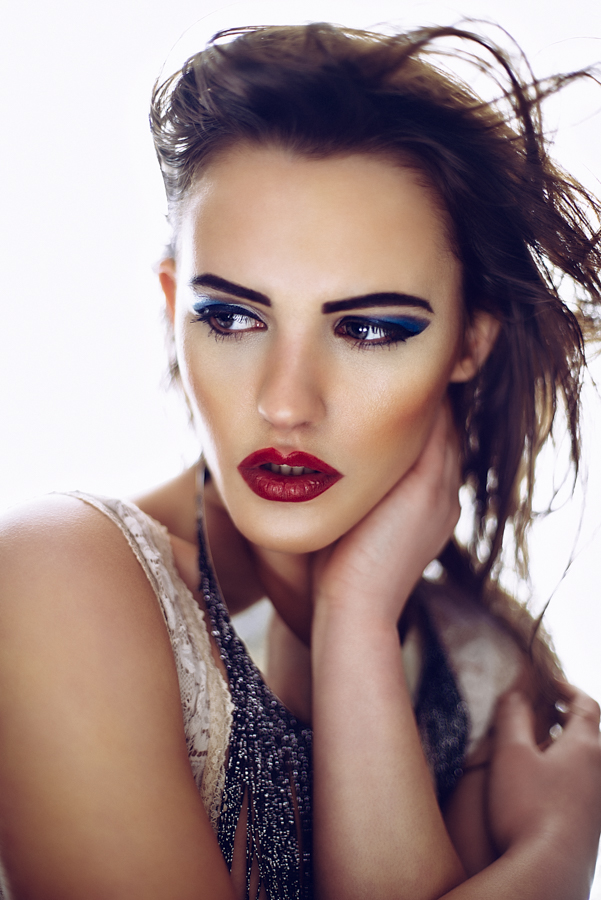
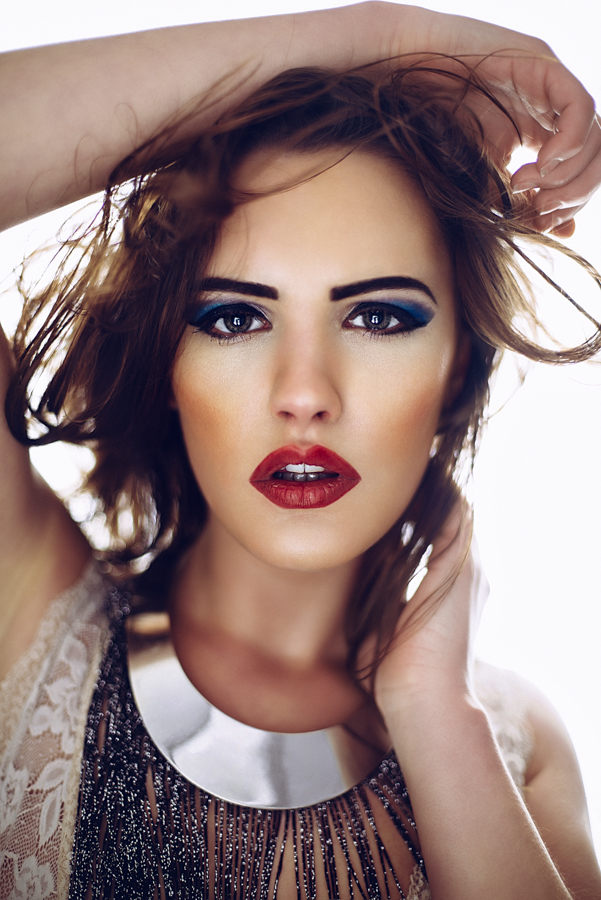
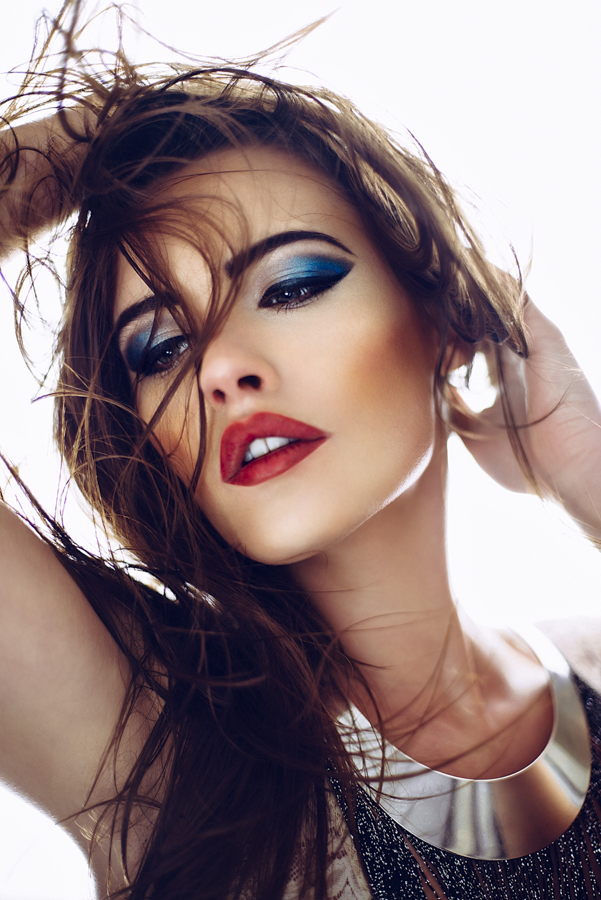
Check out some of the shots I got in literally a few minutes, I was genuinely shocked as to how stunning the lighting looked on the back of the camera straight away. The reason for this is simply just how flattering the lighting is and how that single light wraps around the model and bounces back into the shot giving the impression of the light coming from everywhere. The softbox light bleeds around the model and cuts into her which has a visually slimming effect (especially noticeable with a shallow depth of field) and then bounces light back into her face from a source that is relatively large to her. This reflected light is coming from everywhere equally so it gives the appearance of very soft, flattering light. 

Key Points to Remember

1. Use a silver or white reflector of a decent enough size to cover a half body shot. A 80cm/32in size is a good place to start.

2. Cut a hole in the centre of your reflector large enough to take the diameter of your largest lens.

3. Don't cut a hole in your carpet.

4. The bounced light of your reflector is your key light. To adjust the exposure of this light you will have to move the reflector closer and further away until you're happy.

5. Use an Neutral Density filter on your lens to reduce any unwanted power from your strobe and shoot as wide open as your lens will allow.


You may have noticed from these shots here that they are all shot with a very shallow depth of field which works particularly well with this type of lighting. I was able to shoot at low apertures with my 500w strobes because I also had a LEE Filters ND filter on my lens. A lot of studio strobes are so powerful it's sometimes difficult to shoot wide open when using them but by using neutral density filters you're able to reduce the amount of light entering the lens and shoot at f1.8, f2 etc to get some beautiful looking shots. This one was a ND 0.6 which stopped 2 whole stops of light from entering the shot. If you're a studio strobe user and want to start using faster lenses to get these effects then an ND filter is smart accessory to get. LEE Filters Neutral Density Filters

Instead of an Neutral Density filter for your lens you can also purchase ND filter gels for your strobes to. This gives you greater flexibility with individual lights rather than reducing all light entering the lens. If you're interested in getting some then Neutral Density gels then they are included in my 'Utility' Gels pack at the link below. Scroll down to the bottom of the page to check the contents http://jakehicksphotography.com/products/

Interested in learning more? Why not check out one of my workshops to learn a whole host of different lighting tips and techniques http://jakehicksphotography.com/training/

As always guys, any questions then simply fire away in the comments section below and I very much look forward to seeing what you guys come up with when using this super simple one light technique :)


:WARNING: Even more amazing things that require monies below :D


If you're interested in any of my work and would like to know more about how I created some of my shots then why not check out my workshops. Here you can find out everything there is to know about Gelled Lighting, Long Exposure Flash Photography and my entire Post-Pro Workflow. Jake Hicks Photography - Workshops


I have also just released a brand new 22 hour complete Gelled Lighting Tutorial video. I go over everything from studio lighting setups with gels to being on location with gels plus I also go through my complete retouching and post pro workflow. For more details and complete breakdown of everything that's include check out my Coloured Gel Portraits Tutorial


I also offer comprehensive coloured gel packs. These collections of gels are what I use day to day to create some of the most highly saturated colours around. If you're looking at getting into gelled lighting or need to get stronger and richer colours in your coloured gel work why not check out my Jake Hicks Photography Gel Packs

Tuesday 02.09.16
Posted by Jake Hicks
 

Using a Projector in your Photoshoot

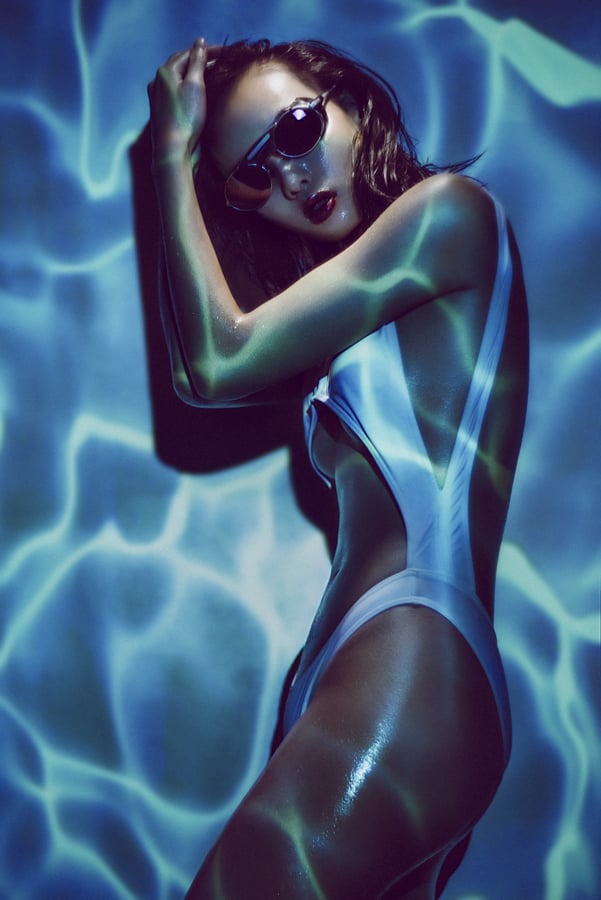
This shot was taken of the lovely Jaye using a projector and one other ambient light. Settings: 85mm lens, 1/100 second, f2, ISO 100, WB 3400.

This shot was taken of the lovely Jaye using a projector and one other ambient light. Settings: 85mm lens, 1/100 second, f2, ISO 100, WB 3400.

There are literally thousands of different ways to modify your light but there is one that probably offers the most versatility and variety in look and that's the humble projector.

The projector is something that has fallen out of fashion in recent years but  in the 1960's and 70's nearly every household owned one. Back then one of the most common ways to take photographs was by shooting with E6 film or as it was more commonly known, slide film. This slide film produced 35mm transparencies that would be loaded into your projector, you'd set it up on your new smoked glass and chrome coffee table and then the full glory of your Kodachromes would be projected huge onto the nearly white wall in the lounge as you gazed in wonderment from the cosy confines of your deep shag pile carpet.

Even as a child in the 80's I remember my father digging out the projector and shining the holiday snaps up onto the screen to go through them. It was actually an incredibly impressive way to view your shots and it's crazy to think that we traded that immersive 6 foot by 4 foot viewing experience for swiping through our latest and greatest shots in the palm of our hands. Surely we missed the point somewhere along the line where convenience trumped experience.

 
These are what our old photo albums looked like. A rack of transparencies ready for the projector.

These are what our old photo albums looked like. A rack of transparencies ready for the projector.

OG Projector

Fast forward to the present and very few homes still have a projector, we've all opted to view our holiday snaps on our phones and maybe sometimes our T.V's if we're feeling really organised. That being said a lot of people still have their old projectors up in the attic somewhere languishing in obscurity, I know my father did and I nabbed it many years ago to give it a new lease of life as a photographic light/modifier. Using the projector as a light in your photography opens up a world of possibilities and once you start off down the path of projecting different images into new images you'll soon realise the potential the projector has to add something unique to your shots is boundless. When I was at University I had a lot of fun experimenting with it and if you get the chance I recommend you having a rummage in the loft or asking your parents/grandparents if they've still got one hanging about. If they do, dust it off, change the fuse and have a play with it.

When you're using just a projector to light your shot it's a bit easier to light your subject. You just choose your image to project, set it up, expose for that one image and you're done.

When you're using just a projector to light your shot it's a bit easier to light your subject. You just choose your image to project, set it up, expose for that one image and you're done.

My fathers old projector that I found in the attic when I was at Uni. Still going strong. Fully complete with that suspiciously familiar red dot ;)

My fathers old projector that I found in the attic when I was at Uni. Still going strong. Fully complete with that suspiciously familiar red dot ;)

The properties of a projector to be aware of when using them in conduction with photography are first and foremost the slides. If you want to use a projector to shine an image into your scene then you first have to buy some E6 film, find an old 35mm camera, learn how to use it, shoot your shot, send it away for a fortnight to be processed, wait around for it to be delivered and then and only then can you delicately place your precious 35mm transparency into a slide mount, pop it into your projector and finally shine it into your scene. (Phew, that's a to of steps! Be thankful you weren't trying to read that last sentence aloud). Pretty safe to say that firing up your old projector is not going to be a quick and spontaneous idea but if you've got a well thought out shot and an awesome image to shine into it then the results it can produce are very cool indeed.

 
The modern projectors are digital, they can be plugged into nearly every digital device and project any image that you want.

The modern projectors are digital, they can be plugged into nearly every digital device and project any image that you want.

Going Digital

So what if you don't have two weeks to spare and the patience of a saint but you'd really like to use a projector in your shots? Welcome to the digital age. The modern alternative of course is the digital projector and this thing can literally shine any image you could possibly think of into your shot and if you have the right cable, you can shine that image from any device you like. Your T.V, your laptop and even your phone. The digital projectors have come down in price a lot in recent years and their main reason for existing now is for home entertainment. I've had mine for many, many years but the brightness is still ok. They're all a lot brighter as standard now but be mindful that you certainly get what you pay for to a certain extent and the key thing to look for if you're in the market to get one is the brightness. A digital projectors brightness is measured in lumens and they vary hugely. For example you can currently pick up a £50 digital projector on eBay with a brightness of 150 lumens but for a £120 you can pick one up with a brightness of 3000 lumens. That is literally like night and day and the extra money for the extra brightness is definitely worth it in my opinion. That extra brightness will allow you to shoot at faster shutter speeds and at lower ISO's, both of which are crucially important when photographing people.

The digital projector is what I use now and that's purely for convenience over anything else. I can find any image I like and shine it into the scene from my phone. If I don't like the way its looking then I can simply change it immediately. Like I mentioned before, with this level of convenience it opens up any digital image on the planet to be immediately shone into your shot.

 
I simply plug my digital projector into my old phone and have access to any image I want instantly.

I simply plug my digital projector into my old phone and have access to any image I want instantly.

So now that we understand all those benefits, what's some of the downsides that we should be wary of when incorporating a projector into our shots? The first thing is power. The power of the light (or lumens) that most projectors put out is pretty dismal in our photographic terms and remember that brightness will be heavily influenced by the type of image you shine. If you shine an image of a shadowy forest into your shot its going to be very dark as an output. If on the other hand you project a bright blue beach scene instead its going to be a lot brighter. Here's a totally arbitrary figure though to give you some idea of what I'm talking about; an average brightness image shone onto a white wall may give you 1/60 second exposure, f4 at 200 ISO. Like I mentioned earlier though, you can now get a lot brighter digital projectors, they're the HD ones that produce a far crisper image to and although I've never used one I'd be very interested to see the results they produce.

 
One thing to watch out for when using a digital projector is the pixels that are projected onto the skin. Theres not to many things that you can do about this apart from maybe knock the projector slightly out of focus to reduce the effect a little.

One thing to watch out for when using a digital projector is the pixels that are projected onto the skin. Theres not to many things that you can do about this apart from maybe knock the projector slightly out of focus to reduce the effect a little.

Another thing to bear in mind with modern digital projectors is that they shine pixels, so you will literally see lots of tiny squares in your projected image which can be a real pain and an eyesore up close. For this reason alone I prefer the older slide projectors as they don't have this issue at all. They simply shine light through your slide film and the only thing you'll notice on the models skin is the film grain from the original transparency and seeing as most slide film has super fine grain anyway you shouldn't even notice anything at all.

 
Start off using a projector with easy shots like ones with a lot of white space in them. This will not only make it easier to position the projector for a more flattering light but it will also limit the amount of awkward white balancing you'll need…

Start off using a projector with easy shots like ones with a lot of white space in them. This will not only make it easier to position the projector for a more flattering light but it will also limit the amount of awkward white balancing you'll need to do later on.

One last thing to bear in mind of course is the colour temperature of the image you are projecting. It's not to much of an issue at all if you're shooting with just the projector as you simply shoot RAW and play with the white balance afterwards until you're happy. This is the best place to start if its your first time experimenting with a projector. Choose an image thats nice and bright, preferably with large sections of white in it and just project that directly onto the model and white balance the image later on.

This shot was taken using the older analogue projector, you can clearly see that even when zoomed in that there is no pixels on the face and the projected image is far clearer.

This shot was taken using the older analogue projector, you can clearly see that even when zoomed in that there is no pixels on the face and the projected image is far clearer.

The colour temperature does become an issue however when you're using the projector in conjunction with other lights. If you were to just shine white light from the projector onto a white wall it roughly produces the same colour temperature as a tungsten bulb (I know this to be the case with my older digital projector but more modern HD ones may be a lot bluer/cooler in tone). As a result if you're using it with flash you'd probably have to use an CTO (Colour Temperature Orange) gel on your flash to compensate. But before you all breath a sigh of relief and think that was easy, all that unfortunately changes when you decide to project coloured images through your projector. This is where it can become a bit tricky. For example, if I was to shine an image of blue water through my orange tungsten bulb, what white balance should I set my camera to and what colour correcting gel should I use on my flash? This is a bit of a minefield I'm afraid and there's no easy answer suffice to say that you'll just have to do a little experimenting with the specific image you choose. One thing that I do though is to take my images that I'm going to project into editing software beforehand and add some blue to the image before I project it. This helps when I'm balancing the lights afterwards as the projected image is already on the blue side as comes through the orange bulb.

 
I get my projector up on a light stand and perched on a Manfrotto laptop plate. This enables me to get the projector above the models eye level.

I get my projector up on a light stand and perched on a Manfrotto laptop plate. This enables me to get the projector above the models eye level.

Brilliant ok so we're all set with some basic theory on do's and don'ts, we've got our image that we want to project so let's start to think about setting up the shot.

Always try to treat your projector like any other light source in your shot. By this I mean think about angle and height of the projector placement. All too often I see people using a projector by placing it on the floor, table or chair next to them. Not only does this cast huge shadows up the wall behind the subject but it also creates that horrendous up-lighting on models that is never flattering. Always get your projector above the models head height to create a far more flattering look. A projectors light is an incredibly hard light source because it's a focused light coming from a tiny point so the least you can do is position it at a flattering height and angle. Getting the projector up high is actually harder than it may first seem but I sit my projector on a laptop plinth from Manfrotto (essentially just a plate that screws to the top of light stands and tripods). I can then attach this to a tripod or even a light stand to give me even more height.

The next thing is the projectors distance from the model. This distance is determined by what coverage of projected image you are looking for on the model but if you are looking to shoot a 3/4 length shot then you're probably going to have to get your projector about 8-10 feet away to cover that area. Most digital projectors are designed for home-cinema use and they are getting better and better at throwing a larger image in smaller spaces than ever before.

 
You can clearly see how much of a difference it makes when you add additional light onto the model to eliminate the projected image.

You can clearly see how much of a difference it makes when you add additional light onto the model to eliminate the projected image.

That's pretty much it, you're done and if you aren't planning on introducing additional lighting then you're all set to start shooting away. If you are looking to add some extra light in there, for example to wash out the projected light on a models face then here's where the fun begins. First off you need to be careful that the light you're shining on the model doesn't fall onto the background where your projection is otherwise its going to wash that out too. For this shoot I've shared here I had my light directly above the model, literally pointing straight down on her. The main reason for this was space if I'm honest, I couldn't get the light any higher because of the ceiling in the way, if I could have, I probably would have put it a little higher and brought it further away from her to soften the hardness of light a little. That being said I'm still really pleased with how they turned out. The modifier I had on this light was simply a reflector dish with a small grid/honeycomb attached. With this grid I can very easily control where the light goes and I can easily ensure no light spills into the background.

I ended up not using flash at all here, I simply used the modelling bulb on my strobe to light her. I actually also used a CTB (blue) gel on this light to cool down the colour a little. It might be reasonable to assume that I wouldn't need to seeing as the other light (the projector) is a tungsten bulb so they should be the same colour but in reality though the image I was projecting was so blue that I had to compensate (like I mentioned you just have to adapt on the day and see what looks best colour wise). I had the model really close to the background to so that I reduced weird shadows but it meant that the placement of the additional light was even more crucial.

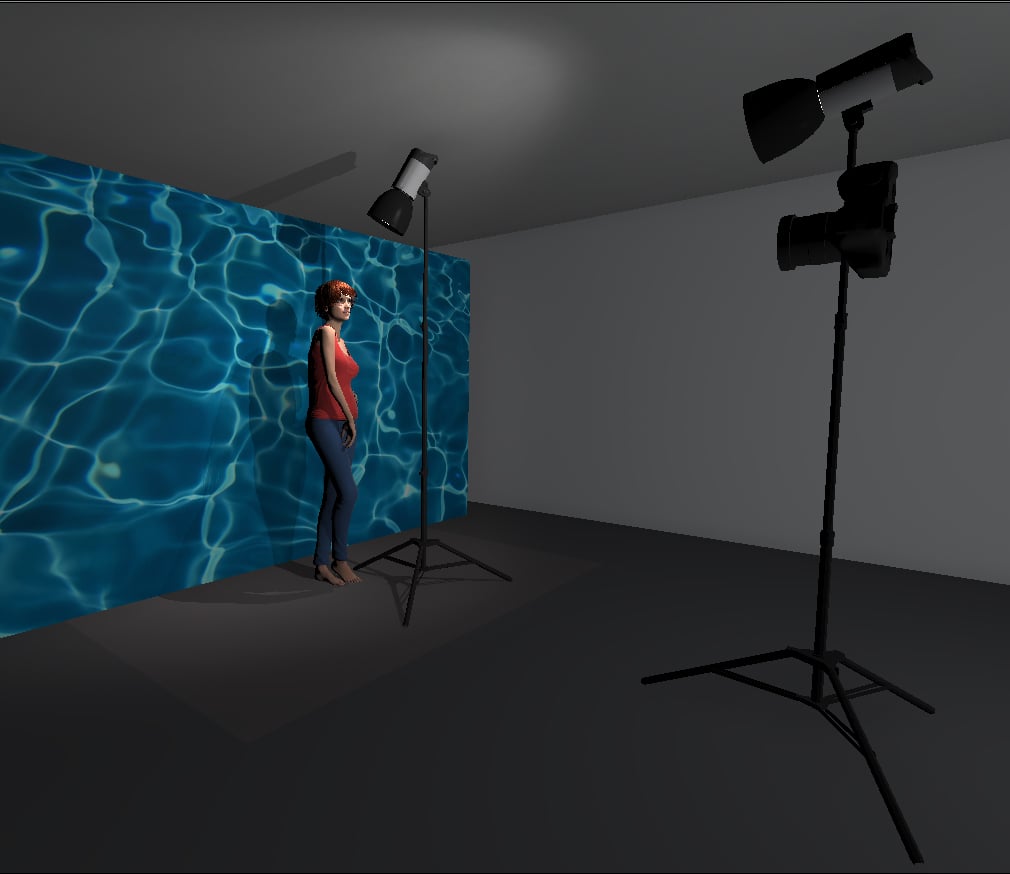
The setup shown above illustrates where I had the models light placed. It was quite close to the model and pointed down sharply to avoid any excess light spilling onto the projected image on the wall behind her. In this diagram the light next to the…

The setup shown above illustrates where I had the models light placed. It was quite close to the model and pointed down sharply to avoid any excess light spilling onto the projected image on the wall behind her. In this diagram the light next to the camera is actually there to represent the projector. Again here you can see that I had the projector above the models head height so that any shadows would be thrown behind her and hidden below her shoulders. I also further increased this by shooting slightly up at the model, this again ensured that there were minimal shadows distracting the overall shot.

Now that we've placed our extra light we need to look at the powers of them. Although you can adjust the brightness of most projectors, it's best to have them as bright as you dare without washing out the colour and then adjust the other lights around that. I had the modelling bulb turned up pretty high on my strobe to wash out the projected image and after I was happy with the power balance I finally got to start shooting.

One thing to bear in mind when shooting is to direct the model around both of your light sources. The key light is now your light that is shining down on the model so your model should base their posing around that. As long as your projector has been set straight on and above the models eye level you shouldn't need to worry about it anymore.

The modifier I used to light the model was simply a small gridded reflector.

The modifier I used to light the model was simply a small gridded reflector.

Thats it, keep shooting and see what's working and what's not working but the key here is to experiment with lots of different images and see what you prefer.

One final point to bear in mind is how much of an influence the projected image has on the overall shot. Try to tie everything else like fashion and makeup around it. In this shoot the model wore a swimsuit and was sprayed with droplets of water to match the look of the projected image of water behind her. All these little elements can really help sell a look.

 
When using more colour in your projected image it can get a bit colour heavy. This is what the shot looks like without any additional light on the model.

When using more colour in your projected image it can get a bit colour heavy. This is what the shot looks like without any additional light on the model.

Key Things to Bear in Mind When Using a Projector in your Photography

1. Start off by choosing an image with a lot of white in it and only use the projector to light your subject.

2. Get your projector above the models eye-level to create a more flattering light and to hide unsightly shadows.

3. Be mindful of the pixels that can be produced on the models skin from digital projectors. If it's a big project where the final image is likely to be blown up big, consider using an analogue projector to reduce this.

4. Be prepared to adapt to weird colour balancing issues on the day. The colours of projected images can drastically distort white balance, adjusting an images colour in Photoshop prior to projection may be a handy workaround.

5. Tie your projected image and your subject together to create a cohesive look. Make sure the image you're projecting makes sense with what the models wearing and the idea you're trying to portray.

Many thanks indeed to my super patient model Jaye - Go check her out on her portfolio

Good luck guys and I look forward to seeing what you all come up with.

View fullsize JakeHicksPhotography (2 of 5).jpg
View fullsize JakeHicksPhotography (3 of 5).jpg
View fullsize JakeHicksPhotography (4 of 5).jpg
View fullsize JakeHicksPhotography (5 of 5).jpg

Click on the images above to enlarge.


:WARNING: There's probably something financially draining below!


If you're interested in any of my work and would like to know more about how I created some of my shots then why not check out my workshops. Here you can find out everything there is to know about Gelled Lighting, Long Exposure Flash Photography and my entire Post-Pro Workflow. Jake Hicks Photography - Workshops


I've also just released a brand new 22 hour complete Gelled Lighting Tutorial video. I go over everything from studio lighting setups with gels to being on location with gels plus I also go through my complete retouching and post pro workflow. For more details and complete breakdown of everything that's include check out my Coloured Gel Portraits Tutorial


I also offer comprehensive coloured gel packs. These collections of gels are what I use day to day to create some of the most highly saturated colours around. If you're looking at getting into gelled lighting or need to get stronger and richer colours in your coloured gel work why not check out my Jake Hicks Photography Gel Packs

Tuesday 01.12.16
Posted by Jake Hicks
Comments: 29
 

50mm vs 85mm: Which is the Best Focal Length for Portraiture?

This shot was taken with the Lensbaby Velvet 56 lens. Even with the model’s hand closer to lens than her face, the distortion is minimal and certainly not distracting.

I’m fortunate enough to have been a pro shooter for many years now. I shoot a wide variety of subjects, but they all tend to fall into the categories of commercial portraits and fashion work. I’m always photographing people—no still lifes, product shots, or architecture. To say that I always photograph people as a portrait and fashion photographer may seem like an obvious statement, but it has a crucial impact for me and the lenses in which I choose to invest.

In addition to being a professional editorial and fashion photographer, I’m also heavily involved in training emerging photographers in the industry. The one question I get asked the most is: “Which lens should I buy to attain the best classic portraits?”

This is a very poignant question and one that we have all faced at least once in our photographic journey. To answer this question properly though, you have to bear in mind a few key factors, such as what you plan to photograph and whether you are allowed any creative freedom in capturing it.

If you’re going to be photographing products and architecture, then you need to bear in mind that 99% of the time you’ll have to document these things without any distortion and with very limited creative freedom. If you take a picture of a building with a 50mm lens from the ground, the distortion lines created by that lens can give the impression of it falling over. The same theory applies to smaller still life shots. Certain focal lengths of lenses are not suited to properly represent the straight lines we see in architecture and packaging. Your client is not going to be overly happy when you show them their building appearing to fall over or their packaging appearing bent and warped.

If, on the other hand, you are going to be photographing people, there are no straight lines in sight and you can afford to use the lens distortions to your advantage.

If you’ve made it this far, I’m sure you’ve probably realized this isn’t going to be a scientific article with distortion charts and algebraic formulas. This is simply my advice and opinion based on many years of experience and client perceptions of the work that I produce for them. If I’ve taken a portrait shot with my 50mm lens and I’ve made my subject appear taller—and thus slimmer—then they have yet to complain about such lens distortion! The point I’m making here is that, as photographers, we’re all in a creative field. We have creative freedom to create what we perceive to look good, not necessarily what looks “right.”


This image was shot with an 85mm lens to maximize the impact of the look from the model. The 85mm lens has compressed the image so that nothing appears closer or further away and all of the attention is brought to the model’s eyes.

Understanding the Key Differences Between 50mm and 85mm Lenses

Let’s back it up here a second. What actually is “right” when taking a portrait or fashion shot? What is deemed “right” by photographers is usually dictated by what our human eyes see. If you attach an 85mm lens to a full frame DSLR, hold it in portrait orientation, and then open both eyes and look through the viewfinder, you should see that both of the images from each eye line up, almost like you aren’t looking through a lens at all. Do the same with a 50mm lens and you’ll soon find that you can no longer merge the two images together. This happens because the 50mm lens is distorting its field of view. To photograph your subject in anything but 85mm then would cause some sort of distortion. This is the theory behind the slightly dated notion that 85mm-105mm are the classic sweet spot focal lengths to eliminate any accidental distortion.

As I just stated above, an 85mm lens is going to give you a more accurate representation of what’s in front of you. This lens will compress the shot so that things that are slightly closer to the camera appear to be on the same plane as things that are slightly further away. This will not only create some really nice shallow depth of field effects, but it also can be a little easier in general for beginner photographers to use. An 85mm lens won’t distort the subject in any way and will only compress your image, so whichever angle you decide to shoot your subject from you’re going to get pleasing results. For example, if somebody has a large nose and you photograph them with an 85mm lens, this won’t distort the nose but will rather give the impression of it being closer to the face and thus smaller. If you’d taken the same shot with a 50mm lens, you would certainly need to be a lot more careful about the position you photograph your subject from.


85mm lenses are great for tighter crop shots like this one. Here you can see that I’m very close to the model. Had I been using a 50mm lens, then I probably would have distorted her face and shoulder too much, which may have been distracting to the viewer.

Selecting a Classic Portrait Lens: 50mm or 85mm?

Perfect. So if an 85mm lens won’t distort my image and I can pop it on my camera and shoot away without worrying about making people look ugly, then why on earth would I ever want a 50mm lens? The reason you may want one is so that you can enhance what’s in front of your camera, using experience and a little knowledge. The 50mm lens will definitely distort your subject. This will become more pronounced the closer you are to your subject, but you can use this distortion to your advantage with the right technique. If you get down a little lower than your standing subject (for example, you can start shooting up at them), you can make them look a little taller and thus a little slimmer. This won’t work all the time. It does depend on the body shape, but with a little experimentation you can usually find the right angle.

There are also times when you’ll be shooting in an interesting environment and you’d like to show more of the subject’s surroundings. This will be very tricky with an 85mm lens as it is more zoomed in, eliminating any room for your location to be displayed as well. The 50mm lens, on the other hand, with the proper usage, will have just enough distortion to show a lot of your surroundings but without distorting your subject negatively.
I personally use 50mm lenses all the time, whether it be in the studio or on location. I find them by far and away the more versatile choice. The most recent lens purchase I made was the new Lensbaby Velvet 56mm classic portrait lens. Not only did I want the lens’ signature edge diffusion, but I also wanted a lens that could properly represent my model and the location she was in for an upcoming editorial. It was a fashion shoot in a penthouse apartment, so I knew that not only would the space be tight but that I also wanted to show elements of the location in the shot with the model. With the available space and look I was after in mind, this shoot would just not have been possible with an 85mm lens.


This image was taken of a singer who was was much shorter than the typical 5’10" height of a professional model. I was sitting on the floor looking up at her with my 50mm lens and from this angle I was able to utilize the lens distortion to make her appear taller and more dominant in the image.

This is another 85mm shot but this time taken on location. The shot is a tighter crop and as such the 85mm lens compresses the image, leaving little room for distortion but also eliminating the majority of the model’s surroundings.

Again, I sat on the floor shooting up at my model with a 50mm lens to take this shot. I personally like the extra depth a 50mm lens gives you in a shot like this. A longer lens may well have compressed the image, but I like how the model’s shoulders have been given extra shape through the lens distortion.

I was very pushed for space in this shot as I am actually photographing the model’s reflection in a mirror. It was only possible to get the whole scene in with the wider focal length of the Lensbaby Velvet 56.

For this shot I used the Lensbaby Velvet 56 again, and I’m really pushing how far I can get away with the lens distortion a 50mm gives you. I really wanted a wider shot like this so I could get more of the model’s environment in the frame. I am at just the right distance from the model to avoid distorting her legs any more. Had I been any closer, her legs would appear abnormally large in relation to the rest of her body.

Bottom Line

If I could only take one lens to a portrait shoot, without hesitation it would be a 50mm lens. Yes, the 50mm does distort the subject whereas the 85mm lens doesn’t. However, with the proper skill and experience you can easily make this distortion work for you and not against you. Remember that we are the creatives. It’s up to us to make creative decisions on how our images look “best,” not “right.”


If you're interested in picking up the Lensbaby Velvet 56mm or any other Lensbaby product here in the UK then head on over to WEX and apply this 10% voucher code JAKEHICKS10 at checkout to receive your exclusive JHP discount :D

Tuesday 10.27.15
Posted by Jake Hicks
Comments: 38
 

The Reality of Actually Getting Published - A List of 10 Magazines Run by Humans

It has been the modus operandi for every fashion photographer since light started hitting the silver halides, every single one of us who has been successful in terms of making money from our art has had to be published in magazines in one way or another.

Back when the world was a larger place and in a time where print was king and digital was still just a glimmer in Mr. Casio's eye, magazines were the only place to be if you wanted your fashion photography to be seen. In fact I'm talking about so long ago that magazines actually used to pay you the photographer to be in them (true story), because strangely enough your art was helping to sell their magazine and make them money.

Sadly those pay-days are long gone but it's not all bad. As a result of an over-saturated photography market so too are there now more magazines than stars in the sky, meaning that there is actually far more chance to get your work published and most importantly seen by others than ever before.


Love/Hate

As you may have noticed by the tone thus far of this article, there is a little love/hate relationship going on here between photographers and magazines. Photographers think their work is amazing and that for a magazine to have it on their pages is a privilege, one that is worth paying for no less. Magazines on the other hand think their magazine is amazing and to have your work grace their pages is a privilege, one that is worth paying them for in some cases (more on those art-murdering heathens later).

So where do we currently stand as photographers in this tenuous commercial stale-mate of exposure versus dignity? The reality is that times have moved on, no we no longer get paid to have our work in fashion magazines (this obviously excludes the commissions of high end fashion magazines) but we do get far more opportunity to get them published, which is fantastic news.

We as photographers should embrace this change,  because this trade of photographic exposure for free magazine pages isn't going away any time soon. I understand the argument for 'never working for free' but truth be told, getting your images published in a magazine is not classed as working for free and it is certainly a far cry from working for a commercial client without pay. You should see getting your images in a magazine as a by-product of a shoot you were going to shoot anyway and remember you still have complete control over those images as they are yours to sell after the magazine has used them too.


Never Ever Pay to get Published

So now that we have established that fashion magazines displaying and sharing your images for free is actually a fair deal let's look at what truly isn't a fair deal. I am of course talking about the so called 'magazines' that charge photographers to be published within their covers. These are simply not fashion magazines, this is merely a modern Yellow-Pages of adverts for photographers, these fashion images/adverts are simply sold to the highest bidder.

You are not being 'published' in a fashion magazine if you pay to be in there and you are merely advertising yourself in a stack of murdered tree souls that will only ever be looked at by your mother.

Earn it

As those of us that have been fortunate enough to be published in fashion magazines will know, it is not simply a case of sending off an email to your favourite mag with a few thumbnails and 4 weeks later there's your images emblazoned on the cover. It takes time, patience and most importantly skill to be published. Magazines will not always except your work, nor like your style and you will receive rejection after rejection. But that's ok, because that magazine is maintaining a high standard of work within their covers. When your work is strong enough I guarantee you it will be showcased.

The magazines that charge you to be published aren't applying the same ethos, they just want your money because they can't sell advertising space to reputable companies because their magazine is crap and their magazine is crap because they house the highest bidder of photographers not the best photography. It's a slippery slope for them and one that isn't sustainable long term so please do not ever under any circumstances pay to get your work published. That money is far better spent on another shoot where your skills will grow and grow and I guarantee that when your skills have grown enough your images will be good enough to be recognised and published.


Five Points to Remember When Submitting Your Work

Just before we all fire-up our emails and get ready to start carpet bombing every editors inbox we can find, let's just take a quick moment to bear a few things in mind from a photographers point of view.

Here are a few things to be mindful and careful of when submitting and agreeing to be published in these magazines.

  1. They are your images, nobody else's, the magazine has no rights over them whatsoever. You are allowing them to be published in that one issue alone and probably displayed on social media. The magazine is not allowed to profit from the sale of your images now or ever.
  2. Magazines are apparently busy, I get it but don't send off your best work and keep your fingers crossed for 6 months. They will usually state how long it will take them to get back to you but even the busiest and biggest magazines don't take any longer than 4 weeks to respond. In my opinion 4 weeks is a long time so unless the magazine is outstanding then as a guide I give it 2 weeks before I resubmit the shots to a different magazine.
  3. Exclusivity is pretty much a mandatory requirement for every magazine now and that includes social media of course. Trust me I know how hard it is to not share your best work for months but you have to sit on it I'm afraid. It's also a very good idea to make sure the team is aware of this before going into a project. The model, MUA, stylist etc need to be made aware if you intend to submit work to publications and the possible timelines associated with doing so. For example if you send out all of the shots to the rest of the team, you have to be aware that the chance of somebody sharing one is extremely high. I myself have been burned before by a member of the team sharing an image before time and losing an imminent editorial. Now, nobody has the final images apart from me until they are published, it might sound harsh but it's in everybody's best interests, especially when a publication is the only thing certain team members are on board for to begin with.
  4. If you are particularly happy with a shoot and it gets published in one magazine there is no harm in offering it to another magazine if it perfectly fits their submission guidelines. Be honest though, make sure you let them know its already been published and chances are if they love it they may publish it or allow it on their online features instead.
  5. This last point should be pretty obvious but read the submission guidelines thoroughly. I know it's a pain in the ass to have to do all the work for them sometimes but you just have to suck it up I'm afraid. There is no point at all in getting the perfect shoot all emailed off to the perfect mag only to find out that they only review images through their online submission process. It's happened!
 

My Top Ten List of Fashion Magazines Worth Submitting To

So let's get down to the details of who we want to be published with. I'm going to be realistic here though, I'm not going to be handing out the editors email of Harpers and i-D here we need to be realistic of where we want to be to get the ball rolling. This list covers a range of different looks and all of them will require something different to get involved with. Some have a smaller following and thus a little easier to get into, some aren't even print based at all but have a colossal following and as such this list is intended to give you an initial jumping off point for your first submissions.

The following list is of course far from exhaustive but I have put together these magazines that I feel are displaying great imagery where your work being included alongside them is a positive thing. But most importantly I feel that these magazines are run by actual human beings, by that I mean that I have either been featured in these magazines myself and had great feedback as a result or I have communicated with them and understood their style and direction through an educated and understanding member of their team. I will not allow a magazine to use my work if they are insanely egotistical, dismissive and demanding nor will I allow any magazine to use my work with frankly ridiculous image rights requests.

:UPDATE: March 2017 - The links below have been checked and updated where appropriate - Alas, it would seem that the publishing world has suffered a few major blows of their own and as a result some of the publications below are no longer with us. I'll be on the lookout for new, more relevant publications soon and will publish my findings as soon as I have them.

Editorial Magazine - Submission Guidelines

A great magazine that simply focusses on the photography and not just some made up last minute back story or pithy story titles, just big bold and engaging imagery. Check out the guidelines too, they don't even insist on exclusivity if the images are good enough.

Elegant Magazine - Submission Guidelines

Elegant Mag has a whole host of awesome photographers on display so this would be a great place to get your work shown. They have several genres too including fashion, lingerie, beauty and ink so there's plenty of scope to submit too. They also get back to you within one week, wohoo!

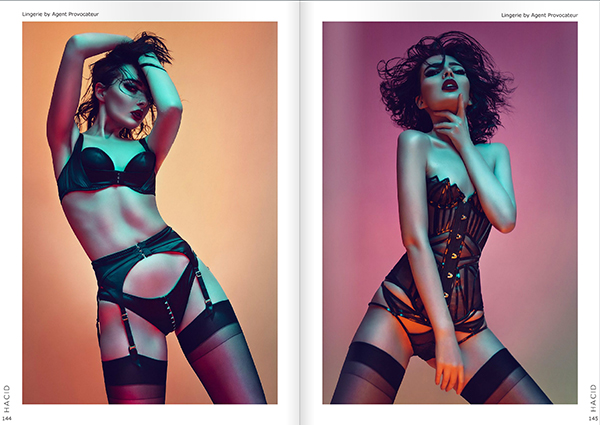
Hacid Mag - Submission Guidelines

Spanish fashion magazine Hacid has been around for a little while now and established itself as having more of a cleaner look to its contents. If you're after the pure fashion photography that is more about the showcasing the clothes rather than photography that sells the idea of clothes then this is for you.

Like a Lion Magazine - Submission Guidelines  :UPDATE: Although links and emails are still active, it appears very quiet over at Like a Lion mag. Probably not worth your time until I hear more I'm afraid.

This is still an emerging magazine but I like a lot of what they put out there and they are't afraid to use images that challenge the status quo. Definitely worth a look.

Lucy's Magazine - Submission Guidelines

I love Lucy's magazine, its always filled with the current photographic looks and the pages are always displaying big bright bold colours. This is the real deal fashion mag here so they want at least 6 different outfits displayed in your story before you submit.

10TEN Magazine - Submission Guidelines

Again here we have another emerging fashion magazine that is worth keeping an eye on. I've chatted to the editor a few times and he seems like a fairly open guy. They mainly look for a quirkier look, both in fashion styling and photography so if you feel you have something a little different in the pipeline then its definitely worth getting in touch with them.

NiF Magazine - Submission Guidelines

NiF Magazine has seen incredible popularity recently and has a huge audience for you to be exposed to. They really straddle the ever increasingly blurred line between fashion and nudity so although not strictly a fashion magazine they certainly summon the visual clout of one. Nif is very focused on the art of the process and if you have work that is not necessarily mainstream but bold, different and engaging then you stand a serious chance of being excepted into the fold.

Ellements Magazine - Submission Guidelines

Ellements magazine has been around for a little while and has a solid reach but it's style is a little harder to pin down. The fashion it displays is a little more mainstream so if you don't have access to antlers, latex collars and the latest fashion stylists just yet, some strong clean photography of the latest high street fashion trends could get you through the door. Like I mentioned, it has decent size audience so Ellements is certainly worth a look.

Papercut Magazine - Submission Guidelines  :UPDATE: Sad times indeed but alas it seems like Papercut Mag may no longer be with us. If you're interested in some fantastic fashion photography inspiration though you should check out their past issues before they're gone for good Papercut Mag - past issues

I've included Papercut magazine here as an example of a magazine that is a little higher up the ladder in terms of exposure and thus a little harder to get into. Papercut has long been established as one of the top independent fashion magazines and as such probably receives a very high number of submissions from eager photographers hoping to grace their pages. As a consequence of this Papaercut has an example of one of those submission processes that is a little bit more tedious than others. You have to create a profile then upload your shots one by one at lo-res with each image being described and credited then repeat the process again upon selection at higher resolution. It also took them nearly 5 weeks to accept the shots so it goes to show that these higher volume mags can be tedious and also take their time.

Fashionising - Submission Guidelines

Fashionising is not technically even a fashion magazine, it solely exists on the web and makes no pretence otherwise. I have included it here in my list to illustrate a little point, we all want to be published but we all want to be 'printed'. Why? Well its because we want that immortalisation of a physical product we can all touch, hold and pass around. Trust me I get it, but we should be honest with ourselves with what we are really after. We are after 'exposure', we want our work to be seen by as many people as possible and printed matter is not necessarily always the best vessel to do that with. Fashionoisng seems to be more of an industry go-to site where editors, stylists, designers and other industry experts go to peruse the latest goings on.  I've only had a few shoots 'published' on Fashionising and I can assure you that I've had more interest, feedback and communication from people through Fashionising than anywhere else. If you can get a profile sorted on here then its definitely worth the time.


Your Thoughts

So there you have it, my list of ten magazines that are worth looking at, all for different reasons and all spanning different genres and ideals. Remember never pay to get published and also remember that you as the photographer has the final say on the usage of your images so never sign anything to the contrary.

Please feel free to add your thoughts on this though as I can only comment on my personal experiences, if you've found yourself at the end of anything to the contrary then please feel free to chime in. Also I'd like to hear your recommendations on mags to submit too, its always good to hear of any that I hadn't considered.

I wish you all the best of luck with your submissions :)

Tuesday 08.11.15
Posted by Jake Hicks
Comments: 57
 
Newer / Older