• >>>NEW Colour 2.0 Workshop<<<
  • Technique
    • Latest Techniques
    • FREE TIPS
    • Quick Tips
    • Video
    • Site Search
    • Blog
    • Archives
  • Mentoring
  • 2026 Workshops
  • >Online Workshops<
  • Studio Lighting Books
  • Contact
    • Newsletter
    • Contact
    • Statement
Jake Hicks Photography
  • >>>NEW Colour 2.0 Workshop<<<
  • Technique
    • Latest Techniques
    • FREE TIPS
    • Quick Tips
    • Video
    • Site Search
    • Blog
    • Archives
  • Mentoring
  • 2026 Workshops
  • >Online Workshops<
  • Studio Lighting Books
  • Contact
    • Newsletter
    • Contact
    • Statement

How to Avoid Colour Banding when using Coloured Gels

Donate & Support

I've always wanted my photography education on here to be free, so although there is no paywall to any of my -Technique Tuesdays-, any and all support is greatly appreciated. ❤️

PLUS: Donate any amount and I’ll send you a link to the hi-res print version of my studio lighting book.

||

PLUS: Donate any amount and I’ll send you a link to the hi-res print version of my studio lighting book. || PLUS: Donate any amount and I’ll send you a link to the hi-res print version of my studio lighting book. ||

Ever wonder why I'm so fussy about 'clean' lighting with my coloured-gel photography? Simply put, failing to produce cleanly lit gel shots simultaneously produces horrendous-looking shots with gels.

When I refer to clean lighting, I'm referring to the fact that I like to keep all of my lights in my scene exactly where they're supposed to be. If I have a background light, then I have it lighting the background and nothing else. When I have a hair light, I have it lighting the hair and nothing else and so on. This might seem fairly obvious, but when you're using white-light and large modifiers like softboxes, the lighting is going everywhere whether you like it or not. You have a 5-light white-light setup, and you likely have the same colour white-light falling on all areas of the image, but because all those lights are the same colour, we barely notice. We simply can't get away with being that sloppy with coloured gels.

I will explain colour banding more thoroughly later on in this article but for now just know that it's where adjacent colours don't appear to blend very smoothly. They 'step' quite aggressively like you see here on this models arm. The colour appear…

I will explain colour banding more thoroughly later in this article, but for now, just know that it's where adjacent colours don't appear to blend very smoothly. They 'step' quite aggressively, as you see here on this model's arm. The colour appears to go from blue to grey to orange, and this can sometimes be referred to as colour banding. But is that accurate?

So why do I insist on clean lighting with gels? Well, it's because when two coloured lights mix, they don't mix like paint, they mix like light does.

Not only do they not mix like we think they should, but they also start to produce an awful-looking side effect we call 'colour banding'. I'll explain colour banding and what it looks like in more detail later, but first, let's take a look at what I'm referring to when I say 'mixing' light versus mixing paint.

The physical mixing of colours is referred to via a 'subtractive' colour wheel, which is used to describe mixing colours like paint. Light hits the paint on a canvas and is reflected back into our eyes, and we see the colour that way. This is the regular colour wheel we're all used to seeing and using.

However, for mixing light, we use the term 'additive' colours, specifically referring to how light mixes from transmissive devices like TVs, smartphones, and so on. No light is reflected off any surface like a canvas, and the colour is mixed as we see it directly on the screen.

Take a look at the diagram below to see just how differently colours mix with paint compared to light.

Click to enlarge - It should be pretty clear to see just how differently red, green and blue mix when we do it with paint compared to light.


How do we create coloured light?

So, before we get ahead of ourselves, what is coloured light? The short form of this is that white light is actually made up of a full spectrum of colours. Basically, that means that when you shine multiple coloured lights on top of one another, you're actually just getting closer and closer to a white light with no colour at all. But don't worry, you're not alone if you think this is weird because we've all spent our entire early school years learning that mixing colours and paint is very different to this. We've been told that mixing colours like blue and yellow will result in green and that if we mix red and yellow, we'll get orange, and so on.

You can literally forget everything you were taught at school about colour mixing as it’s completely different when it comes to photography and mixing coloured lighting.

The diagram below illustrates that white light is, in fact, a complete rainbow (spectrum) of colour.

jake hicks photography red gel spectrum.jpg

So, how does this relate to us as photographers? Take a look at the diagram above to get an idea of what coloured gels actually do to our light once it has left the flash. ‘White’ light leaves the flash and travels into the gel. As we mentioned before, white light is actually a complete rainbow (spectrum) of colour, so when it hits our red gel, the gel isn't actually turning the light red, but instead, it's filtering out all the other colours of the spectrum and leaving only red behind.

So now imagine the same thing happening with a blue gel and a green gel alongside this too, with their powers combined (they produce Captain Planet - if you get that reference you're officially old ;) ) they create white light once again on the resulting surface.

When RED, GREEN & BLUE light are combined they produce white light.


The Two Colour Wheels

Yes, that's right. You heard me correctly earlier on. There are, in fact, two colour wheels, and we need to understand how they both work, how they relate to one another, and what's important for us as photographers before we can continue.

I spoke about 'additive' colours and 'subtractive' colours before, now I'd like to try and explain these in terms that relate to us as photographers, so from now on, I'll be referencing 'subtractive' colours as the painters colour wheel and 'additive' as the lighting colour wheel.

First off, let's take a look at how the two colour wheels differ visually.

Click to enlarge

They're certainly very similar but there are a few key differences in the way the colours are laid out to illustrate how colour is mixed between them.

First, we should clarify the primary colours in both of these colour wheels. If you're not sure what defines a 'primary' colour, it's the core set of three colours from which all other colours are derived. In the painter's wheel, it's Red, Yellow, and blue, and in the lighting colour wheel, it's Red, Green, and blue (RGB).

Click to enlarge

Now that we know the primary colours for both the painter's and lighting colour wheels, we can start to examine how these primary colours mix to create other colours. As we mix these colours, we can see why these colour wheels are laid out the way they are. Take a look at the two sets of colour wheels below to see what I mean.

Click to enlarge. Now, we're starting to get a clearer idea of why the two wheels are laid out differently. The secondary colours are between the primary colours, as we see here.

You should see that secondary colours are simply the colours that sit between the primary colours on each wheel. So, although both colour wheels appear to have a red and a blue in common for their primaries, the secondary colours are clearly quite different.

There is a very reasonable scientific reason for why we have two colour wheels and how reflected light and transmissive light of subtractive colours and additive colours, respectively, vibrate at different wavelengths to create varying colour combinations... but this article is long enough already. I aim to create an article specifically targeted at photographers and what we NEED to know but if you're interested in the deeper-dive physics of this topic, then I recommend this linked article for some light bedtime reading (see what I did there) on Light Absorption, Reflection and Transmission. Enjoy :)


Complimentary Colours

Now, let's take the principles we've learned about what 'white' light actually is and apply a little colour theory to it. In art, we have something called colour theory. This is the principle that certain colour combinations are more favourable and resonate well with us as people than other colour combinations. One of the most popular colour theories is the one we refer to as 'complementary colours', and we'll be exploring this a little deeper with coloured light here.

If you have a colour wheel, complimentary colours are very easy to understand as a complimentary colour is simply any colour that is opposite one another on the colour wheel.

These three complimentary colour combinations of yellow+purple, red+green and blue+orange are certainly the most popular combos, but is there a reason for that?

These three complementary colour combinations—yellow + purple, red + green, and blue + orange —are certainly the most popular, but is there a reason for that?

Take a look at the colour wheels above, and you'll see the examples of complementary colours that I've pointed out. These three colour combinations are certainly the most popular: red and green, purple and yellow, and orange and blue. But is there a reason for that?

These complimentary colour combos are so popular because they each contain a primary and a secondary colour. If you're a bit rusty on your primaries and secondaries, take a look at my handy image below to refresh your memory.

Click to enlarge

Now, let's take a look at how those secondary colours are created by mixing two primary colours.

Blue & Yellow = Green

Yellow & Red = Orange

Red & Blue = Violet

The primary colours and the secondary colours - Mixing primaries will result in secondary colours.

The primary colours and the secondary colours - Mixing primaries will result in secondary colours.

It stands to reason that colours that are essentially derivatives of their primary brothers actually become their complementary counterparts.

For example, yellow and purple are complementary colours. The other two primaries that aren't yellow are red and blue. Mix those together, and you get purple, which is complementary to yellow.

JEEZ JAKE! I normally only come here for the pretty pictures of ladies covered in oil and coloured lighting!!! This is a bit much!

Yes, I do apologise if this is a bit of a headache, but you really don't need to know the math behind colour theory to be good with it. However, it certainly can be nice to know how it all ties together. Here's a quick list of the complementary colours and how they relate to their primaries.

Complimentary colours are simply primary colours and the combination of their brother primary colours. For example the complimentary colours yellow and purple are yellow plus the other two primaries combined, red and blue.

Complimentary colours are simply primary colours and a combination of their brother's primary colours. For example the complimentary colours yellow and purple are yellow plus the other two primaries combined, red and blue.

So, although you don't need to fully understand the reasoning behind how certain complimentary colours are made, you do need to know how important they are.

Everything from room decor to corporate branding, from the clothes we choose to wear to the packaging we're drawn to on the shelves, undergoes colour theory before it's released.

I cannot overstate how powerful colour is in our everyday lives, so it stands to reason that colour theory is incredibly important, too.

The biggest distinction about colour theory so far is that it uses the painter's wheel to figure out harmonies in colour. Do not use the lighting colour wheel to work out what colours work well together; that is purely used to show how certain coloured lights will mix to generate other coloured lights.


Mixing Complimentary Colours with Coloured Paint

In the previous section, I explained the importance of complementary colours and how powerful the colour theory behind them is. Before we talk about using complementary colours in lighting, I just wanted to quickly show you what happens when we mix complementary colours with paint.

I doubt the resulting images below will surprise anybody. Paint mixes the same way physical colours have always done, and the resulting colours are the same now as they were when we were crushing up beetle shells and mixing them with fern roots. The important thing here is how different this is from mixing complementary colours in lighting.

JHP paint mix text.jpg

Yes, when I use the term brown to describe the resulting colours above, I'm generalising greatly, as there are many different versions of brown. But let me explain how the colour theory of paint works when it comes to mixing colours.

When you mix primary colours (red/yellow/blue) you get the secondary colors (orange/green/purple). When you mix the primary colors with the secondary colours or use different amounts of primary colors, like if you have more yellow than blue, you get all the other shades in the color wheel like yellow-green, blue-green, red-orange, yellow-orange, blue-purple, red-purple, and so on.

When you mix two complementary colours like purple and yellow, you simply get a shade of 'brown'. The brown isn't important, but what is important is how we get a very different result when we mix complementary colours in lighting.


Mixing Complimentary Coloured Light

Okay, so now let's apply the test to our photography world and see how colours mix when using light compared to paint. First, let's see what happens when we mix the lighting primary colours of Red, Green, and Blue. This will give us a baseline of how light mixes compared to paint and will also show us why the RGB colour wheel is laid out the way it is to create its secondary colours of Magenta, Yellow, and Cyan.

Thankfully, this test was fairly simple. All I did was attach coloured gels to the ends of two gridded strobes, fire them against a white wall, and take shots of the colours separated and another couple of shots of the colours mixed.

Click to enlarge Above, you can clearly see how the coloured light mixes on a white wall. Red and Blue make Magenta, Red and Green make Yellow, and Green and Blue make Cyan.

The results above speak for themselves. Although I was aware of the principle of mixing coloured light before I did this test, I was still pretty surprised at how well these coloured lights actually mixed on a wall. Remember, the lighting colour wheel is based on mixing transmissive colours, colours that mix as they are emitted from a screen and not shone onto a surface.

The next stage was to test how the complementary coloured lights mixed. The results were very different and, honestly, pretty surprising.

Click to enlarge This is the result of mixing the complimentary colours together; purple & yellow, red & green and orange & blue.

What's interesting about these results is why it is so important for us to employ clean lighting when using coloured gels. Thankfully, red and green are two of our primary colours on the lighting colour wheel, so mixing those two coloured lights produced the expected results of yellow, but it's when we mixed the other two complementary colour combinations that it got interesting.

Mixing both violet & yellow and orange & blue actually produces grey.

It's probably more technically correct to say that these colours cancel each other out, but essentially, mixing these two complementary-coloured lights together removes their colour, leaving a dull white colour in its place.


Colour Banding…. or Bad Lighting?

So, you made it this far, and we can at last discuss this 'colour-banding' problem that I'm sure we've all faced at some point.

What is colour banding? Colour banding is the odd 'stepping' of colour that can be produced in very saturated images. It is when colour doesn't smoothly transition from one colour to another in our digital images. In the image below, you should see that the colour on the model's arm goes from orange to grey and then to blue, and this look is often referred to (sometimes mistakenly) as colour banding.

Now, technically speaking, this example isn't strictly colour banding, but for the sake of argument, we're going discuss what causes this effect and how to avoid it.

This infuriatingly ugly effect is a huge problem with coloured gelled lighting, and for years, I thought it was simply crappy digital cameras not having the power to render all the colours I wanted or even online platform compressing my files which resulted in this ugly visual stepping effect, and although this certainly plays a part, it would seem we can only blame our tools so much.

Click to enlarge The image above clearly shows what I mean by colour banding but take a closer look. Is it actually colour banding or is it messy lighting?

The above raw image clearly illustrates what looks like colour banding, but in actuality, it's not the camera's fault; in fact, it's messy lighting.

What is happening here is that two complementary colours meet on the skin, and when they do, they appear grey as they cancel each other out. Look closely at the circled section above, and you'll see that the colour on the arm goes from blue to grey to orange—not a pretty look. Remember what happened in our lighting test earlier when we mixed complementary coloured lighting? Does it look familiar?

So how can we avoid this? Well, the simple answer is first to be very aware of what happens when you mix certain coloured lights together in a scene. The biggest offenders (and likely the ones you'll be mixing the most) are the complimentary colours. Thankfully, red and green only produce yellow, which, although unlikely to be a good thing, is still better than grey, and of course, the biggest culprits are the mixing of orange & blue plus the purple & yellow creating grey. This unsightly gelled lighting phenomenon is certainly something you want to avoid at all costs, and thankfully, you can do just that with proper light control as we see below.

Click to enlarge Colour banding can be avoided with proper light control but more importantly so can the ugly grey overlap of complimentary colours.

All of the images above show heavy use of the complementary colours orange and blue, but you should see that I've avoided the dreaded grey colour overlap that can occur when combining these lights by keeping the lighting clean and never spilling the two colours onto one another.

Now, I understand that this is a lot easier said than done, and actually keeping the lighting separate is the topic for another article. Still, I hope you can see how important clean lighting is now, especially with colour gels.


Closing comments and conclusions

Firstly, thank you if you've made it this far in the article. I'm not known for my short, snappy social media posts or articles, and this monster of a piece is no different. But I do feel that everything being said here is relevant and although I debated splitting this up and getting multiple posts out of it, I really think everything here needs to be seen together to fully understand what is going on.

Although I didn't want to complicate this any further, I will add that we, as photographers, actually operate between the two colour wheels. Don't panic; what you've read so far is relevant, but we, as artists who use light as our medium, fall between the two colour wheels because the lighting colour wheel is for transmissive RGB displays only. Yes, we use light, but we shine that light onto an object and then photograph that reflected light, and reflected light is what painters use to mix colour. I know that is a bit of a mind-bender, but really, all you need to know is that light mixes like it does with RGB, but bear in mind that it requires a white surface to be the subject for it to remain relatively accurate. Chances are you're not photographing coloured gels on white walls, so caution is required when making assumptions about the mixing of colour on another surface that has its own colour, like skin. Like I said, I didn't want to overcomplicate something that was already fairly complicated, but I wanted to highlight that point to any of you who may have been wondering about it.

Points to remember

  1. Use the painter's (subtractive) wheel for colour theory. For example, use it to work out complementary colours.

  2. Use the lighting (additive) wheel to work out what coloured lights to mix, or what will happen if you do mix certain coloured lights together.

  3. The more paint you mix together, the darker the colour will become. The more lights you mix together, the lighter the colour will become.

  4. Complimentary colours are always opposite one another on the painter’s wheel. For example, orange and blue.

  5. Mixing two of the three primary colours will result in a secondary colour for both the painters and the lighting colour wheels.

  6. Mixing certain complementary coloured lights will result in grey, such as orange and blue or purple and yellow.

  7. Always try to keep the coloured lights separate on whatever you're photographing. Failure to do so will result in an ugly-looking colour banding effect.

For reference, print out or save these 'cheat sheets' below on how colour theory works.

Click to enlarge. The painters colour wheel theory

Click to enlarge. This is the difference between mixing paint and mixing light

Click to enlarge. How complimentary colours are created

Click to enlarge. The two colour wheels you must understand and why

For more of these cheat-sheets, head over to my Quick-Tips page that has loads more of them on all kinds of photographic topics.


I know this was a monster-brain-melting article, but I've seen very little on this topic that is specifically targeted at us photographers, so I hope it helps at least one person understand more clearly what's going on when mixing coloured gels.

As always, thank you, and if you have any questions or anything to add, feel free to keep it to yourself.......sorry, I meant post it in the comments below ;)


:WARNING: Items that wants your monies below!


LAST 2017 WORKSHOP DATES ANNOUNCED - If you're interested in any of my work and would like to know more about how I created some of my shots then why not check out my workshops. Here you can find out everything there is to know about Gelled Lighting, Long Exposure Flash Photography and my entire Post-Pro Workflow. Jake Hicks Photography - Workshops

gel workshop trio.jpg

I've also just released a brand new 22 hour complete Gelled Lighting Tutorial video. I go over everything from studio lighting setups with gels to being on location with gels plus I also go through my complete retouching and post pro workflow. For more details and complete breakdown of everything that's include check out my Coloured Gel Portraits Tutorial

gel trio set video.jpg

I also offer comprehensive coloured gel packs. These collections of gels are what I use day to day to create some of the most highly saturated colours around. If you're looking at getting into gelled lighting or need to get stronger and richer colours in your coloured gel work why not check out my Jake Hicks Photography Gel Packs

gel trio set crop.jpg
Tuesday 10.17.17
Posted by Jake Hicks
Comments: 15
 

Getting Creative with Speedlights - 5 Simple DIY Setups

Technique Tuesday Facebook Thumbnail speedlights 5 simple setups.jpg

As some of you already know, I recently developed and released a brand new lighting workshop called Creatively Simple Lighting. In that workshop, one of the core foundations of what I teach is how to get creative with simple lighting and simple lighting doesn't get any simpler than when you use Speedlights. At their most basic, Speedlights can simply sit on top of your camera and illuminate whatever is in front of you. If you want to get a little more creative however, the first thing to do is to get that flash off your camera and step into the vast world of off-camera flash.

Off-camera flash is where it gets interesting and it's very easy to throw a cheap softbox on your speedlight and take some pleasant yet fairly basic shots. So how do we make it a little more engaging without spending a fortune? Well, as part of my workshop I wanted to prove that all the setups I was teaching could be achieved with a couple of Speedlights and some very basic modifiers. The following article is the result of me dusting off my Speedlights and playing with some homemade modifiers to see if I could create some engaging and creative effects without it costing me a penny.

20 Years Ago

About 20 years ago when I was at Uni studying photography (yes, I'm that guy who actually studied a course he eventually got a job in) we were pretty poor. In fact there was a group of three of us that always hung out and we helped each other do shoots but only one of us had a Speedlight. We all used that single Speedlight but we had no real modifiers to speak of (unless you count the Rizla [cigarette paper] over the end to act as a diffuser 'modifier') so we had to get creative with how we modified the light that emerged from that poor little overworked Speedlight.

Circa 1998: Behold, the power of a single Speedlight and a Frosties cereal box at work!

Circa 1998: Behold, the power of a single Speedlight and a Frosties cereal box at work!

The above image that I took well over 20 years ago now is a great example of working within the constraints you've been afforded. My good friend Dan is the model here, I'm taking the picture and my good friend Chris is holding the flash by hand off to my right. Because we had no fancy telemetry systems this flash is firing 'cold' which means it's not connected to the camera in any way. Because we couldn't fire this flash remotely, we had to come to this old abandoned bus factory in the middle of the night so it was dark enough for me to use a one second exposure on my old OM-1 35mm camera. During that single second exposure, I would count down from 3 and then Chris would manually fire the flash by hand down an opened cereal box... hopefully at Dan. I remember he struggled because he had a broken arm at the time and his cast kept getting stuck in the box. Good times haha ;)

Now remember, it's pitch black and the middle of the night in place that we weren't technically supposed to be. Also there were no mobile phones back then to act as lights (I know right?! I'm that old - NO MOBILE PHONES!) so with no auto focus on the camera, focusing in the dark was almost an impossibility beyond judging the distance and then adjusting the lens accordingly. Plus, there's no modelling bulbs on the Speedlight so Chris had to use his best guess that he was pointing his Frosties box in roughly the right direction.

PLUS: It was an old film camera - NO BACK OF CAMERA IMAGE!

I think I shot an entire roll of 24 frames of just this setup and hoped we had at least one frame that was passable. But we wouldn't know until tomorrow.

Looking back on that now, I learned about and worked through so many problems on that one little shoot and for that I'm so grateful I grew up learning with the madness that is film photography. It forced us to be so creative every single time we picked up a camera where we now may be guilty of relying on post-pro just a little too much a little too often.

Using Speedlights 20 years on

JakeHicksPhotography (1 of 9) speedlight square.jpg

So fast forward nearly 20 years and I pick up speedlights once again to prove a point. It fact it had been so long since I'd used Speedlights that I actually started the shoot with no batteries and had to run out and get some. I was certainly a little rusty with using them. But if Speedlights are so versatile and simple to use, why did I ever leave Speedlights in favour of strobes to begin with? Essentially Speedlights are fantastic but they do have limitations and in the end your skill with lighting will exceed what they can offer you.

I liken using Speedlights versus strobes to a master chef making a fine meal. The chef can either make the meal with fresh meat and vegetables from a country market or they can make the exact same meal from ingredients bought from the corner store. Both results will produce the same meal but one will definitely taste better than the other. The result is only ever as good as the ingredients.

So now that we're aware of what Speedlights can do and the limitations they have, let's take a look at some of the creative ways I used them without spending any money.

The Humble Speedlight

I'm sure you all know the type of light that a Speedlight produces, its pretty hard due to the nature of its size. If you aren't aware of what I mean by 'hard' light then I simply mean that it's quite harsh and generates a contrasting light. The shadows are very dark and the highlights are very bright so it's not always that flattering or interesting to look at.

Let's add some household product packaging into the mix and see if we cant rustle up something a little more visually engaging with very little effort.


5 Simple and Very Cheap Creative Effects with Speedlights

Setup 1 - Controlling the Light

First off, I got one of those silver tubes you eat crisps out of. I cut the end off and put the Speedlight inside. In this first shot I had the Speedlight quite far into the tube so that I could control the light and stop it from bouncing around the white room. This resulted in some very strong and very clean shadows.

A simple silver lined crisp tube with the base cut off and a Speedlight inserted.

A simple silver lined crisp tube with the base cut off and a Speedlight inserted.

JakeHicksPhotography (3 of 6).jpg

Normally what happens when you use a Speedlight in a small white room is that light bounces everywhere and you loose some of the contrast. Channeling the light down this silver tube allows you to limit this light from bouncing unnecessarily and results in a stronger shot.


Setup 2 - Drawing your Viewer in

The simplest way to engage a viewer is to control where they look. If you can guide their eyes to the focal point of your shot then you automatically create a more engaging image. For this next shot I simply pulled the Speedlight out from the silver tube as much as I could and it created a very clear vignette of shadow around the model resulting in a more visually engaging lighting effect.

With the Speedlight pulled further out of the tube I was able to create a vignette of shadow around the model resulting in a more engaging lighting.

With the Speedlight pulled further out of the tube I was able to create a vignette of shadow around the model resulting in a more engaging lighting.

JakeHicksPhotography (2 of 6).jpg

Setup 3 - Directional Yet Soft Shadows

So can we take the edge off this strong yet directional light? Well thankfully yes and you'll be pleased to know its simple and very cheap to implement. All you will need is your crisp tube lid and a piece of toilet tissue and you're done.

Simply place a single sheet of toilet tissue over the lid and attach it to the tube.

It's not classy nor does it look pretty but it is cheap :D &nbsp;Take the edge off your hard lit portraits.

It's not classy nor does it look pretty but it is cheap :D  Take the edge off your hard lit portraits.

The resulting image is far softer than before yet it still maintains a strong directionality. Compare those shadows on the wall behind the model to the previous shots.

The resulting image is far softer than before yet it still maintains a strong directionality. Compare those shadows on the wall behind the model to the previous shots.

So with the minor addition of a single sheet of toilet tissue you should see a dramatic difference in the way the shot looks. Pay close attention to how soft the shadow edges are now. Ironically this type of lighting is actually fairly tricky to achieve with strobes. The reason for this is because there's actually a lot of light in the shadows. Look at how bright the shadows are compared to the original shot with no diffusion tissue on the end. The lighting now creates very strong directional lighting but with detail in the shadows thanks to the light spread.


Setup 4 - Channeling the Light

Next up I'm going back to my roots of 20 years ago and channelling the speedlight down a cardboard box once again. This next idea, couldn't be simpler. All you need is to find a cardboard box and open up the end and fire the speedlgiht through it. Once you have that in place you can adjust the angle and tilt of the box to create more interesting slits of light and shadow.

Any long and thin cardboard box will do, even an old Frosties cereal box will do if you've still got one ;)

Any long and thin cardboard box will do, even an old Frosties cereal box will do if you've still got one ;)

Adjusting the angle of your box can create different effects and simply twisting it a little will creates slits of light and shadow like this.&nbsp;

Adjusting the angle of your box can create different effects and simply twisting it a little will creates slits of light and shadow like this. 

It should be pretty easy to see how effective and engaging this look can be with a little effort. Plus, remember that this is just a single speedlight and a cardboard box! Nothing fancy here yet its a beautiful looking light.


Setup 5 - Adding some Colour

This next step is for those that want to take the creativity to the next step by adding an extra light. This time around we will take the 'Channelling the Light' technique from before, leave that exactly as it but with the addition of a second light and softbox.

We can place this softbox where we like but just out of shot will be fine. Before we attach a softbox to our speedlight though, we're going to add a blue gel to it. This will add a whole other dimension of colour and interest to the shot and thereby making it far more engaging for the viewer.

Adding a second light can obviously open up a whole new world of creative possibilities but adding some colour to that light can certainly be a great way to go if you want to add some interest.

Adding a second light can obviously open up a whole new world of creative possibilities but adding some colour to that light can certainly be a great way to go if you want to add some interest.

The addition of some colour here completely changes the way the shot looks.

The addition of some colour here completely changes the way the shot looks.

With very little effort, an inexpensive softbox and a cardboard box found at home and you can quickly add a lot of interest into your images.&nbsp;

With very little effort, an inexpensive softbox and a cardboard box found at home and you can quickly add a lot of interest into your images. 


So there you have it, a look at some cheap and very basic ways of getting creative with a speedlight. It's good to see that I'm still able to make use of an old cardboard box as a speedlight modifier 20 years on from when I first played with it haha ;)

But I'd love to hear about your cheap and homemade modifiers. Have you ever used something odd as a modifier to create some interesting effects? If you have then let me know in the comments below. As always, if you have any questions then fire away and I'll do my best to answer them as soon as I can :)

Thanks for reading.

Patient model: Jaye


WARNING: Slightly more expensive ways of improving your photography await below :D


NEW 2017 WORKSHOP DATES ANNOUNCED - If you're interested in any of my work and would like to know more about how I created some of my shots then why not check out my workshops. Here you can find out everything there is to know about Gelled Lighting, Long Exposure Flash Photography and my entire Post-Pro Workflow. Jake Hicks Photography - Workshops

gel workshop trio.jpg

I've also just released a brand new 22 hour complete Gelled Lighting Tutorial video. I go over everything from studio lighting setups with gels to being on location with gels plus I also go through my complete retouching and post pro workflow. For more details and complete breakdown of everything that's include check out my Coloured Gel Portraits Tutorial

gel trio set video.jpg

I also offer comprehensive coloured gel packs. These collections of gels are what I use day to day to create some of the most highly saturated colours around. If you're looking at getting into gelled lighting or need to get stronger and richer colours in your coloured gel work why not check out my Jake Hicks Photography Gel Packs

gel trio set crop.jpg
Tuesday 09.26.17
Posted by Jake Hicks
Comments: 3
 

5 Hidden Tips & Tricks in Photoshop

This weeks article comes in the form of a video of me discussing some of the less intuitive features of Photoshop. Although I would class these five things as 'hidden' they're not exactly secret so you may already know some of them of have been aware of them but never used them in this way before. I certainly hope theres something in here for you and as always if you have any questions let me know :)

A list of five hidden things in Photoshop that can certainly save you time and speed up your workflow.

1. Fade Function 0:42

2. Content Aware 3:55

3. Mask Stacking 11:27

4. Multi-Document Layer Dragging 16:47

5. Accessing Legacy Versions of Photoshop 22:48

Tuesday 09.19.17
Posted by Jake Hicks
Comments: 2
 

Shooting through Prisms at Home or in the Studio

Technique Tuesday Facebook Thumbnail Temp edge 80.jpg

In this tutorial we will be going over how to create gorgeous in-camera flared effects that can add a lot of depth and interest to a simple portrait image. To do this we will be using a glass prism which can be found on any number of online retail sites. The glass prisms are generally used for school science experiments so they're readily available and very inexpensive.

25mmx100mm glass prism on Amazon link here

The prisms are very easy to use out on location as you simply hold them in front of the lens and shoot away. If you're looking to use them in a studio environment though there are a few key things to bear in mind to maximise the flared effect that creates that signature look.

In this setup we'll be keeping it super simple with just two lights and a backdrop. One light to illuminate the model and one light to shine into the prism to create the effect. Even the backdrop used here is a simple window blind so the whole thing is very cost effective and I even shot this in my front room so it doesn't even need much space either.

Prisms reflect the surrounding scene into your lens so shooting with prisms indoors is a little tricker than when you're outside. They're harder to use indoors because quite often there's nothing else that interesting around you to reflect into the …

Prisms reflect the surrounding scene into your lens so shooting with prisms indoors is a little tricker than when you're outside. They're harder to use indoors because quite often there's nothing else that interesting around you to reflect into the shot. In this instance we'll be using an additional light behind the model to shine back into the scene to create this flare and additional interest.


Predicted shoot time

30-40 minutes

Suggested shoot skill level

Beginner - Intermediate

If you're happy shooting with off-camera flash and want to get a little more creative, this is a great next step to add some interesting elements.

You will need

  • 1x Prism
  • 1x Camera
  • 2x Light stands
  • 2x Flash heads or Speedlights
  • 1x Key light modifier (Beauty Dish/Softbox/Umbrella)
  • 1x Simple Reflector Dish Modifier
  • 1x Backdrop

Setting up Your Camera

Step 1 Camera Settings Full Res.jpg

If you're going to be shooting outside on location with available light then simply setting your camera to aperture priority will be enough. To get the most out of this technique though, a wider aperture of around f2.8 to f5.6 will yield the best results. If you're in a studio then setting the camera to manual mode will be best.

Have your starting settings at a wider aperture, around f2.8 to f5.6 should be fine. Set the ISO 100 (as low as your camera will go) and your shutter speed to 1/160, this will be fast enough to limit ambient light but still sync to the flash.


Selecting the Key Light Modifier

Step 3 Beauty Dish Full Res .jpg

It's worth thinking about which modifier you'll be using for your key light. I used a 22" white beauty dish here but a small 60cm softbox or umbrella would do equally well too. Using any of these modifiers will give you a softer more flattering light on the subjects skin. I prefer to use the softer lighting modifiers like these over the less flattering modifiers like grids and snoots. Roughly translated, the larger the light source the softer and more flattering the light will be. Also the other benefit to using larger modifiers like this is that the light will spill onto the background behind the model. This eliminates the need for an additional background light.


Setting up Your Key Light

Step 2 Key Ligth Postion Full Res.jpg

You want to position your key light above the models head, angled down and about 2-3 ft away. Your subject should be about half way from the background to the key light, by doing this the key light should now illuminate the model and spill onto the backdrop to light that as well. I'm using strobes here but speedlights will be just as good. You can either take a light meter reading or take a shot and review the results. Remember we are adjusting the lights to the camera not the other way around. If the shot is too bright then turn down the power of the light, don't adjust the camera to compensate.


Setting up Your Backdrop

Step 4 Setting up Your Backdrop Full Res.jpg

When using prisms in your photography it's important to pay close attention to your backdrop. This becomes less important when shooting on location because the whole world is your backdrop but in a studio environment the prism will distort the field of view so make sure that you have a backdrop large enough to accommodate for this effect. I actually shot this in my front room so I simply used a window blind as a backdrop. They're relatively inexpensive, and there's loads of variety plus it can easily be rolled up and stored away after use.


The Flare Light

Step 5 Flare Light Full Res.jpg

This flare light was simply an open reflector dish. The trick here is this flare light will double up as our hair light as well as the light that generates flare into the prism we're holding to get the lovely soft glow effect in-camera. Place this light behind the model and off to the side just out of shot. A good starting point on the power of this light is to set it about one stop brighter than our key light, this will ensure a strong flaring effect through the prism into the camera lens. Take a few shot and adjust the power until you get the desired amount of flare into the lens.


The Complete Setup

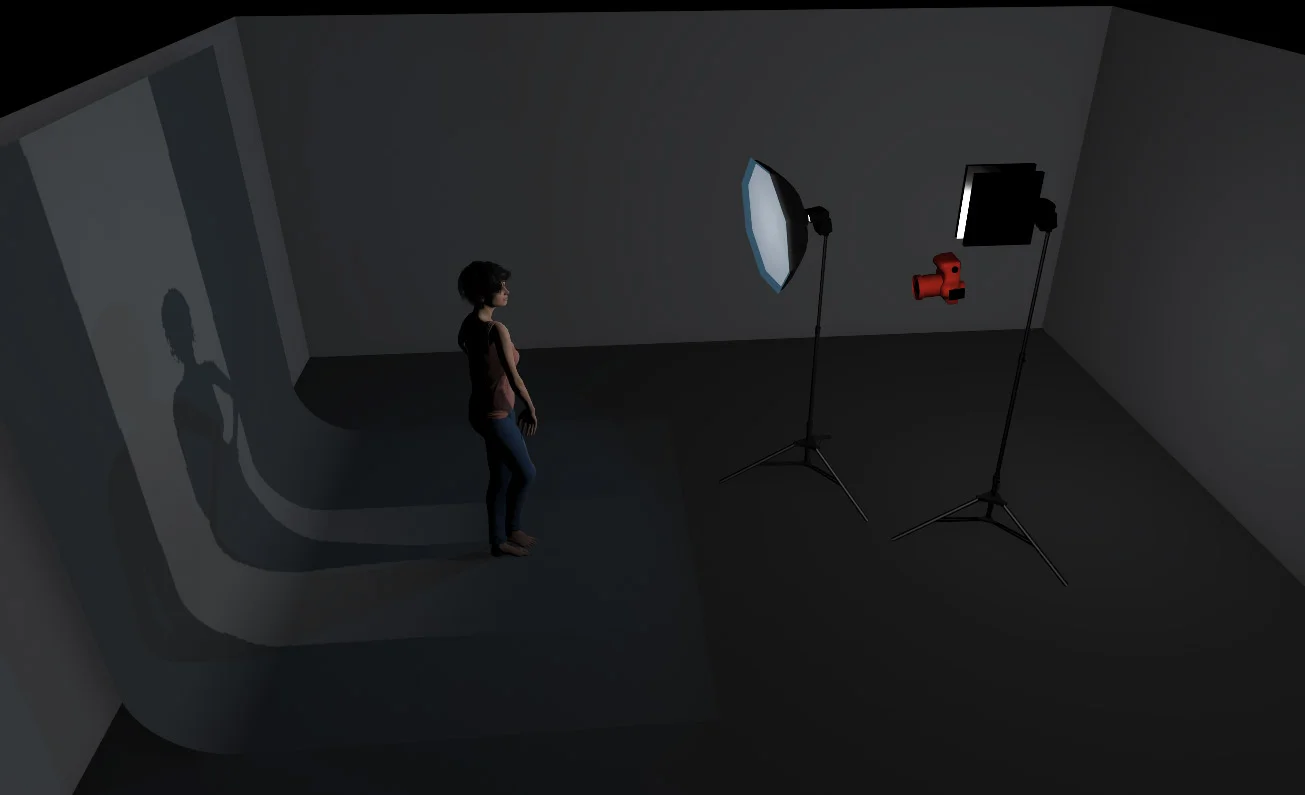
Set up Diagram.jpg
Set up Diagram Plan View.jpg

Backdrop - This is a very inexpensive silver window blind. We will be shooting at a wider aperture so this wont be in focus.

Model - Position the model a couple of feet away from the backdrop. Get them correctly placed and the key light will fall off nicely onto the backdrop simultaneously lighting them both.

Keylight - Beauty Dish. You can substitute this for a softbox or umbrella but you should position it above the models head and about 2-3 feet away.

Flare Light - Open wide reflector. This will be the light positioned just over the models shoulder and pointing towards the lens and prism we will be holding. 


The Prism

Step 6 Prism Full Res.jpg

Now the fun part begins. Simply start shooting away whilst holding the prism in front of your lens at different angles. Try it with the prism held horizontally above the lens or to the side and don't forget to try twisting it as well to produce different looks. One thing to keep in mind is to always keep the prism quite close to the lens and to just have it creeping into shot, don't have it dominating the frame to much otherwise it will obscure the image entirely.

Experimentation is key here as there is no right or wrong way to do this, only what you prefer.


The Final Image

Using prisms indoors can be tricky at first but if you persevere with them you can get some beautiful in-camera effects like the flare and rainbow effects you see here.

Using prisms indoors can be tricky at first but if you persevere with them you can get some beautiful in-camera effects like the flare and rainbow effects you see here.


Shooting through Crystals

You needn't stop with just the prism in front of the lens, in fact you can try any number of glass objects to produce some stunning results. Think about trying simple wine glasses and other glassware or even crystals. Crystals give a slightly more distorted look compared to the prism but simply holding a crystal or several crystals directly in front of your lens can create some gorgeous colours and bokeh effects. One quick tip to bear in mind for best results is to try and get your hands on some antique crystals, these slightly older crystals were coated in a very thin film of lead which gave them those gorgeous rainbow colours as you look through them. You can get away with shining lights directly into them to get some great bokeh effects too.

Using crystals or anything vaguely transparent that refracts the light can be shot through. Experimenting with a variety objects can produce some vey interesting results.

Using crystals or anything vaguely transparent that refracts the light can be shot through. Experimenting with a variety objects can produce some vey interesting results.


The Retouch

Plus, if you're interested in the five minute retouch techniques I used to edit this image, take a look at the image below for the details :)

Click to enlarge...

As always, questions comments and ideas are always welcomed :) If you've given this a go yourself then please feel free to let me know as I'd love to hear how you got on. Thanks again for reading and good luck!


:WARNING: Pay-To-Win below :D


NEW 2017 WORKSHOP DATES ANNOUNCED - If you're interested in any of my work and would like to know more about how I created some of my shots then why not check out my workshops. Here you can find out everything there is to know about Gelled Lighting, Long Exposure Flash Photography and my entire Post-Pro Workflow. Jake Hicks Photography - Workshops

gel workshop trio.jpg

I've also just released a brand new 22 hour complete Gelled Lighting Tutorial video. I go over everything from studio lighting setups with gels to being on location with gels plus I also go through my complete retouching and post pro workflow. For more details and complete breakdown of everything that's include check out my Coloured Gel Portraits Tutorial

gel trio set video.jpg

I also offer comprehensive coloured gel packs. These collections of gels are what I use day to day to create some of the most highly saturated colours around. If you're looking at getting into gelled lighting or need to get stronger and richer colours in your coloured gel work why not check out my Jake Hicks Photography Gel Packs

gel trio set crop.jpg

Tuesday 09.12.17
Posted by Jake Hicks
 

Comparing the Lensbaby Lens Effects

Technique Tuesday Facebook Thumbnail Temp lensbaby lens effects.jpg

If you've ever wondered what effect a specific Lensbaby lens has or if you've ever wondered how that compares to other lensbaby lenses or even standard lenses then this article is for you.

I took the same image of a model using a wide variety of Lensbaby lenses as well as standard prime lenses and compared the results. All images were taken with flash with an ISO 100 at 1/125 second and all at f4. You should notice that the model stays a similar size in the frame when using a variety of focal length lenses, that was to create 'real-life' look to the test. I have taken the images as I would do normally regardless of focal length and they all appear here completely un-cropped.


Standard 50mm Lens

This is your standard 50mm lens and probably the most common prime lens you'll use. You should be very familiar with how this image will look but it's good to have this shot as a baseline to compare the subsequent Lensbaby lenses against.

Click to enlarge

stan 50.jpg
standard 50 grid.jpg

Standard 85mm Lens

Again, you should be fairly familiar with how the images should look taken with this lens. The only significant point to make is how the background looks compared to the standard 50mm and other 50mm lenses. You can quite clearly see that the background is far softer as a result of the extended focal length at a similar aperture to the 50mm.

Click to enlarge

stan 85.jpg
standard85 grid.jpg

Sweet 50

This is probably the most well known Lensbaby and just to be clear, the Sweet 50 is an optic that is situated in the Composer Pro cradle. What that means is that the ball-joint and focusing part of the lens called the Composer Pro can hold other Lensbaby optics like the Edge 80 for example. The Sweet 50 creates a radial type blur that emanates from a user defined epicentre. The user can dictate where the in-focus area is and then the lens blurs the image the further you get from that. I use this technique a lot in portraits as I can get the subjects face in focus and then blur the surrounding shot to create a sense of depth and movement. It's also worth pointing out that the aperture also affects the blur. At f16 for example the blur is very subtle and at f2.8, the blur is very strong. For more examples of the image this lens takes, take a look at one of my previous photographic projects 'The Moving Portrait'

Click to enlarge

sweet 50.jpg
sweet 50 grid.jpg

Edge 80

The Edge 80 optic, like the Sweet 50, sits in the Composer Pro cradle and that controls focus and tilt. The Edge 80 is an incredibly powerful lens that has the ability to creates very clean slices of focus at any angle in your image. This effect is often seen in those 'toy-town' photos where a drastic illusion of forced depth of field gives a false impression of scale. The slice of focus can be placed in any way the user wants, from vertically to horizontally and everything else in between. I have used this lens to create a sense of an incredibly narrow depth of field in portraits and you can see some more of those results here in the close head shots from this shoot 'Lucid Dreams' 

Click to enlarge

edge 80.jpg
edge grid.jpg

Twist 60

This is one of the few Lensbaby lenses that creates an effect that can't be heavily influenced by the user. The Twist 60 creates a swirling pattern towards the edge of the frame leaving a cleaner, more untouched centre. This lens is a little trickier to use in a studio as composing your shot with a sharp subject requires you to place them in the centre of the frame. In the image you see here, you should notice that the subjects eyes are a little soft because the effect can't be kept off them. I took another image where the subjects face was in the centre of the frame and the eyes were pin sharp so a little care and thought is needed when composing your images with the Twist 60. The effect this lens creates can be increased with shallower f numbers like f2.8 and reduced with higher apertures like f16. A full review of this lens can be found here 'Twist 60 Review'

Click to enlarge

twist 60.jpg
twist grid.jpg

Velvet 56

Lensbaby have released two Velvet lenses, a 56mm and a 85mm. This version is one of the first lenses that Lensbaby released that produced a more subtle effect. Their previous lenses have been very popular for their very defining results whereas the Velvet lenses explore a more refined effect. They have been called art lenses that create an almost 'vintage' lens effect. Although this is a quick and easy way of explaining what they do, it falls a little short as there is a lot going on in the making of the resulting image. The best way that I can explain is that there's almost a sharp image nestled underneath a soft and creamy image. The effect is more dramatic towards the edge of the frame and can also be increased further by opening up the aperture to f2.8 and beyond. For a more comprehensive look at the lens, take a look at my review 'Velvet 56 Lens Review'

Click to enlarge

velvet 56.jpg
velvet 56 grid.jpg

Velvet 85

Like the Velvet 56, this is another of the Lensbaby lenses that creates a more subtle effect. The 85mm is almost identical at the 56 apart from the obvious focal length difference. If you're a portrait shooter you may prefer this longer focal length over the 56 but it's also worth pointing out that the Velvet effect seems to be stronger on this lens compared to the 56. The reason of this is simple; like other 85mm lenses, the depth of field blur is more pronounced on longer focal length lenses and the same is true here. Like other Lensbaby lenses, the signature lens effect is often more pronounced with wider apertures so when shooting the same shot at 56mm at f4 and 85mm at f4 the lens appears to create a stronger effect. Take a look and compare the backgrounds in the two Velvet lens shots and make your own decisions. If you'd like to know more about the Velvet 85 then check out my complete review here 'Velvet 85 Lens Review'

Click to enlarge

velvet 85.jpg
velvet 85 grid.jpg

Simple cheat-sheet to save for reference - Click to enlarge

For more information on these lenses, take a look at the Lensbaby website for the full descriptions and specifications via the links below.

  • Sweet 50
  • Edge 80
  • Twist 60
  • Velvet 56
  • Velvet 85

I also have a discount code for anybody who is interested in picking up any of the Lensbaby lenses here in the U.K. via WEX Photographic

I have worked very closely with the fine people over at Lensbaby for many years and they have very kindly allowed me to share my discount code with you. If you decide to use my code to get some money off your purchases then I will also receive a few pennies for the beer fund so please feel free to use it if you'd like to :)

Use the code JAKEHICKS10 at checkout to get 10% off any Lensbaby lens at WEX Photographic.


As always, if you have any questions about any of these lenses then fire away in the comments below. But if you own any of these lenses already, I'd love to hear what you think of them. Do you have a favourite lens? Are you considering getting an additional one? Feel free to link me to your Lensbaby shots too as I'd love to see how you guys use them :)


:WARNING: Yet more tempting products lie in wait below!


gel workshop trio.jpg

If you're interested in any of my work and would like to know more about how I created some of my shots then why not check out my workshops. Here you can find out everything there is to know about Gelled Lighting, Long Exposure Flash Photography and my entire Post-Pro Workflow. Jake Hicks Photography - Workshops


gel trio set video.jpg

I've also just released a brand new 22 hour complete Gelled Lighting Tutorial video. I go over everything from studio lighting setups with gels to being on location with gels plus I also go through my complete retouching and post pro workflow. For more details and complete breakdown of everything that's include check out my Coloured Gel Portraits Tutorial


gel trio set crop.jpg

I also offer comprehensive coloured gel packs. These collections of gels are what I use day to day to create some of the most highly saturated colours around. If you're looking at getting into gelled lighting or need to get stronger and richer colours in your coloured gel work why not check out my Jake Hicks Photography Gel Packs

Tuesday 08.29.17
Posted by Jake Hicks
 
Newer / Older